This topic contains the following sections.
VisionPro lets you interactively build powerful, robust, ready-to-deploy vision applications quickly. VisionPro also provides a full-featured toolkit that you can program using Microsoft Visual Studio.
VisionPro provides an interactive development environment that you can use to assemble tools, configure acquisition and discrete Input/Output, and deploy robust, high-performance applications with full-featured operator interfaces.
The key components of the development environment are listed below:
QuickBuild is an interactive application builder that lets you define a job consisting of an image source, the image-processing and vision tools necessary to analyze each acquired image, and the results-analysis logic to determine the result of each inspection.
A single QuickBuild application can consist of multiple jobs for production environments where more than one camera captures images of objects to be inspected either synchronously or asynchronously. You can run the jobs interactively, using either manual, triggered, or automatic operation.
- The Communications Explorer provides point-and-click browser access to Cognex discrete I/O hardware. You can link specific data items and results from a job with individual output lines. You can also configure system-level output such as a job-ready signal and a system heartbeat.
- Using the Application Wizard, you can quickly generate a complete application, including operator interface, that encapsulates the job, acquisition, and discrete I/O configuration you create using QuickBuild and the Communications Explorer. The Wizard-generated application includes an executable Windows program, fully commented VB.NET or C# source code, as well as the job and discrete I/O configuration data. Depending on the options you specify, the application can also provide full configuration control over the job internals at run time.
The following figure provides an overview of the VisionPro development process:
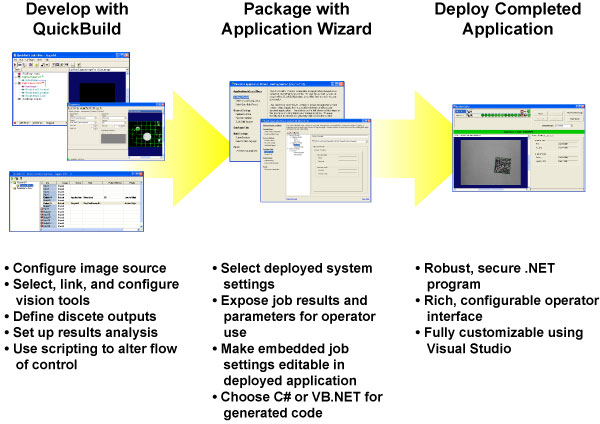
In addition to using the Application Wizard to package your VisionPro application for deployment, you can also write your own custom application around the configured jobs, or you can create your entire application using C# or VB.NET directly with the underlying VisionPro components:
- VisionPro Tools: Discrete functional areas within VisionPro, such as image acquisition from a camera, are encapsulated within a VisionPro tool. Each VisionPro tool makes use of a different combination of lower-level VisionPro objects to provide its specific functionality, but at the same time each VisionPro tool presents a unified tool interface. This unified interface makes it possible to build high-level environments for managing collections of VisionPro tools.
- VisionPro objects: These building block objects implement VisionPro's basic functionality: Acquiring images from cameras, frame grabbers, files, or other devices; displaying images in an application window; and performing image processing and image analysis.
- User-Written Tools: You can easily write your own tools that implement custom functionality and include them with Cognex-supplied tools in an application. VisionPro exposes all of the information required to implement the unified tool interface.
- Tool Edit Controls: All VisionPro tools are supplied with an associated Tool Edit control. A tool edit control presents a graphical user interface that lets the user view and change all of the tool's (and its underlying low-level objects) properties.
For more information on using QuickBuild, see these topics: