This topic contains the following sections.
Shape extraction is a mechanism that automatically creates VisionPro shapes based on the contours of an image. VisionPro provides an CogShapeExtract that lets you extract VisionPro shapes from images. The CogCaliperIOPParams control uses this interface to implement the Shape Extraction mode. Although you can use the extracted shapes in any application, the PatMax edit control uses Model Maker to let you create shape models for the Shape Training feature of PatMax
For example, in the following illustration the shape extractor extracted the shapes (on the right side of the illustration) from the grey-scale image on the left.
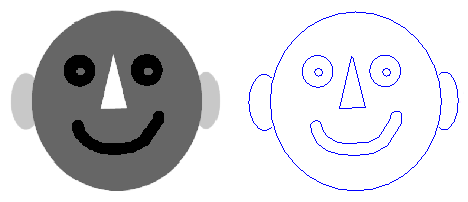
The shapes that the shape extractor are actually CogShapeModel which are regular VisionPro shapes (such as CogCircle and CogLineSegment) that have been wrapped in the model interface to provide the CogModelFeature that PatMax shape training requires. it is very easy to obtain the underlying Shape from a shape model if you need it. To make this discussion easier to follow, this topic uses the term "shape" instead of shape model.
All shape operations take place in the units of the selected space of the image. If the selected space is pixel space, then all of the units are in pixels. If the selected space is a calibrated space, millimeters for instance, all of the units are in millimeters. It is important to keep this in mind not only when you specify values such as perimeter lengths, but also tolerances.
Shape extraction begins by finding the edges in an image. Edges whose pixel difference is within the ContrastThreshold and whose end points are within the ConnectTolerance are joined together into chains. In general you will not need to change the connection tolerance unless your image has artifacts that cause gaps in edge chains that should otherwise be joined together. Connection tolerance is always expressed in the units of the selected space of the image.
If PerimeterLimitsEnabled are enabled, chains whose total length is less than the PerimeterLimitMin or greater than the PerimeterLimitMax perimeter are discarded. Perimeters are expressed in the units of the selected space of the image.
Once the shape extractor finds all the edge chains in the image, it uses a Vocabulary of primitive shapes to convert that edge chain information into VisionPro shapes. The shape vocabulary does not specify the kinds of shapes that the shape extractor extracts. Instead, the vocabulary specifies the VisionPro shapes into which the extractor converts the edge chains that it finds. The shape vocabulary must contain at least one of the following:
- Line segment
- Circle
- Ellipse
- Circular Arc
- Elliptical Arc
When possible, the shape extractor converts the edge chains into one of the primitive vocabulary shapes. Otherwise, if the vocabulary contains arcs or line segments, the chains are converted into CogGeneralContour that contain arcs and line segments.
For example, if the vocabulary consists only of circles and ellipses, and you try to extract shapes from the following image, the shape extractor converts the edge chains into circles and ellipses.
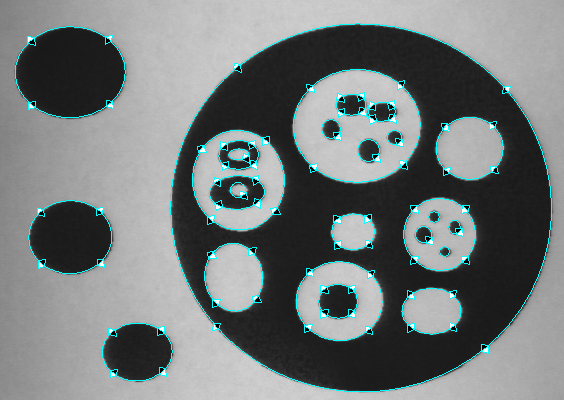
Note: The diamonds on the shapes are the polarity adornments that appear when you use the shape extractor as part of the Model Maker control.
If you were to use the same image and change the vocabulary so that it included only line segments, the shape extractor would find the same shapes, but it would use contours composed of short line segments to trace the edges of the circles and ellipses.
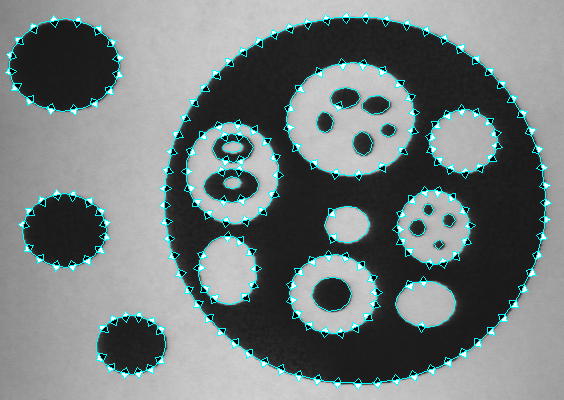
Note: When it finds circular shapes, Model Maker always uses CogEllipse whose x- and y-radii are of equal length instead of CogCircle. The shape extractor CogShapeExtract uses circles when it can extract a shape as a circle.
The shape extractor uses an ApproximationTolerance to control how it converts the edge chains into VisionPro shapes. The approximation tolerance is the upper limit on the deviation between the edge chains and the extracted shape. Smaller values result in shapes that follow the edges more closely, but higher values result in simpler shapes. Approximation tolerance is always expressed in the units of the selected space of the image.
For example, this is the result of a shape extraction with the approximation tolerance set to the default of 0.7.
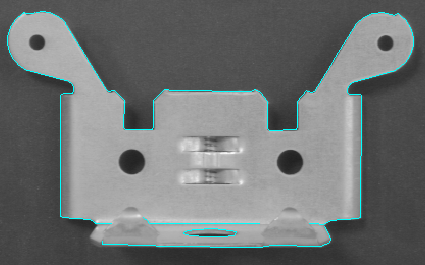
This is the result of shape extraction on the same image but with the approximation tolerance set to 6.0
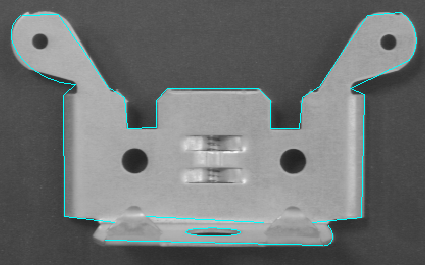
To make shape extraction more manageable, you can impose certain limits on the kinds of shapes that the shape extractor returns:
- Limit extraction by the minimum and maximum perimeter length
- Limit extraction to open or closed shapes or either
- Limit extraction by shape polarity (dark on light or light on dark) or ignore polarity
- Limit the number of shapes to extract
If you limit extraction to open shapes (or if you do not care whether the extracted shapes are open or closed) the vocabulary must include at least one open shape primitive: Line Segment, Circular Arc, Elliptical Arc. Closed shapes can be constructed out of open shape primitives.
The shape extractor RankMode it finds using one of three criteria. By default the extractor ranks shapes by perimeter. You can also specify that it rank the extracted shapes by contrast or by proximity to a ProximityShape. The rank criterion determines the order in which the extracted shapes are returned. If you limit the number of shapes to return, shapes beyond the number you specified are discarded after they have been ranked.