This topic contains the following sections.
The CogCalibNPointToNPoint edit control provides a graphical user interface (GUI) for the CogCalibNPointToNPointTool vision tool and allows you to easily perform calibration. The process of calibration happens in two steps. The first step occurs at training or calibration time and involves defining a coordinate space that maps image coordinates to real-world coordinates. The second step occurs at run-time and involves attaching the precomputed coordinate space to the coordinate space tree of an image.
You use the CogCalibNPointToNPoint edit control at train-time to define a calibrated coordinate space using N pairs of points. The calculation of this coordinate space is performed only once (unless you change a calibration parameter, in which case you must recalibrate). At run-time, the underlying CogCalibNPointToNPoint tool simply attaches the predetermined calibrated space to the coordinate space tree of an input image and supplies an updated image as output for use by other tools.
The following figure shows the N-point calibration edit control.
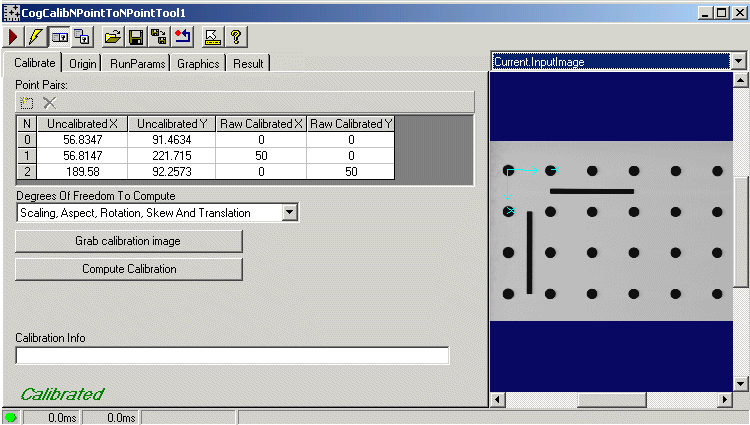
The CogCalibNPointToNPoint edit control includes the following components:
- A row of control buttons at the top left.
- A tool display window that displays the three CogCalibNPointToNPoint tool image buffers: Current.InputImage, Current.CalibrationImage, and LastRun.OutputImage. Right-click the tool display to bring up menu options that include zooming in or out of the image or showing a pixel or subpixel grid.
- A set of tabs organized by function. These functions include parameter settings to calibrate and run the tool; settings to display tool graphics, such as axes and points in the uncalibrated, raw, and calibrated spaces; and tool results. Pressing the Control + Tab keys scrolls through the set of tabs.
- A status bar at the bottom left of the control. A green circle indicates that the tool ran successfully; red means the tool ran unsuccessfully. The status bar also displays the time to run the tool and any error codes or messages. The first time that the status bar displays is the raw tool execution time. The second includes the time needed to update the edit control. Controls only update when they are visible.
When used in conjunction with the CogToolGroup edit control or from within the QuickBuild application, the CogCalibNPointToNPoint edit control exposes the following default tool input and outputs for creating data links:
| Type | Name |
|---|---|
| Input | InputImage |
| Calibration.UncalibratedPointX(0) | |
| Calibration.UncalibratedPointY(0) | |
| Calibration.UncalibratedPointX(1) | |
| Calibration.UncalibratedPointY(1) | |
| Calibration.UncalibratedPointX(2) | |
| Calibration.UncalibratedPointY(2) | |
| Output | OutputImage |
You supply the following information with the edit control, so that the underlying N-point calibration tool can calculate a calibrated space:
- An input image that contains identifiable features with known physical locations.
- A set of N points in uncalibrated space and a corresponding set of N points in raw calibrated space.
- The degrees of freedom for computing the mapping between these sets of points.
- Optional adjustments to the final calibration's origin, x-axis rotation, and handedness.
- A nonqualified coordinate space name for the calibrated space.
The CogCalibNPointToNPoint edit control has several buttons common to most VisionPro controls.

The following table describes the buttons at the top left of the edit control.
| Button | Description |
 | Runs the tool. You must have an image available in the Current.InputImage buffer (equivalent to the InputImage). This button invokes the Run method. |
 | Toggles electric mode. When selected, the CogCalibNPointToNPoint tool runs automatically if certain parameters have changed. When the edit control is in electric mode, these parameters are indicated by electric bolt icons. |
 | Opens or closes the local tool display window. This window has a selection box that you use to specify the image buffer you want to view. |
 | Opens one or more floating tool display windows, providing an additional tool display window. As with the local tool display window, you can specify the image buffer to view. |
 | Loads a VisionPro persistence (.vpp) file, which contains a set of saved properties for this vision tool object type. Loading a persistence file for another object type throws an error and the load is unsuccessful. For more information about VisionPro persistence features, see the topic Persistence in VisionPro. |
 | Saves the current properties of the underlying tool to a VisionPro persistence file. You have the option to save either the entire tool or the tool without its images or results. |
 | Saves the current properties of the underlying tool to a new VisionPro persistence file. |
 | Resets the underlying tool to a default state. This tool gives you a choice between resetting to the default-constructed state, which is appropriate when you are using it in a Visual Studio.NET application, and its template-initialized state, which is appropriate for QuickBuild applications. |
 | Enables or disables the display of tooltips for individual items in this edit control. |
 | Opens this help topic. |
The CogCalibNPointToNPoint edit control has three image buffers: Current.InputImage, Current.CalibrationImage, and LastRun.OutputImage. Both the local and floating tool display windows show these three image buffers.
- The Current.InputImage buffer uses the image supplied by the underlying CogCalibNPointToNPoint tool's InputImage property. You cannot manipulate the graphics displayed in this buffer.
- The Current.CalibrationImage buffer contains the calibration image given by the tool's CalibrationImage property. To get a calibration image, you click the Grab calibration image button on the Calibrate tab. A calibration image allows you to interactively position the final calibrated space. Note that this image is not processed in any way by the calibration tool, nor is it necessary to run the tool. The Current.CalibrationImage buffer can also show graphics that represent the uncalibrated and raw calibrated points, in addition to the uncalibrated and raw calibrated coordinate space axes.
- The LastRun.OutputImage buffer holds the OutputImage that results from running the tool. The output image is a new COM object that references the same pixels and space tree, as the input image. Because of this, the newly attached fixture space is accessible from either image. The space was attached to the shared tree, not just to the tree associated with the output image. The selected space names, however, are not shared. Each image has its own selected space name. Result graphics shown on the LastRun.OutputImage reflect the tool's historical state: you cannot manipulate them.
Your application must provide an image for the edit control's Current.InputImage buffer. You can load an image from an image database using the Image File Edit Control, or you can obtain an input image from the AcqFIFO Edit Control and then copy it from the OutputImage buffer into the tool's InputImage property.
During the training or calibration phase, you typically supply a special calibration image as the input image. This image should contain features that have known real-world coordinates and measurements. You might, for example, employ a special calibration plate or a circuit board with fiducial markings for which you know or can easily measure distances between features to a high degree of accuracy. The selected space of the calibration image is the uncalibrated space, which is almost always the root ("@") space.
At run-time, you supply an image to which you want to apply the calculated calibrated space. The selected space of your run-time images must be the same or have the same relationship to the physical world as the calibration image. In practice, this means that the calibration and run-time images must be acquired through the same camera (and lens) and that the selected space name for a run-time image will also be the root ("@") space.
Use the Calibrate tab to configure the sets of N uncalibrated and raw calibrated points, specify the degrees of freedom to permit in the calibration computations, obtain a calibration image, and calculate the calibrated space from the tool's inputs.
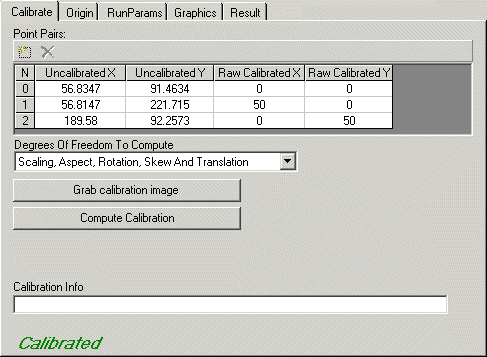
The following table describes the key features of this tab.
| Feature | Description |
| Point Pairs Grid | Allows you to add, delete, or modify the x- and y-coordinates for the set of N points in uncalibrated space and corresponding set of N points in raw calibrated space. These points are used by the CogCalibNPointToNPoint tool at training or calibration time to calculate the calibrated coordinate space. Note that the Point Pairs grid reflects the points available for the tool's next run. You obtain the coordinates for the set of uncalibrated points by running a pattern-matching or feature-locating vision tool, such as CogPMAlignTool or CogBlobTool, and supplying the coordinates of the found patterns or features as input to the Calibration control. The coordinates of the raw calibrated points come from the known physical locations or measurements of features found on a special calibration plate or board with fiducial markings. Using the Point Pairs grid is equivalent to the following tool methods: |
| Degrees of Freedom to Compute | Sets the degrees of freedom to allow when computing the best-fit transformation between the uncalibrated points and the raw calibrated points. Equivalent to the DOFsToCompute property using the CogNPointToNPointDOFConstants enumeration values. |
| Grab calibration image | The Grab calibration image button sets the calibration image from the current input image. This is equivalent to setting the tool's CalibrationImage from the InputImage data. You can view the current calibration image by selecting the Current.CalibrationImage buffer. |
| Compute Calibration | Computes the calibrated coordinate space using the current sets of N points, degrees of freedom, and optional origin adjustment. The calibrated coordinate space is stored and may be attached to an input image at run-time. This is equivalent to invoking the Calibrate method. |
| Calibration Info | Displays diagnostic messages about the calibration computation. For example, if the calculations result in a large RMS error value, Calibration Info reports this and possible remedies to reduce the error. These diagnostic messages are obtained from the GetInfoStrings method. |
Use the Origin Tab to supply optional adjustments to the origin, x-axis rotation, and handedness of the calibrated coordinate space. The adjustment information is factored into the calculation of the final calibrated space at calibration-time.
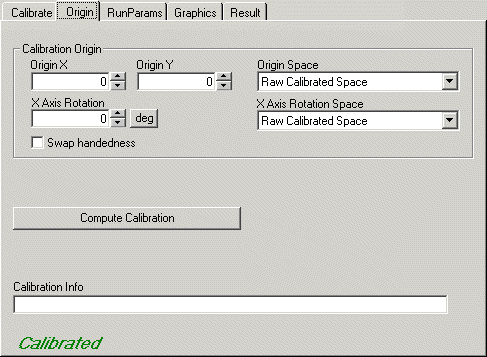
| Feature | Description |
| OriginX | Specifies the x-axis coordinate for the origin of the calibrated space. Equivalent to setting the CalibratedOriginX property. |
| OriginY | Specifies the y-axis coordinate for the origin of the calibrated space. Equivalent to setting the CalibratedOriginY property. |
| X Axis Rotation | Specifies x-axis rotation for the calibrated space. That is, the calibrated space is adjusted so that its x-axis appears at this angle. Equivalent to setting the CalibratedXAxisRotation property. |
| Swap Handedness | Specifies the handedness for the calibrated space. If unchecked, the calibrated space has the same handedness as the raw (unadjusted) calibrated space. If checked, the calibrated space acquires the opposite handedness. Equivalent to setting the SwapCalibratedHandedness property. |
| Origin Space | Specifies whether the origin for the calibrated space is expressed in units of the uncalibrated space or in units of the raw calibrated space. This field defaults to "Raw Calibrated Space". Equivalent to setting the CalibratedOriginSpace property. |
| X Axis Rotation Space | Specifies whether the x-axis rotation for the calibrated space is expressed in units of the uncalibrated space or in units of the raw calibrated space. This field defaults to "Raw Calibrated Space". Equivalent to setting the CalibratedXAxisRotationSpace property. |
| Compute Calibration | Computes the calibrated coordinate space using the current sets of N points, degrees of freedom, and optional origin adjustment. The calibrated coordinate space is stored and may be attached to an input image at run-time. This is equivalent to invoking the Calibrate method. |
| Calibration Info | Displays diagnostic messages about the calibration computation. For example, if the calculations result in a large RMS error value, Calibration Info reports this and possible remedies to reduce the error. These diagnostic messages are obtained from the GetInfoStrings method. |
Use the RunParams tab to control the run-time parameters for the CogCalibNPointToNPoint tool.
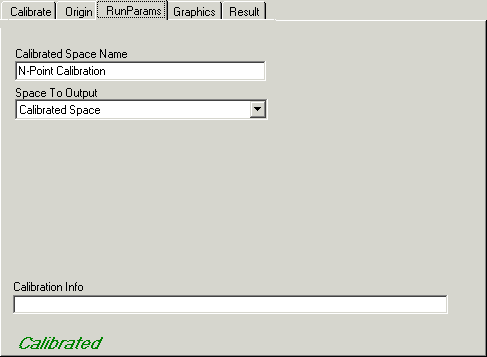
Run-time parameters include the name of the calibrated space and the selected space name of the output image. When the edit control is in electric mode, electric bolt icons indicate parameters whose changes cause the tool to run automatically.
| Feature | Description |
| Calibrated Space Name | Name of the calibrated coordinate space to attach to the CogCoordinateSpaceTree of the input image. This must be a valid nonqualified space name. The Calibrated Space Name field defaults to "N-Point Calibration". Equivalent to the CalibratedSpaceName property. |
| Space to Output | Specifies whether the selected space name of the output image will be a copy of the calibrated space name or a copy of the uncalibrated space name. This field defaults to "Calibrated Space". The output space determines in which selected space the tool reports the calibration results. The output selected space name is always a fully-qualified space name. Equivalent to the SpaceToOutput property. |
| Calibration Info | Displays diagnostic messages about the calibration computation. For example, if the calculations result in a large RMS error value, Calibration Info reports this and possible remedies to reduce the error. These diagnostic messages are obtained from the GetInfoStrings method. |
Use the Graphics tab to control what is displayed in the local and floating tool displays. When the control is in electric mode, electric bolt icons display parameters that cause the tool to run automatically if parameter values change.
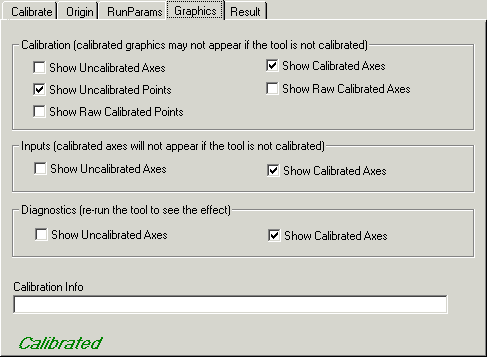
The following table describes the key features of the Graphics tab.
| Feature | Description |
Calibration | You can display the following graphics on the calibration image contained in the Current.CalibrationImage buffer:
|
Inputs | You can display the following graphics on the input image contained in the Current.InputImage buffer:
|
Diagnostics | You can display the following noninteractive, diagnostic result graphics on the output image contained in the LastRun.OutputImage buffer:
|
| Calibration Info | Displays diagnostic messages about the calibration computation. For example, if the calculations result in a large RMS error value, Calibration Info reports this and possible remedies to reduce the error. These diagnostic messages are obtained from the GetInfoStrings method. |
The Result tab shows the display-only results of the calibration.
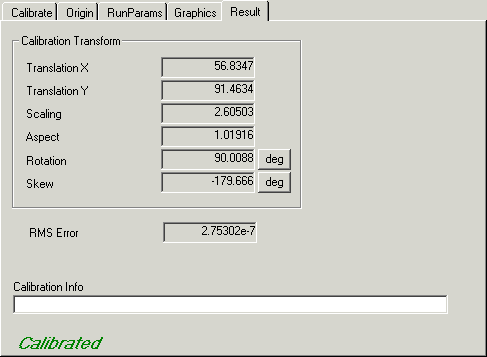
Results include the components of the GetComputedUncalibratedFromCalibratedTransform transform that defines the calibrated space, the detected ComputedRMSError for the calculation, and any GetInfoStrings returned about the calibration. The information on the Result tab comes from the tool's CogCalibNPointToNPoint subobject.