Motion-Guided (Manual) Hand-Eye Calibration
This guide provides a step-by-step walkthrough for Motion-Guided (Manual) Hand-Eye Calibration in a VGR Vision-Guided Robotics is an In-Sight Spreadsheet feature that uses machine vision to guide robot motion through Robotics String Functions and VGR commands. application. For more information, see Hand-Eye Calibration.
Prerequisites
Before starting a Motion-Guided (Manual) Hand-Eye Calibration, ensure the following:
-
The vision system is properly mounted, connected, and discovered in In-Sight Spreadsheet.
-
A spreadsheet VGR job A job is a user-configured program in In-Sight Spreadsheet consisting of functions and designed for specific applications. You can create and edit jobs using the In-Sight Spreadsheet interface, and load them on a vision system for deployment in a live environment. has been created and configured, containing:
-
Image acquisition Acquisition is the process or result of the vision system acquiring a new image. logic
-
The required Robotic String Functions used for Hand-Eye Calibration (VGRProcessCommand, VGRDefinePart, and VGRHandEyeCalibration)
-
A Feature Finder tool is configured and reliably detectable, as it serves as the calibration target.
-
-
Robot communication is established and verified.
For more information about building a Spreadsheet job for VGR applications, see Building a VGR Job.
Setup
Once you have created a job with the required Robotics String Functions, open the VGRHandEyeCalibration property sheet.
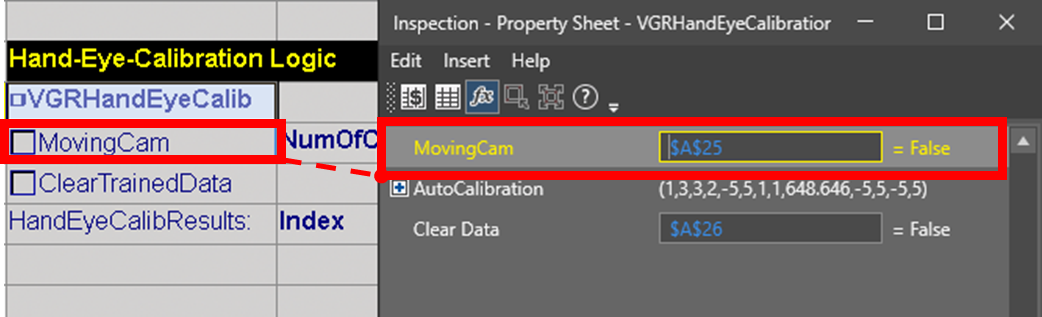
Because calibration motion is fully controlled by the robot controller, only the Moving Cam parameter is required in VGRHandEyeCalibration. The remaining auto-calibration parameters are ignored unless the function Functions are tools that are available in Spreadsheet for processing and analyzing acquisitions or other results. You can add functions to your Spreadsheet job to create tool chains and produce results for specific applications. is triggered using an ACB (Auto Calibration Begin) command.
Depending on the mounting for your vision system:
-
Set MovingCam to True if you are using a robot-mounted vision system.
-
Set MovingCam to False if you are using a stationary vision system.
Once you have specified the mounting configuration in VGRHandEyeCalibration, switch to the robot controller. From the robot controller, send the required VGR commands to the vision systemto initiate Hand-Eye Calibration.
Program Sequence
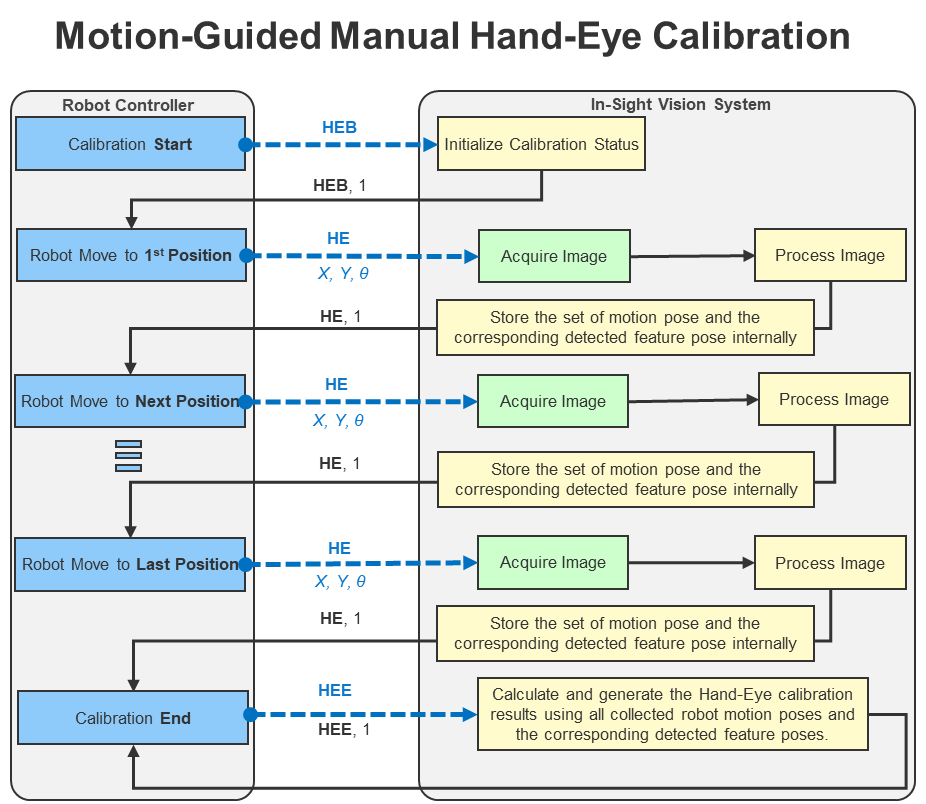
The program sequence for manual calibration is as follows:
-
Start the calibration procedure with the part positioned near the center of the vision system FOV.
-
The robot controller sends a Hand-Eye Begin (HEB) command to the vision system.
-
The vision system initializes the calibration process and returns a HEB response to the robot controller.
-
If the vision system response status field contains a value of 1, move the robot arm to the first calibration position. For detailed calibration pose requirements, see Hand-Eye Calibration.
-
The robot controller sends a Hand-Eye Execute Step (HE) command to the vision system, which includes the robot pose at the current calibration position.
-
The vision system acquires an image, locates the calibration target, and accumulates feature data for that pose. It then returns an HE response to the robot controller.
-
If the vision system response status field contains a value of 1, move the robot arm to the next calibration position.
-
Repeat steps 5-7 for all predefined calibration poses.
-
Once the vision system returns a successful response at the last pose, the robot controller sends a Hand-Eye End (HEE) command to the vision system.
-
The vision system computes the final hand-eye calibration results using the collected data from all the previous steps, and returns the completion status.
The diagram illustrates the Motion-Guided Hand-Eye Calibration workflow, showing the command-response interaction between the robot controller and the vision system: