This topic contains the following sections.
Each VisionPro image has an associated coordinate space tree defining the root space and any defined user spaces. VisionPro uses the coordinate space tree to track spatial transformations applied during image processing as well as map coordinates from root space to any defined user space and back again. The coordinate space tree for any image can be accessed through its CoordinateSpaceTree property.
Each user space in the space tree has a parent coordinate space related by one or more transformations. All user spaces can trace their ancestry back to the root space. Whenever a VisionPro tool modifies the pixels of an acquired image, it automatically updates the root space to reflect any changes in the location of image features. All user spaces, since they stem from the root space, are automatically updated to reflect the same changes.
Each user space in the space tree has a unique name which can be referenced in your vision application.
At any given time, one space within the coordinate space tree is designated as the selected space for a given image. The selected space is the coordinate system in which all VisionPro tools that operate on the image return results (such as locations and distances) and in which the tools interpret input data (such as regions of interest). You set the selected space for an image using the image's SelectedSpaceName property, either explicitly in your Visual Studio application or implicitly in your QuickBuild application.
An image's currently SelectedSpaceName determines the coordinate system used to define locations and dimensions within an image. You can switch between different selected spaces to make measurements in different coordinate systems. When you create a new image using a calibration or fixturing tool, the tool adds a new coordinate space to the input image's coordinate space tree and automatically selects that space as the new image's selected space name. At any time you can specify a different space for use as the selected space of a particular image.
The following figure shows how a typical coordinate space tree might be organized.
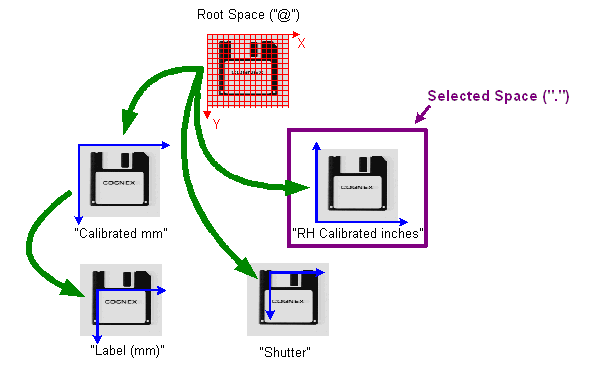
Each of the green arrows represents a transformation between two spaces in the image's coordinate space tree.
The Calibrated mm space is based on root space. The Label (mm) space is a fixtured space for working with the diskette label in calibrated space. The RH Calibrated inches space is an alternative calibrated space based on the root space. Unlike Calibrated mm, RH Calibrated inches uses a right-handed coordinate system and is calibrated in inches instead of millimeters. The Shutter space is a fixtured space based directly on the root space.
If the RH Calibrated inches space is the selected space of the image, all tool results are expressed using this space. A tool that locates the label on the diskette, for example, will return the location in terms of inches in the (X,Y) direction relative to the lower left-hand corner of the image. If you change the selected space, then results of subsequent tool operations are expressed using the newly selected space.
Keep in mind that the root space is automatically adjusted by VisionPro whenever image processing operations are performed on an image. In addition to the root space, each image also defines a pixel space, which is a coordinate system tied directly to the actual image pixels. The following figure shows how pixel space is related to the root of the coordinate space tree:
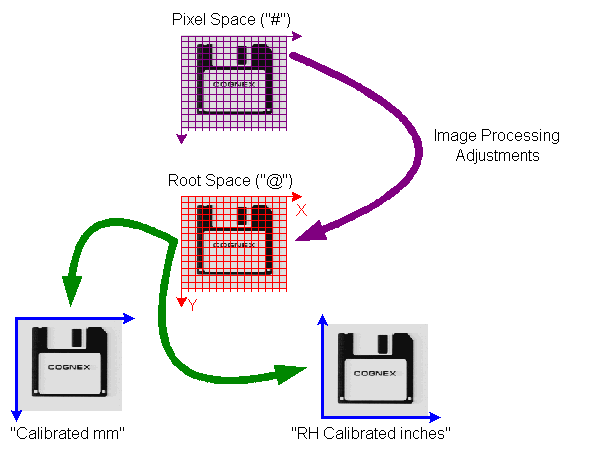
In this figure, each of the green arrows represents a transformation between two spaces in the image's coordinate space tree. The purple arrow represents the transformation between the pixels of the image and its root space; this transformation incorporates all of the image processing adjustments. You can obtain the transformation between the pixels of the image and its root space through the image's PixelFromRootTransform property.
Pixel space is not actually present in the coordinate space tree; each image has its own pixel space, and each image manages the relationship between pixel space and the coordinate space tree associated with the image. This lets multiple images with different pixel spaces share coordinate space trees.
Most applications do not need to be concerned with pixel space.
The coordinate space tree includes methods that let you obtain a composed transformation that can map points between any two spaces anywhere in the coordinate space tree.
If you request a transformation using the GetTransform method of an image, you specify the names of the coordinate spaces between which you want to transform points. You can specify the name of a user space, you can specify "." for the currently SelectedSpaceName, you can specify "@" for the root space, or you can specify "#" for pixel space. See the topic Coordinate Space Names for more information.