This topic contains the following sections.
- 2D Linear Transformations
- Scaling
- Uniform Scaling
- Nonuniform Scaling
- Rotation
- Uniform or Rigid Rotation
- Nonuniform or Skew Rotation
- Aspect
- Translation
- Manipulating 2D Linear Transformations
- ScalingX/Y-RotationX/Y Method
- Scaling-Aspect-Rotation-Skew Method
- Matrix Elements Method
- VisionPro 2D Transformation Objects
A two-dimensional (2D) transformation mathematically maps points from one 2D space to another. In VisionPro, a 2D transformation always maps points from a source coordinate space, called the from space, to a second coordinate space, called the to space. Many machine vision tasks, for example, require you to correlate points in an image’s coordinate space to those in a user-defined space. The two coordinate spaces often have different measurement units for expressing the coordinates. You use a 2D transformation to map the points correctly from the pixel space to the user space.

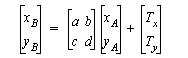
The most common type of 2D transformation in VisionPro is the 2D linear transformation. You represent the general 2D linear transformation that maps points from the coordinate space A to the coordinate space B as a (2x2) matrix and a (2x1) vector:
The 2D linear transformation has several basic properties. These include:
- scaling
- rotation
- translation
In the mathematical representation of the 2D linear transformation, the (2x2) matrix comprises scaling, and rotation information; the (2x1) vector describes the translation between space B and space A.
Scaling alters the x- and y-axis units of one coordinate space relative to another. Changes in scaling can be either uniform or nonuniform.
Uniform scaling involves equal changes in both the x- and y-axis units. For example, in the following figure, coordinate space A's x- and y-axis are scaled by a factor of 10 with respect to coordinate space B's x- and y-axis.

The following matrix describes the x- and y-axis unit changes in a uniform scaling.

You can map the coordinates of point P in the preceding figure from one coordinate space to the other using:

If the coordinates of P in space A are (1, 1), the corresponding coordinates in space B are (10, 10).
In nonuniform scaling, the changes in the x- and y-axis units are not equal. Nonuniform scaling alters the aspect of a coordinate space. You can think of nonuniform scaling as either:
- a scaling by two different scaling factors (Sx and Sy) or
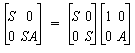
- a uniform scaling (S) and an additional aspect ratio (A).
The following matrix describes scaling by two different scaling factors:

Alternatively, this matrix represents nonuniform scaling accomplished by applying a uniform x- and y-axis scaling factor and an aspect ratio:
You can rotate the x- and y-axis of one coordinate space relative to another. The rotation angle is measured in DegToRad. There are two types of rotations:
- uniform or rigid rotation and
- nonuniform or skew rotation.
Uniform or rigid rotation is a special case of nonuniform rotation in which both the x- and y-coordinate axes rotate by an equal angle. The following figure shows two coordinate spaces uniformly rotated with respect to each other.

You measure the rotation angle θ from coordinate space B and express its sign relative to space B. For example, the rotation angle shown in the preceding figure is about -20 degrees or -0.349 radians. You can map the coordinates of P in space A to the corresponding coordinates in space B with the following transformation:
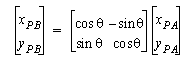
Note that the rotation angle θ is the angle from space B to space A as measured in B.
In a nonuniform rotation, each coordinate axis rotates by a different angle. You can think of nonuniform rotation as:
- a rotation by two different angles (θx and θy) or
- a uniform rotation (θ) and an additional skew factor (Q).
The following figure shows a nonuniform rotation of coordinate spaces.

If θx and θy are the two different rotation angles of the x- and y-axes measured from space B to space A, you can map the coordinates of point P in space A to the corresponding points in space B using:
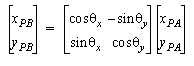
Note that the angles θx and θy are the rotation angles from space B to space A as measured in space B. Coordinate space B must also be orthogonal.
In the second way of thinking about nonuniform rotation, you map points using a matrix that consists of a uniform rotation and an additional skew as follows:
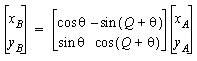
You calculate the skew factor by:

Aspect is the ratio of scaling along the y-axis over scaling along the x-axis. It is calculated by:

The following figure illustrates a change in aspect.

You can represent the aspect component of a transformation using this (2x2) matrix (in which A represents the aspect value) :

A translation consists of an offset of a coordinate space’s origin relative to another coordinate space. For example, this figure shows a simple translation:
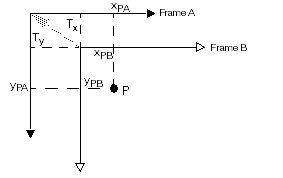
If (Tx, Ty) are the components of the translation vector from coordinate space B to space A, expressed in terms of space B, then you can map the point P in space A to space B using:

You can manipulate a 2D linear transformation using three methods:
- ScalingX/Y-RotationX/Y
- Scaling-Aspect-Rotation-Skew
- Matrix Elements
All three methods are based on the general 2D linear transformation shown previously, and you obtain the same mathematical mapping of points from each method. The only difference is how you specify the elements of the (2x2) matrix of the transformation. Use the method that best suits your vision application or your existing algorithms.
If your application involves only uniform rotation and scaling, you may find it easier to set a single Rotation or Scaling value using the Scaling-Aspect-Rotation-Skew method.
On the other hand, if you need to perform nonuniform rotation and scaling, you should pick the method that matches your data. For example, if you know that you want to scale the x-axis by 10 and the y-axis by 11, then you should set ScalingX and ScalingY using the ScalingX/Y-RotationX/Y method. If, instead, you know that your image camera has an aspect ratio of 10-to-11 and that you zoomed in by a factor of two, you should use the Scaling-Aspect-Rotation-Skew method and set the Scaling and Aspect values.
The first method involves specifying the individual x- and y-scaling and x- and y-rotation values of the 2D linear transformation. Each value can vary independently of the others.
If you decompose the general 2D linear transformation’s (2x2) matrix into two (2x2) matrices, the first of which represents the x- and y-rotation and the second represents the x- and y-scaling, you get the following:

where:
- Sx is the x-axis scaling.
- Sy is the y-axis scaling.
- θx is the x-axis rotation.
- θy is the y-axis rotation.
- Tx and Ty are the x- and y-translation.
In the second method, you specify scaling, aspect, rotation, and skew values for the transformation. Again, starting with the general 2D linear transformation, you can decompose the (2x2) matrix into four (2x2) matrices, which represent uniform rotation, skew, uniform scaling, and aspect.

where:
- S is the uniform x- and y-axis scaling.
- A is the aspect.
- Q is the skew angle.
- θ is the uniform or rigid rotation.
- Tx and Ty are the x- and y-translation.
In the Matrix Elements method, you alter specific elements of the basic (2x2) matrix to obtain the correct transformation. The matrix is given by:
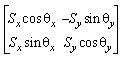
OR
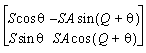
Note that these two matrix presentations differ only in interpretation. Both refer to a (2x2) matrix that contains four floating point numbers. You decide how you want to think about these four numbers, and set the elements according to the result you want to obtain.
The VisionPro coordinate space tree includes functions that let you obtain a transformation object that maps points between any two spaces in the coordinate space tree. The most common way to obtain a transform from a coordinate space tree is to call the GetTransform method of a VisionPro image object. GetTransform allows you to extract a transformation that maps points between any two spaces in the tree. It also allows you to obtain transformations to or from the special pixel space "#". You can also use the image's GetTransform method with partially-qualified names, such as "." (the currently-selected space name).
The basic VisionPro two-dimensional transform is implemented as the ICogTransform2D interface. This interface implements a general two-dimensional transformation. The underlying transformation may be a linear or nonlinear transformation. For mapping points between two spaces, you use this object's MapPoint method.
In general, however, your application does not need to be concerned with whether a transformation is linear or nonlinear. In most cases, simply use the ICogTransform2D interface to map points between spaces. If you know that the actual transformation underlying a ICogTransform2D interface is linear, and you wish to use a linear transformation-specific capability, you can use the ICogTransform2D interface's LinearTransform method to obtain a new CogTransform2DLinear object.
You should note that changing the property values of this new transform do not change the values of the original transform. If you want to convert from an unknown transform type, you should use QueryInterface in C++ to determine if the transform has a CogTransform2DLinear interface. If QueryInterface succeeds, you can use the original object as a linear transform, and can directly change its values. In Visual Basic, you can simply assign the transform object to a variable that you have declared as a CogTransform2DLinear object.
A CogTransform2DLinear represents a specific 2D linear transform. You can modify any or all of the components of a CogTransform2DLinear, and you can use it to map points, vectors, and areas between coordinate spaces.
The following figure shows how you might use a transformation. An image with two user spaces is shown. The spaces are named "Calibrated" and "Label". The transformation object, shown in green, maps a given point (the location of the "X" in "COGNEX") from the user space "Calibrated" to the user space "Label".

Note that the location (the "X" in "COGNEX") is the same in both images. The transformation maps the expression of the location in one user space to another user space. You can use a transformation to map any point from one user space to another.