This topic contains the following sections.
Any VisionPro image supports a collection of coordinate spaces to provide a numerical framework for expressing the locations of particular features. The most useful spaces are root space, which relates points to the pixels in the originally acquired image, and user spaces, which you use to obtain feature locations and measurements in calibrated and fixtured spaces.
An image's root space is a left-handed coordinate system that is perfectly aligned with the pixels of an acquired image prior to any image processing. The origin (0, 0) of the root space is typically at the upper-left corner of the upper-left pixel of the image. The positive x-axis extends to the right while the positive y-axis extends down.
The following figure shows an image with its root space overlaid in red.
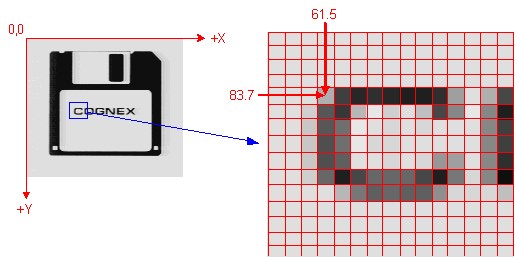
In an acquired image, the root space coordinate grid defines the boundary between image pixels. The location of any feature can be described with (X, Y) values from the grid.
As an acquired image undergoes image processing operations (subsampling, morphology) that change the total number of pixels in the image, VisionPro automatically re-adjusts the root space such that features in the processed image have the same root space coordinate locations.
The following figure shows the same image after it has been reduced in size through subsampling.
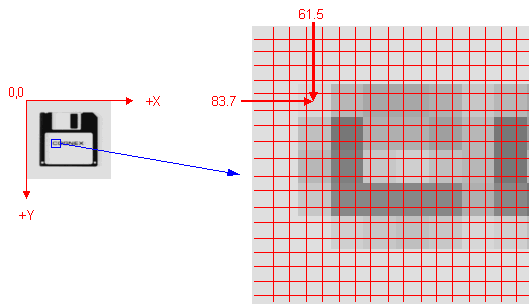
After image processing, the root space coordinate grid no longer corresponds to pixel boundaries. VisionPro automatically adjusts the root space so that image features (such as the "C" in "COGNEX") retain the same coordinate locations.
VisionPro calibration and fixturing tools create user spaces that define any number of additional coordinate systems beyond the root space for an image. The tool you use determines it handedness and units, and determine how it is related to the root space.
The following figure shows a user space added to the root space of an acquired image.
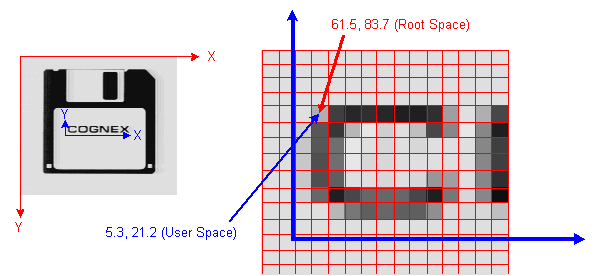
In this case, the user space is a right-handed coordinate system with its origin positioned at the base of the "COGNEX" text. A single feature has different coordinate space locations depending on which space you are considering.
Each user space has a unique name that your application can use to determine which space VisionPro uses to report tool results. All of the user spaces associated with an image are stored in a coordinate space tree
Pixel space is similar to root space, except that VisionPro does not adjust it to reflect the effect of image processing operations. The origin of pixel space is always the upper-left corner of the upper-left pixel. If you subsample an image, the locations of features will be different in the subsampled image's pixel space than they were in the original image's pixel space.
In general, pixel space is rarely useful for applications, although it can be useful when specifying graphics for display.