VisionPro supports developing your application using a Windows 64-bit operating system.
This topic contains the following sections.
Developing a VisionPro application has the following requirements:
- You must install the 64-bit version of VisionPro.
- You must install the full development environment of Microsoft Visual Studio, including the 64-bit cross compilers on the 64-bit machine.
You must add references to the VisionPro 64-bit assemblies by using the Browse tab in the Add References dialog box:
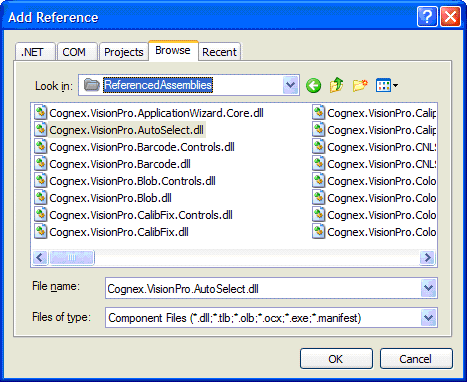
If you have a purely managed .NET application you can build your application with the Any CPU platform option. If you have an application that contains a mix of managed and unmanaged code, you must create a x64 platform setting in your solution file as described in the section Cross Compiling from a 32-bit Operating System and set the platform option to x64.
You must create an x64 platform setting in your solution file and set the platform option to x64 or Any CPU for purely managed applications.
With these requirements met, you can build, debug and run the x64 executables.
Your VisionPro installation includes VisionPro edit controls, allowing you to create an application targeted for 64-bit (x64) operating systems. Be aware of the following when using VisionPro edit controls in Microsoft Visual Studio:
- Microsoft Visual Studio is a 32-bit application only, and runs as a 32-bit process on a 64-bit operating system. As you develop your application on a 64-bit operating system, Microsoft Visual Studio Designer uses the 32-bit version of the edit controls.
- When you deploy a 64-bit application that contains VisionPro edit controls on a 64-bit operating system, the application will automatically load the 64-bit version of the edit controls. This is also true if you target Any CPU.
- If you debug your 64-bit application on a 64-bit operating system, it's the 64-bit version of the edit controls that will be loaded, since it is the application loading the edit controls and not Visual Studio Designer (which uses the 32-bit versions as previously described).
If you use a CogToolGroupEditV2 edit control in the graphical user interface to a WinForms application (C# or VB.Net), the control can display the message, "The license bit for this control is not enabled. Please contact Cognex for assistance":
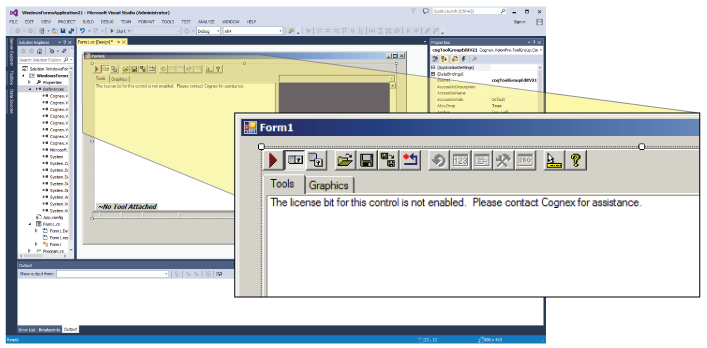
Be aware that the security check is performed at application run time. You can safely ignore this message as you design your application.