The Caliper tool lets you define scoring functions that enable you to rank edge or edge pair candidates based on how well they meet your criteria. This topic summarizes the different scoring functions and shows how to choose the scoring function that best suits your application.
Note: You can define multiple scoring functions for a single Caliper tool. If you do this, the overall score for an edge or edge pair candidate is equal to the Nth root of the product of the individual scorer's results, where N is the number of enabled scorers.
| Scorers for Single Edges or Edge Pairs | |
Edges or edge pairs close to the center of the caliper region score higher than edges or pairs that are away from the center. The absolute distance from the edge or edge pair to the center of the input region, expressed in the selected space of the image, is used as input to the scorer. When used to score an edge pair, the edge pair position is defined to be the midpoint between the two edges. To give centered edges or edge pairs lower scores than off-center edges or edge pairs, set x0 > x1 > xC. | 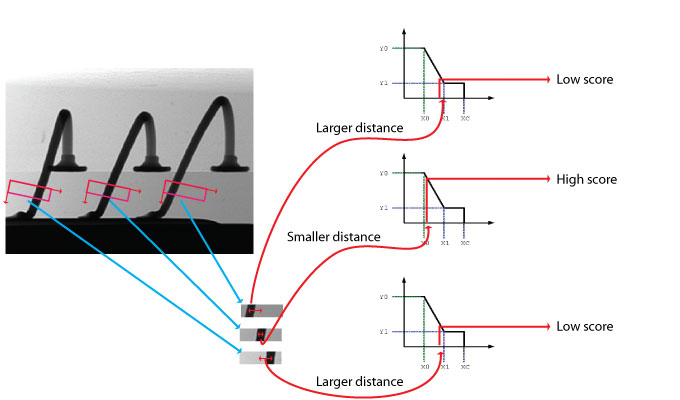 |
Edges or edge pairs are scored by their position within the search region, relative to its center. Unlike CogCaliperScorerPosition, this function uses the signed distance of the edge or edge pair from the center of the caliper region. If the region is searched from left to right, positions to the left of the center will be negative and positions to the right will be positive, expressed in the units of the selected space of the input image. You use this function to give edge candidates lower scores the closer they are to the right edge of the input region. When used to score an edge pair, the edge pair position is defined to be the midpoint between the two edges. To give edges with positive distances higher scores than edges with negative distances, set x0 > x1 > xC. | 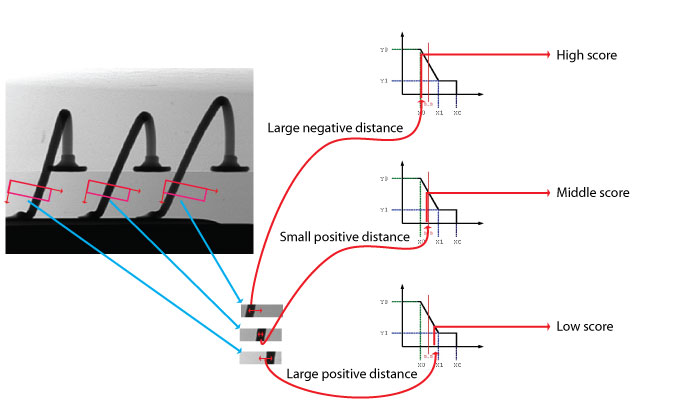 |
More pronounced edges score higher than less pronounced edges. Scores ignore the position and polarity of the edge within the search region. Contrast is a signed, dimensionless value (positive for dark-to-light, negative for light-to-dark). Contrast represents the height of the edge's peak in the filtered edge image graph. Contrast values are approximately equal to the difference in average pixel values across the edge. The range of possible contrast values is -256 to +256. Most contrast values will be well inside that range; you can observe the values generated for your images and regions to help set good values for a contrast scorer. Note: While contrast values are signed, the contrast scoring function always uses the absolute value of contrast for its input value. You never need to specify negative values for a contrast scoring function. When used to score an edge pair, the average contrast value for the two edges is used. To give lower-contrast edges higher scores, set xC > x1 > x0. | 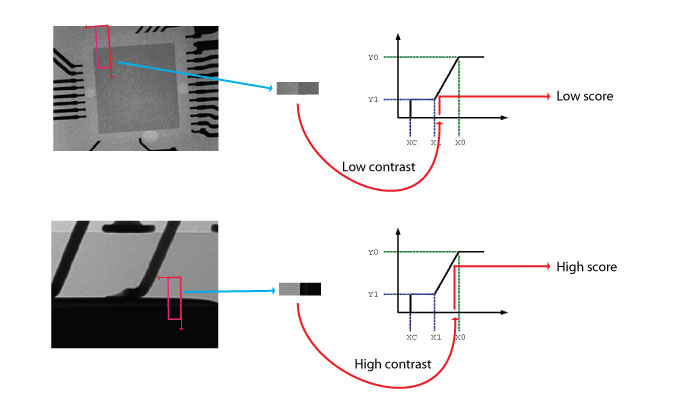 |
| Scorers for Edge Pairs Only | |
Edge pairs which are closer to the center of the caliper region score higher than pairs that are farther away from the center. The distance between the edge pair center and the caliper region center is normalized: it represents the position of the pair divided by the expected width of the pair. This function is the same as CogCaliperScorerPosition, except that the distance is normalized. The normalized position is a dimensionless quantity. It is unaffected by changes in the units of the selected space, or by uniform scale changes to the image and caliper region. This means that you can use a single function regardless of changes to your selected space units or the size of the of the image or region. To give centered edge pairs lower scores than off-center edge pairs, set x0 > x1 > xC. | |
CogCaliperScorerPositionNormNeg Edge pairs are scored by their normalized position within the search region, relative to its center. The normalization is the same as is used by CogCaliperScorerPositionNorm. Unlike CogCaliperScorerPositionNorm, this function uses the signed distance of the edge or edge pair from the center of the caliper region. If the region is searched from left to right, positions to the left of the center will be negative and positions to the right will be positive. You use this function to give edge candidates lower scores the closer they are to the right edge of the input region. To give edge pairs with positive distances higher scores than edges with negative distances, set x0 > x1 > xC. | |
Edge pairs are scored based on their width, normalized by dividing the found width by the expected width. For example, an edge pair that is exactly twice as wide as expected will have a normalized size of 2. To give larger edge pair widths lower scores, set xC > x1 > x0. |  |
Edge pairs are scored based on the difference between the expected width and the found width, normalized by dividing the absolute value of the difference between the found and expected widths by the expected width. This function makes it easy to give edge pairs that are of the expected size high scores while giving low scores to edge pairs that are too wide or too narrow. An edge pair of exactly the expected width produces a value of 0, while edge pairs that are 25% wider or 25% narrower both produce a value of 0.25. To give low scores for edges of the expected size and high scores for narrow or wide scores, set x0 > x1 > xC. |  |
CogCaliperScorerSizeDiffNormAsym This function is the same as CogCaliperScorerSizeDiffNorm except that you can score smaller-than-expected edge pairs differently from larger-than-expected edge pairs. You do this by specifying a two-sided scoring function. To give low scores for edges of the expected size and higher scores for narrow or wide scores, set x0H > x1H > xCH > xC > x1 > x0. |  |
Edge pairs where the edges straddle the center point of the caliper region receive a score of 1 while edge pairs which do not straddle the center point receive a score of 0. | 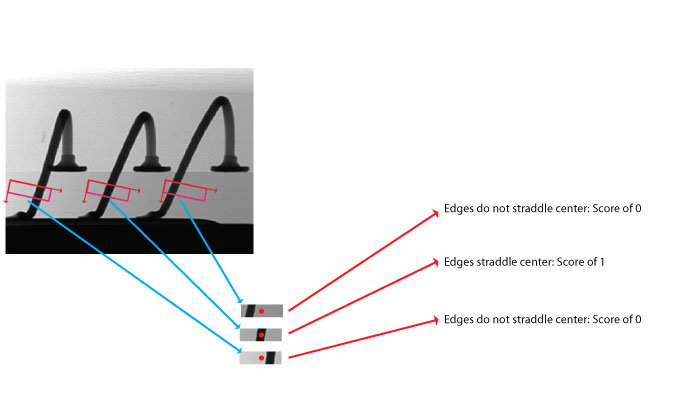 |