This topic contains the following sections.
The Inspection Designer feature of VisionPro is a collection of capabilities that allow you to compare a database of graded images to the results produced by a set of vision tools contained within a CogToolBlock. If the results generated by the CogToolBlock do not match the results of the graded database, you can adjust the parameters of the vision tools you are using or try an alternative approach to the vision solution. Inspection Designer components allow to you confirm that your vision application is generating the desired results for images you have previously evaluated manually.
Using Inspection Designer capabilities involves the use of three VisionPro components:
- Using the Image Grading Utility to evaluate a set of images stored in an image-database or a folder and creating a Cognex.VisionPro.Database of graded images.
- Creating a CogToolBlock of vision tools configured to analyze the same images.
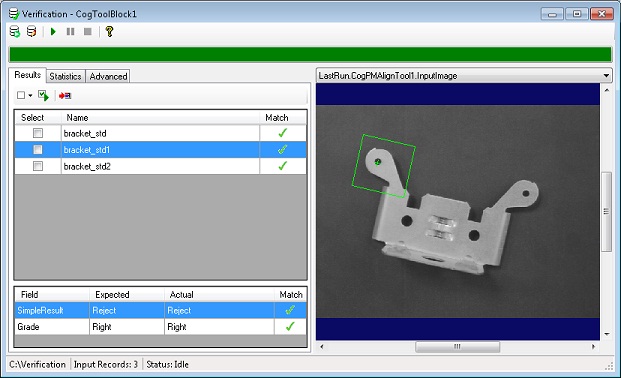
Using the Verification control, available only through the CogToolBlock, that compares the results produced by the CogToolBlock to the assigned grades of those same images in the database.
The Verification control can graphically depict which analyzed images match or do not match the expected result.
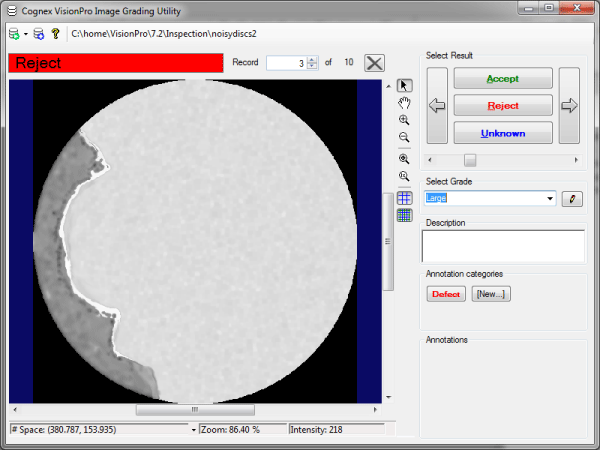
Use the Image Grading Utility to create a graded database of images that you plan to verify using the Inspection Designer components. Each record includes:
- The image under inspection, with an optional description of the object or scene
- A Result of Accept, Reject or Unknown to describe what result the vision application should return after inspecting this image with VisionPro vision tools
- A Grade, represented by a character string you specify
- Graphics and descriptions that highlight specific features of the image for the purpose of identifying why the image receives whatever grade you assign to it
The utility accepts saved images in a variety of formats and gives you the option of storing the image as part of the database record or linked to the original image stored elsewhere on your PC or network. The following figure shows the Image Grading Utility with an example record:
For more details on the Image Grading Utility, see the topic Image Grading Utility.
Use a CogToolBlock to increase and improve the structure of your application. See the topic Using a CogToolBlock for details. In addition, Cognex recommends you use a Results Analysis tool to determine the Accept or Reject status of each inspection, as the result generated by a Results Analysis tool sets the value of Result for this CogToolBlock, which is what the Verification control will use to compare against the assigned Result and Grade of the image from the record database. See the topic Results Analysis Tool for more information.
The Verification control, available only through the CogToolBlock, compares each image stored in a file or folder to those same images imported into the Image Grading Utility, and can graphically depict the inspection results, as shown in the following example:
See the topic Using a CogToolBlock for details on using the Verification control.
The topic Verifying an Image Database describes a procedure for performing an actual verification using a sample database included with your VisionPro installation.
The directory %VPRO_ROOT%\samples\Programming\Inspection\Verification\UserVerification contains sample applications that perform an image verification programmatically.