This topic contains the following sections.
A Cognex Communication Card allows communication between a VisionPro application and a variety of factory floor equipment. Specifically:
- Discrete I/O devices can send and receive signals to indicate such conditions as part presence or to trigger a strobe light.
Programmable Logic Controllers (PLCs) can send and receive signals that cause the vision system to trigger an acquisition or communicate information about the results of running VisionPro tools.
See the section Cognex Network Data Model for more information.
VisionPro supports the Cognex Communication Card through the Cognex.VisionPro.Comm namespace of the VisionPro API for use in your vision application. There is no support for accessing the Cognex Communication Card through the Communication Explorer.
The API contains the classes CogCommCard and CogCommCards for representing the Cognex Communication Card installed in your PC as well as representing a collection of all the Cognex Communication Cards available (see the topic About this Release for the number of Cognex Communication Cards supported in this release).
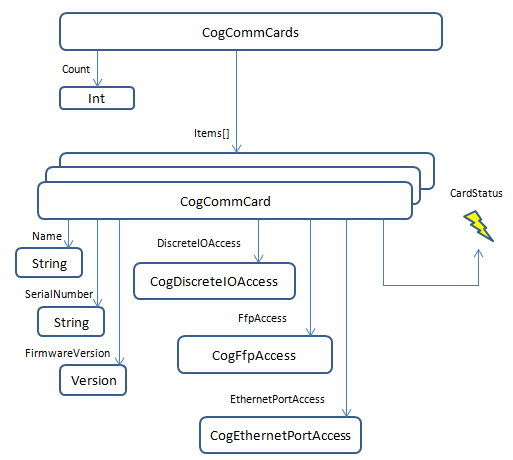
A default constructed CogCommCards object is automatically initialized with a reference to every Cognex Communication Card found in the PC.
CogCommCards commCardCollection = new CogCommCards();

Console.WriteLine("Found: {0} comm cards", commCardCollection.Count);

if (commCardCollection.Count == 0)
    return;

CogCommCard card = commCardCollection[0];
The API for the Cognex Communication Card allows you to create a predefined set of events capable of receiving and transmitting signals between various pieces of discrete I/O equipment in your production environment without having to call an API from the host PC at the time of execution. Using precision I/O can avoid common issues related to Microsoft Windows latency when processing I/O events using the host application.
The response to any event can be configured to occur immediately or your vision application can schedule events to take place at an exact time. In addition, an event can be scheduled and later cancelled before it occurs, depending on the needs and results generated by the vision application.
The API for the Cognex Communication Card can optionally notify the host application when a precision I/O event occurs, providing the time and I/O state information.
See the topic Using Precision I/O for more details on configuring your VisionPro application to use the precision I/O capabilities of the Cognex Communication Card.
The Cognex Network Data Model (NDM) determines how supported Ethernet factory floor protocols transfer data between a PLC and a VisionPro application. Specifically, the NDM supports the following factory floor protocols:
The NDM supports up to four acquisition and inspection channels, and supports both synchronous and asynchronous image acquistion.
The NDM supports host notification through a set of .NET events that your vision application responds to using the appropriate event handlers, and a set of notification methods when your vision application has data that needs to be sent to a connected PLC.
See the topic Factory Floor Protocols Overview for details on how to use the CogNdm interface.
The Cognex Communication Card must be configured with an IP address and other network settings in order to communicate over Ethernet factory floor protocols or using the Cognex Network Data Model.
VisionPro includes the Cognex Comm Card Configurator available from the Windows Start menu, to configure various Ethernet settings which are saved to non-volatile memory on the card itself. See the topic Configuring Ethernet Settings for more information on the utility.
The VisionPro API includes the CogEthernetPort class to set these parameters programatically, but Cognex recommends you use the Cognex Comm Card Configurator for all but the most advanced applications.
VisionPro installs Cognex Communication Card API sample applications in the %VPRO_ROOT%\samples\Programming\IO\CommCard directory. These sample applications can be opened with any supported version of Microsoft Visual Studio. The sample applications include:
BasicDiscreteIO
This sample application demonstrates basic discrete I/O using the Cognex Communication Card, allowing the user to set output lines high or low and receiving notification when input lines change state.
BasicFactoryFloorProtocol
This sample application demonstrates the use of the Cognex Network Data Model using any of the factory floor protocols supported in this release. The application can receive notification from a connected PLC and handles these events through the appropriate event handlers, while also sending data to the PLC through the supported notification methods of the Network Data Model API.
In addition, the sample application allows the user to modify and apply the Ethernet settings of the Cognex Communication Card.