This topic contains the following sections.
The Cognex Communication Card supports 8 discrete input lines and 16 discrete output lines, and connects to external devices through an I/O terminal block or a breakout cable. The card also supports an ethernet port for communication with industrial ethernet devices, typically a programmable logic controller (PLC). See the Communication Card Installation Manual for details on how to install the hardware and connect it to external devices.
The API for the Cognex Communication Card allows you to read and write to the I/O lines as well as communicate with factory floor equipment using supported factory floor protocols and the Cognex Network Data Model. See the topic Factory Floor Protocols Overview for more information on the Cognex NDM.
In addition, the API for the Cognex Communication Card allows you to create a configurable I/O event system capable of handling the signals between your vision application and the discrete I/O equipment in your production environment without having to call API from the host PC as your vision application operates. This can avoid common issues related to Microsoft Windows latency when processing I/O events using typical I/O solutions.
This type of configurable I/O event system is called precision I/O when using a Cognex Communication Card API.
This section contains the following subsections.
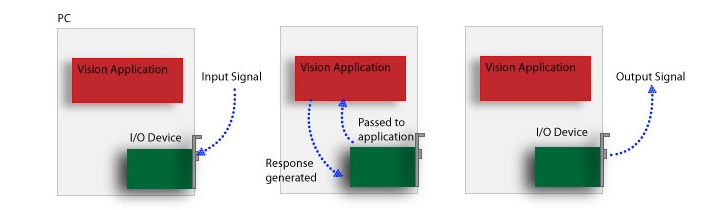
In a typical production environment, the vision application on the host PC must acknowledge and process incoming I/O signals before responding with appropriate outgoing signals:
By defining a precision I/O event system, the vision application can load a predefined set of precision I/O events onto the Cognex Communication Card and allow the processor on the card to read input lines and generate the appropriate response by setting desired output lines:
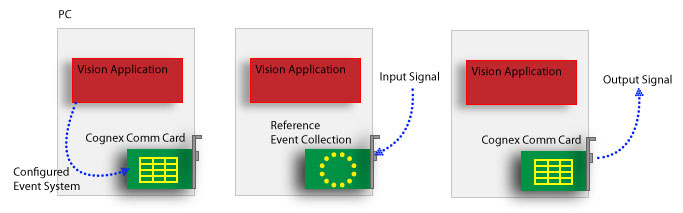
The precision I/O event system eliminates the overhead of coordinating each I/O event with the host vision application.
This section contains the following subsections.
The Precision I/O feature of the Cognex Communication Card API allows you to configure an event system to schedule and respond to I/O transitions without involving the host PC. Your vision application can contain any number of precision I/O events.
A single precision I/O event is defined by its name, its causes, and its responses. For example, the following event immediately sets the Output 0 line High for 15 milliseconds when the Cognex Communication Card detects that Input 0 is High:
- Name: "Part Present Sensor"
- Cause: Input 0 goes high
- Response: Pulse Output 0 for 15 ms
A more complex event can support a collection of causes and responses, as shown:
- Name: "Stop Inspections"
Causes: Any of the following:
- Input 0 goes high
- Input 1 goes high
- Input 2 goes high
Responses: Both of the following:
- Pulse Output 0 for 10 ms
- Pulse Output 1 for 10 ms after a 500 ms delay
In this example, the "Stop Inspections" event will occur whenever Input lines 0, 1 or 2 are set to High. Whenever any of these causes occur, the event will pulse Output line 0 for 10 milliseconds and Output line 1 for 10 milliseconds after a half-second delay.
Once your event collection has been defined with causes and responses, you enable the event system and allow the Cognex Communication Card to respond to signals detected over discrete I/O devices.
Events and Event Collections
The API supports the CogPrio, the CogPrioEvent, and the CogPrioEventCollection classes for creating precision I/O events and configuring them to interact with a precision I/O event system.
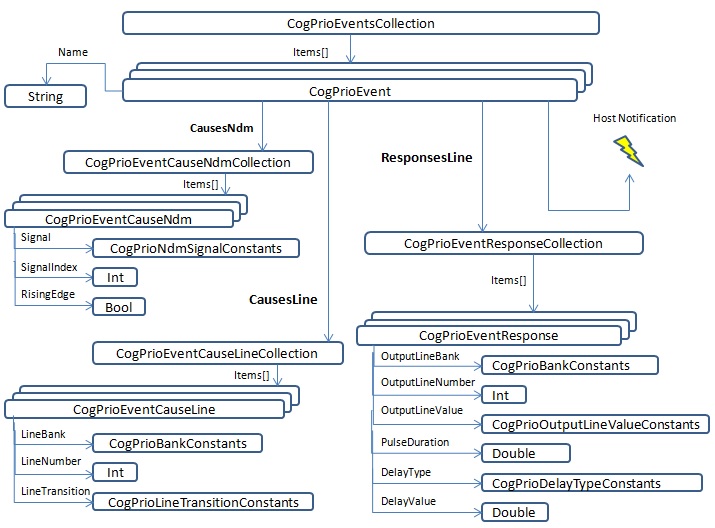
Each precision I/O event holds a possible collection of CogPrioEventCauseLine and CogPrioEventResponseLine objects, and events do not interrupt the PC unless you explicitly configure it to do so by subscribing for HostNotification. Once your precision I/O event collection has been defined, your vision application calls the EnableEvents method to allow the Cognex Communication Card to respond to any signals that are defined as event causes.
The following example creates a single precision I/O event that triggers a light connected to discrete output line 0 in response to a signal on discete input line 0, and then adds this event to an event collection:
// Holds a reference to the Comm Card Collection
CogCommCards mCards = new CogCommCards( );

// Holds a reference to the Comm Card in the PC
CogCommCard mCard = mCards[0];

// Holds a reference to the Precision I/O interface
CogPrio mPrio = mCard.DiscreteIOAccess.CreatePrecisionIO();

if {mPrio != null)
{
    mPrio.DisableEvents( );

    CogPrioEvent turnOnLight = new CogPrioEvent( );
    turnOnLight.Name = "Enable the Red Light";

    CogPrioEventCauseLine mCause = new CogPrioEventCauseLine
                (CogPrioBankConstants.InputBank0, 0, CogPrioLineTransitionConstants.LowToHigh);
    turnOnLight.CausesLine.Add(mCause);

    // Turn on the light for 1 second after a 3 second delay
    CogPrioEventResponseLine mResponse = new CogPrioEventResponseLine
                (CogPrioBankConstants.OutputBank0, 0, CogPrioOutputLineValueConstants.SetHigh, 1000, CogPrioDelayTypeConstants.Time, 3000);
    turnOnLight.ResponsesLine.Add(mResponse);

    // Adds this event to the event collection
    mPrio.Events.Add(turnOnLight);

    if (!mPrio.Valid)
    {
        MessageBox.Show("Event Collection Not valid.");
    }
    else
    {
        mPrio.EnableEvents();
    }
}
Collection Validity
The Cognex Communication Card API uses the Valid property to indicate whether the configuration of the precision I/O events in a collection are valid (true) or not (false). The property is updated automatically as events are added to the collection.
The precision I/O event collection cannot function while its Valid property is false, which can happen if you do any of the following:
- Set LineBank to a value not supported by the Cognex Communication Card.
- Set LineNumber to a value not supported by the Cognex Communication Card.
- Configure two or more events to share the same LineBank, LineNumber and LineTransition.
- Set OutputLineNumber to a value greater than the number of lines supported by the current bank.
- Configure two or more events to share the same OutputLineBank, OutputLineNumber, and OutputLineValue.
- Set DelayValue to a negative value when DelayType is set to Time.
Cognex strongly recommends your application check the status of the Valid property as it launches, and use the ValidationErrorMsg property as necessary to view the error messages that describe issues with the events collection.
Host Notification
By default a precision I/O event does not notify the vision application. The CogPrioEvent class supports the HostNotification event to signal the PC that a precision I/O event has occurred by raising a .NET event. The arguments for the event contain the state of all the I/O lines and the exact timestamp the event occured and the encoder count.
See the sample solution %VPRO_ROOT%\samples\Programming\IO\CommCard\BasicDiscreteIO for a precision I/O application that uses host notification.
Event Scheduling
The CogPrioEvent supports the Schedule method for scheduling a precision I/O event, which can be scheduled to occur at exact times relative to other events through a timestamp. Scheduled events can be later cancelled based on the needs of the vision application.
See the sample solution %VPRO_ROOT%\samples\Programming\IO\CommCard\ConveyorTracking for a precision I/O application that schedules events.