VisionPro supports the Cognex Comm Card Configurator utility for configuring the Ethernet settings your Cognex Communication Card will need for network communication in your production environment. The utility also allows you to set parameters if your vision application communicates to a programmable logic controller (PLC) using the PROFINET factory floor protocol. The utility stores the settings you save in flash memory on the Cognex Communication Card and retrieves them each time you start your vision application. Be aware the network settings the Cognex Communication Card is using at any time can be different than network settings stored in flash memory if the settings have been modified from a connected PLC.
Launch the utility by choosing Start->All Programs->Cognex->VisionPro->Utilities->Cognex Comm Card Configurator.
Note: Although your VisionPro application can perform the same tasks as the Cognex Comm Card Configurator utility through the CogEthernetPort VisionPro API, Cognex recommends that you start with the utility and reserve the API for advanced application needs.
Use the Network Configuration tab to set network parameters your Cognex Communication Card will need for network communication. Consult with your network administrator as necessary for choosing the best settings for your network.
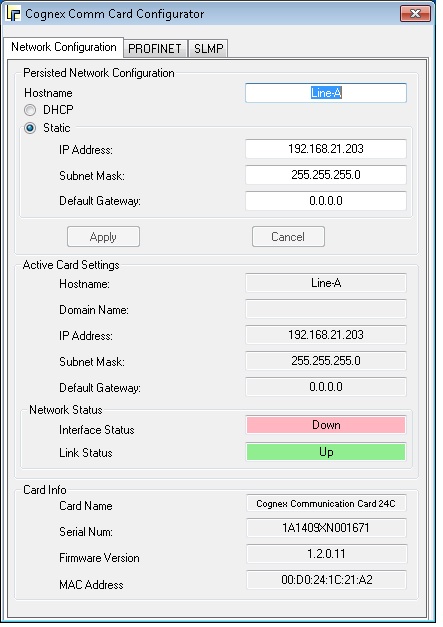
The utility displays a Link Status as Up if the Ethernet port is electrically connected.
Choose values for the following settings:
- Hostname: (HostName): A host name for the hardware
- DHCP (DHCPEnable) or Static: Enable the Dynamic Host Configuration Protocol for dynamically assigning network settings from a DHCP server on your production network.
The utility ignores any attempt to set the following Ethernet port properties if DHCP is enabled:
- IP Address (IPAddress)
- Subnet Mask (SubnetMask)
- Default Gateway (DefaultGateway)
Click Apply to write the current settings to the flash memory of the Cognex Communication Card. The utility will update the Interface Status (IsInterfaceUp) to reflect the Ethernet port interface status.
Be aware that if you close the utility without clicking Apply, none of the current settings will be saved.
The utility provides the PROFINET tab to configure settings when your Cognex Communication Card communicates using the PROFINET factory floor protocol.
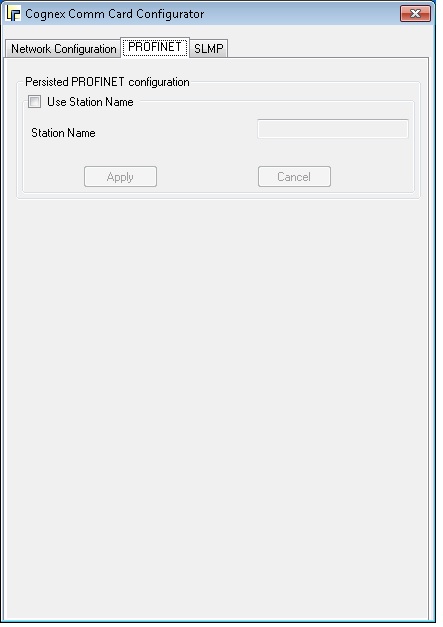
- Use Station Name (UseStationName): Enable the use of the PROFINET station name.
- Station Name (StationName): Set the PROFINET station name.
Click Apply to write the current settings to the flash memory of the Cognex Communication Card.
The utility provides the SLMP tab to configure settings when your Cognex Communication Card communicates using the SLMP factory floor protocol.
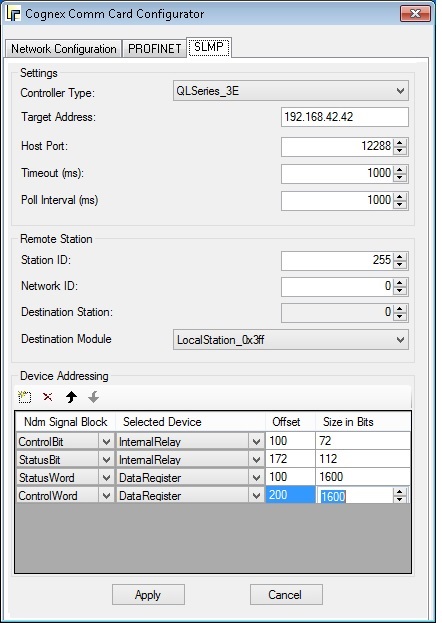
- Controller Type : Specifies the type of Mitsubishi PLC to communicate with, either a Q/L Series (3E Frame), the default, or an FX Series (1E Frame).
- Target Address (TargetAddress): Specifies the IP address of the PLC that will be connected to the vision system.
- Host Port (TargetPort): Specifies the TCP port number, in decimal format (Dec: 1-65535; default = 12288), of the SLMP channel that will be used by the PLC.
- Timeout (ms) (Timeout): Specifies the timeout, in milliseconds (5 to 1000; default = 1000), for a response from the PLC to an SLMP message.
- Poll Interval (ms) (PollRate): Specifies the amount of time, in milliseconds (5 to 1000; default = 1000), between successive polls fo the Vision Control block on the PLC.
- Station ID (RemoteStationID): Specifies the station ID (ID of C24 on a multi-drop serial connection); also used as the PCID field for 1E/3E frames.
- Network ID (RemoteStationNetworkID): Specifies the SLMP network number (0 to 239; default = 0) that will be used to communicate (0 = the local network).
- Destination Station (RemoteStationDestStationID): Specifies the Remote Station Destination Station ID, which is the ID of the second hop station (also the PCID for 1C frames).
Destination Module (RemoteStationDestModule): Specifies the Remote Station Destination Module, which is the ID of the station in the rack:
LocalStation_0x3FF 0x3FF ControlSystemCPU_0x3D0 0x3D0 StandbySystemCPU_0x3D1 0x3D1 SystemACPU_0x3D2 0x3D2 SystemBCPU_0x3D3 0x3D3 CPU 1_0x3E0 0x3E0 CPU 2_0x3E1 0x3E1 CPU 3_0x3E2 0x3E2 CPU 4_0x3E3 0x3E3 - Ndm Signal Block (NdmSignalBlockMapping): Specifies the name (read-only) of the data block that will be communicated to or from the PLC.
Selected Device : Specfies the PLC device that will be used to read or write the block. The available PLC devices are as follows:
Device Name Prefix Bit/Word Based Address Representation Q/L Series FX Series Input Relay X Bit Hex (Q/L Series)/Octal (FX Series) X X Output Relay Y Bit Hex (Q/L Series)/Octal (FX Series) X X Internal Relay M Bit Decimal X X Latch Relay L Bit Decimal X Annunciator F Bit Decimal X Link Relay B Bit Hex X State Relay S Bit Decimal X Data Register D Word Decimal X X Link Register W Word Hex X File Register R Word Decimal X X File Register Mutliple Blocks ZR Word Hex X Timer TN Word Decimal X X Counter CN Word Decimal X X - Offset : Specifies an offset within the device table used to read or write the data block. The offset value should be entered in decimal, hexadecimal or octal, depending on the Selected Device.
Size in Bits : Specifies the size of the data block that will be communicated with the PLC. The size is expressed in units of PLC "devices", and is configurable only for those data blocks that do not have a fixed size.
Note : The size is always specified in bits, even for Word Based memory areas.
Cognex recommends you be aware of the following regarding the Ethernet port interface when communicating over a Cognex Communication Card:
- The Ethernet port interface is up when using the utility with valid network settings. Otherwise the Ethernet port interface is down.
- The utility does not initialize the Cognex Network Data Model (NDM), so you cannot use it to establish a connection between the Cognex Communication Card and a PLC and validate your network settings.
- It may take several seconds after the VisionPro application starts for the Ethernet port interface to be ready, depending on whether you use static network settings or DHCP settings. Your application should syncronize itself with the IsInterfaceUp event before it attempts any communication.
- If your application needs to modify network settings as it executes, use the BringInterfaceDownAsync method to manually bring down the Ethernet port interface. After your changes are made, use the BringInterfaceUpAsync method to manually bring the Ethernet port interface back up.