This topic contains the following sections.
Using the TCP/IP protocol you can establish a communication channel between your VisionPro application and other devices and applications across network hardware. Your VisionPro application can send and receive various types of information with other applications running on the same or other machines once you establish a reliable communication path. Using a configured TCP/IP device for any Job, your application can exchange inspection results, application parameters and other properties through a TCP/IP port. You can create as many TCP/IP devices as you need for your vision solution. The following figure shows an example TCP/IP configuration between various network devices:
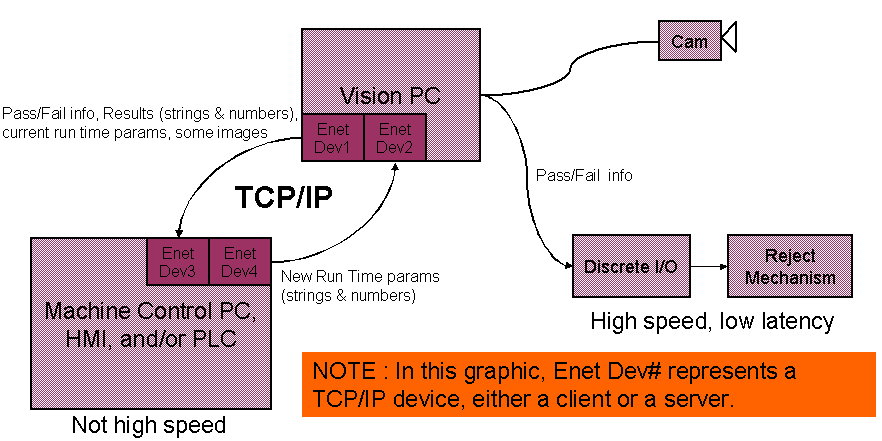
Unlike discrete I/O signals which can only signal discrete I/O lines high or low, you can use TCP/IP to exchange tool results, run-time parameters and other intrinsic data types the application uses.
VisionPro uses a client-server relationship to establish a TCP/IP link between the vision application and other network hardware, where the client is responsible for initiating a link using a specific TCP/IP port number. A TCP/IP device can be configured as either a client or a server. If configured as a client, the application it exchanges data with must be configured as a server. Conversely, if the TCP/IP device is configured as a server, the other application must act as a client. Whether to configure a new TCP/IP device as a client or server is up to the developer of the vision application. A server waits for a connection request but can communicate with multiple clients, while a client initiates a connection request but can communicate with only one server.
Once a TCP/IP link has been established, the vision application will transmit data through the TCP/IP device after every iteration of each job in the vision application as long as the connection port is open.
QuickBuild can be configured with multiple TCP/IP devices for sending data out to other devices, but will not interpret input data received over the TCP/IP port. If you need your vision application to parse incoming data over a TCP/IP device, you must use the VisionPro StreamInput and write the programming statements to handle any input commands. VisionPro includes a programming sample of accepting incoming TCP/IP data. The default location for the sample code is at C:\Program Files\Cognex\VisionPro\Samples\Programming\TCPIP.
To establish a TCP/IP link with another device, the QuickBuild application must be Online. See the section on Online and Offline for more information.
See the topic Adding TCP/IP Output to Your QuickBuild Application for more details on using TCP/IP devices in QuickBuild.
Be aware of the following limitations when using TCP/IP:
- You cannot use TCP/IP to send images to other applications.
- The vision application sends TCP/IP data each time the application operates.
- You cannot configure multiple TCP/IP client devices to communicate with the same server.
- There is no programmatic interface to send data out through TCP/IP devices.
- VisionPro does not support handling TCP/IP input commands through scripting since the event handler cannot be added and removed easily.