VisionPro supports the IPOneImage tool to process an input image with one or more image-processing operations, such as grey-scale morphology, Gaussian sampling, or median filters. You specify an ordered list of image-processing operators to use, with each one accepting an input image and generating an output image. The output image from the first operator becomes the input image to the second operator, and so on until the last operator produces the final output image.
The following figure shows an input image and the output image produced by an IPOneImage tool after processing the input image with several operators:
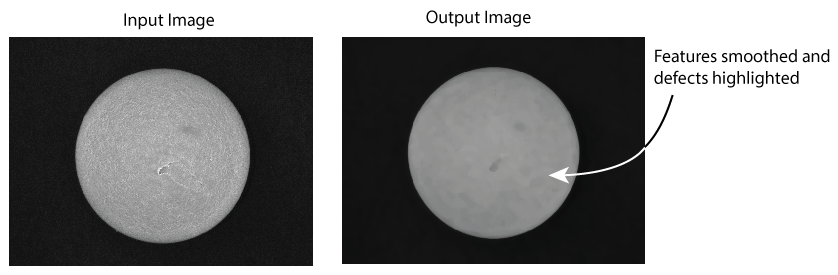
Many operators generate the value of a given output image pixel from the values of a rectangular grid, or kernel, of input image pixel values. In most cases the pixel location at the center of the grid corresponds to the location of the pixel in the output image.
The types of supported input images varies from operator to operator, but all support the CogImage8Grey. See the topic Vision Tools and Supported Image Types for a complete list of IPOneImage operators and supported image types.
See the following sections for more information:
In typical input image masking, you supply the IPOneImage tool with a CogImage8Grey to use as an image mask. Every pixel in the input image mask has one of two pixel values - 0 for Don't Care and 255 for Care pixels.
In the simplest use case, the IPOneImage tool moves an operator kernel progressively around the input image and the image mask, with the center of the kernel positioned over each pixel in turn.
- If the image mask value at that center position equals 0 (Don't Care), the tool copies the grey value from the input image pixel directly to the corresponding pixel in the output image.
- If the image mask value at that center position equals 255 (Care), the tool computes a new value for the corresponding pixel in the output image based on the operator and the input pixels in the kernel having a corresponding Care value in the image mask.
The following figure illustrates this model:
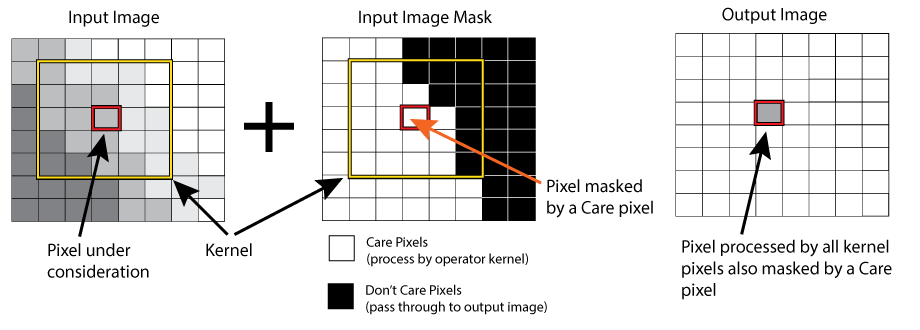
In some vision applications, you may want more control of when the tool determines the value of an output pixel based on the ratio of Care pixels to kernel pixels. The IPOneImage tool supports an intermediate computation policy with two options:
UseCenterPel
This duplicates the legacy behavior of input image masking, and generates an output image as shown in the previous figure.
UseCarePelsMinFraction
The tool generates an output image as follows:
- The tool analyzes all the input image mask pixels under the kernel. The number of Care pixels divided by the total number of kernel pixels determines a value for CarePelsMin.
If the CarePelsMin value equals or exceeds a specific value you set for CarePelsMinFraction, the tool considers the kernel placement valid for computing a value to put in the intermediate image at the position corresponding to the center of the kernel.
The tool uses only those input image pixels whose corresponding image mask values are set to Care within the bounds of the kernel.
- If the CarePelsMin value is less than the value for CarePelsMinFraction, the tool copies the input image pixel value directly to the intermediate image at the position corresponding to the center of the kernel.
The following image-processing operators support image masking:
Input image masks do not need to be the same size as the input image. Your application positions an image mask with respect to an input image using a pair of user-specified integer pixel offsets, such as InputImageMaskOffsetX and InputImageMaskOffsetY. VisionPro makes these offsets available through the API only.
Your application considers any input image pixels that do not match up to an image mask pixel to be matched with a Care pixel, so the IPOneImage tool will compute a new output image pixel value based on the operator and the kernel it uses.
Be aware that each operator supports its own image mask property. If your application uses an image mask and multiple operators, each operator that can use the mask must have it assigned to its ImageMask property. In the following figure, a CogIPOneImageTool in a QuickBuild application uses a MedianNxM and GaussSampler operator. For each operator to use the image mask, the MedianNxM operator property InputImageMask and the GaussSampler operator property InputImageMask properties must be exposed and set explicitly.

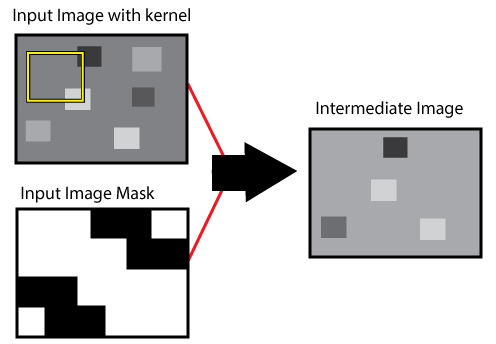
In addition to supporting input image masking, the CogIPOneImageGaussSampler and CogIPOneImageMedianNxM image-processing operators support intermediate image masking, an additional step that provides more flexibility in controlling the output of computed pixel values versus input pixel values. Intermediate image masking processes the input image with the initial image mask to produce an intermediate image, which is then analyzed using the intermediate image mask to produce the final output image.
To perform image processing with intermediate image masking, the IPOneImage tool starts by using the input image, the operator kernel, and the input image mask to generate an internal intermediate image:
To generate the output image, the IPOneImage tool uses the intermediate image and the intermediate CogImage8Grey image mask you provide:
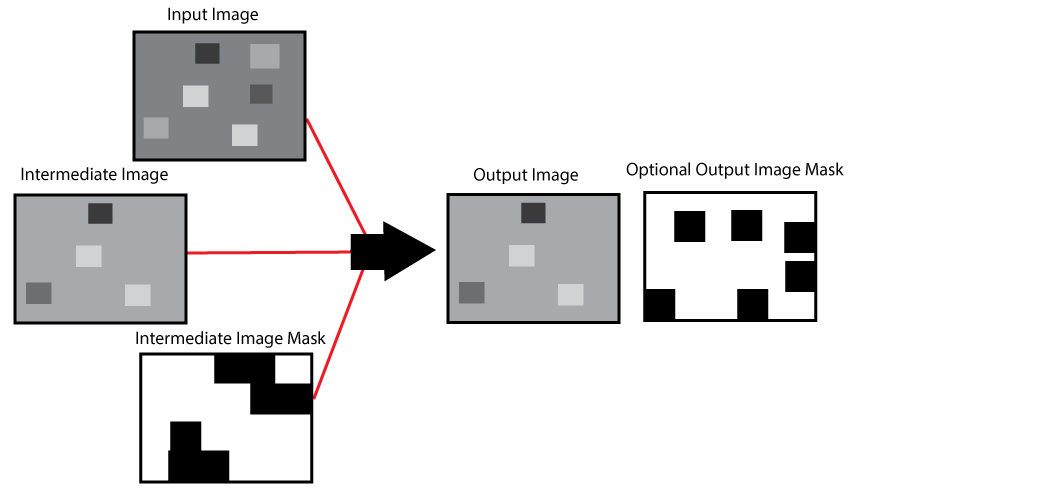
For each pixel in the intermediate image, the IPOneImage tool considers the intermediate image mask. If the corresponding intermediate image mask value is set to Care, the tool outputs the pixel value from the intermediate image. Otherwise, the tool outputs the pixel value from the original input image.
Finally, you have the option to generate an output image mask, an CogImage8Grey image that represents the mask used to determine which output image pixels were taken from the intermediate image and which were taken from the input image.
Refer to the following VisionPro API documentation for details on intermediate image masking: