VisionPro supports two types of median filters, which can be an effective noise reduction technique for many types of images. For each pixel in the input image, a median filter picks the middle value from all the pixels of the input image that lie within a boundary specified by a kernel. This middle value becomes the grey value in the output image at the position that corresponds to the center of the kernel. A median filter is very effective in reducing salt-and-pepper noise from an image.
A median filter performs quite differently than an Image Average tool, which computes the mean of all the values defined by the kernel. A median filter can reduce the blurring effect an Image Average tool can have while also retaining sharp edge information. For example, the following figure shows an input image and the two output images it generates using an Image Average tool and a median filter:
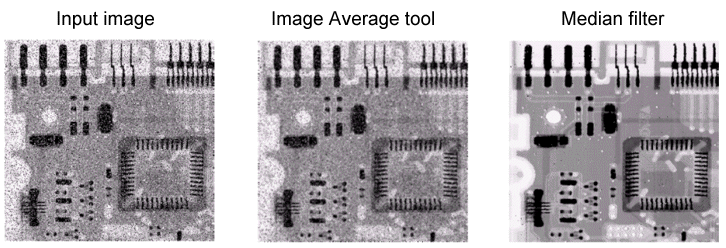
A median filter requires no parameters. In addition, unlike other image-processing operations, the median filter produces an output image with the same dimensions as the input image.
See the following sections for more information:
To illustrate how the median filter functions, the following figure shows the pixel values in a fragment of a grey-scale image and highlights the nine pixels defined by a 3x3 kernel:
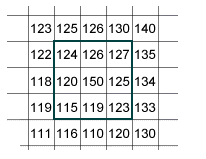
The grey values within the kernel, in sorted order, are '115', '119', '120', '123', '124', '125', '126', '127', and '150'. The median value for the output image in a 3x3 kernel is the 5th value, or '124' in this case. In the output image, the value '124' replaces the previous grey value of '150', and the algorithm moves on to the next pixel in the input image.
The 3x3 Median operator is available through the One Image Edit Control and can be used before or after other image processing operations.
To specify your own custom sized kernel, use the median NxM functionality and specify an NxM kernel appropriate for your vision application. Larger kernels have a greater impact on the output image.
A median NxM filter allows you to select which pixels in the kernel are 'Care' and 'Don't Care' values at every position. As the median algorithm operates, kernel positions with a 'Don't Care' value are not considered when generating the new grey value for the output image.