This topic contains the following sections.
The CogAcqFifoTool is different from other VisionPro tool objects in one important way. If you configure a CogAcqFifoTool's underlying ICogAcqFifo operator object for automatic triggering, then the underlying operator will execute whenever a trigger is received without any intervention from the user, the tool edit control, or the tool, as shown in the following figure:
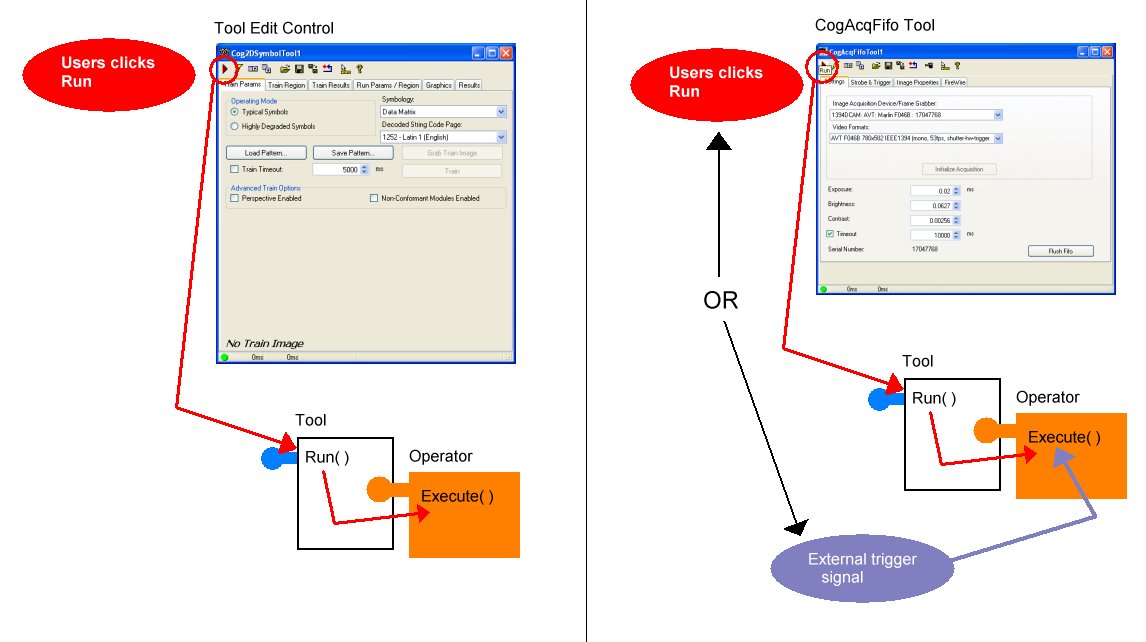
When the underlying operator executes as the result of an external trigger, none of the operator's events (such as the Complete event) are captured by the tool. The tool, and consequently any tool edit control associated with the tool, has no knowledge that a trigger has been received or that a new image is available.
Because a CogAcqFifoTool's underlying operator may execute without any user intervention when you are using automatic triggering, some aspects of the way a CogAcqFifo tool edit control behaves may be unexpected. The following sections describe the main differences.
If an acquisition fifo is configured for automatic triggering, then it is an error to call the StartAcquire function; acquisitions are started only when external trigger events are encountered. When you click the Run button in an AcqFIFO Edit Control, and the FIFO is configured for automatic triggering, the control calls the CompleteAcquire function. If a trigger has already been received, but not processed (that is the acquired image is still available), this results in the display of the previously acquired image by the tool edit control. If no trigger has been received, or if the image has already been processed (perhaps by your application's Complete event handler), then the tool will block, waiting for the next trigger to arrive.
If a steady stream of trigger events are arriving, then clicking the Run button will still only display a single recently acquired image. There is no mechanism within the tool edit control to automatically display a new image each time a trigger is received. To do this, you must write your own Complete event handler and display the images yourself using a CogDisplay control.
The statistics shown in the AcqFIFO Edit Control for completed, failed, and missed acquisitions do not include data for automatically triggered acquisitions. To obtain these types of statistics for triggered acquisitions, you must track the acquisition completion status yourself, using the errors returned by CompleteAcquire.
Whenever an external trigger is received by a ICogAcqFifo object, if the object is configured for automatic triggering and its TriggerEnabled property is true, the object will acquire and queue an image and fire its Complete event. The object does this regardless of the state of the tool or the rest of your application. In particular, if you load a persisted CogAcqFifoTool that includes an operator configured for automatic triggering with triggers enabled, the object will start acquiring images immediately upon receiving trigger signals.
For this reason, Cognex recommends that you always persist CogAcqFifoTool and ICogAcqFifo objects with TriggerEnabled set to false, then enable triggers explicitly in your application at the appropriate time.