This topic contains the following sections.
There are several types of objects in VisionPro. Among them are VisionPro tool objects, which have a name ending in "Tool" and which implement a common set of interfaces to provide consistent access to different types of functionality, and VisionPro operator objects, which implement properties and methods that are specific to the type of object. VisionPro also includes parameter, pattern, and result objects.
Both tool and operator objects include properties and methods that let you perform machine vision operations, such as acquiring images, performing image processing, and locating patterns in images. The way in which you use tool objects and operator objects is different. This topic explains the relationship between VisionPro tool objects and operator objects, and shows how to use both types of objects.
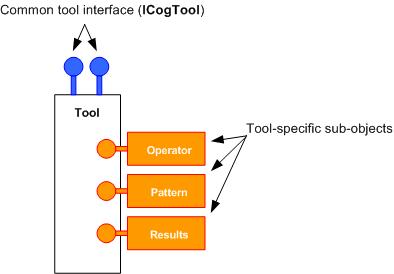
All VisionPro tool objects have a common structure. They all implement the ICogTool interface. A tool object always includes a Run method that takes no arguments.
A tool object also always includes references to the following subobjects: a ICogRunStatus object that contains the status from the last run of the tool; an InputImage property, if the tool takes an input image; a Region property, if the tool supports an input region; and an OutputImage property, if the tool produces an output image.
Tools that have multiple run-time parameters usually have a RunParams property. Tools that can be trained may have a Pattern property to store train-time parameters and trained state information.
Tools which produce a single result object have a property named Result, while tools that produce a collection of results have a collection property named Results. A few tools, which produce a single-value result, have neither of these properties.
The particular types of the various parameter, pattern, and result sub-objects and their contents are different for different tools. One of these sub-objects, that implements an Execute function, is called the tool's operator.
The following figure shows the structure of a VisionPro tool object:
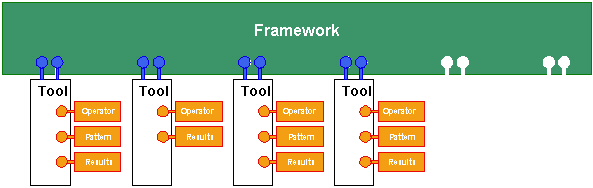
The common structure of and interfaces implemented by VisionPro tools enable them to be used within frameworks that can link together tools of any type. The CogToolGroup is a framework that VisionPro uses to link tools together. The tool group is itself a VisionPro tool, but it is also a collection of other VisionPro tools. In most cases, you use tool groups as part of CogJobManager objects.
When you invoke a tool group's Run function, the tool group invokes the Run function of each of the tools within the group in turn.
The following figure shows the relationship between VisionPro tools and a tool framework:
In addition to their common structure and interfaces, all VisionPro tools also are supplied with tool edit controls. These tool edit controls are specifically designed to provide interactive access to the properties and methods contained in the tool and its sub-objects.
The following figure shows the relationship between a tool edit control and a VisionPro tool:
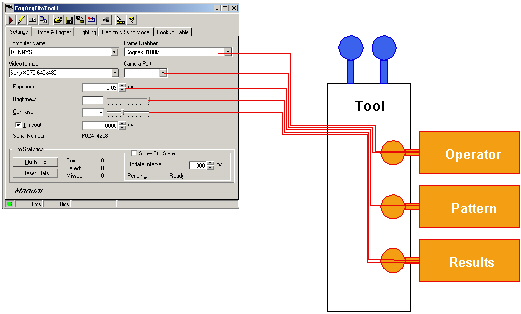
As shown in the preceding figure, tool edit controls do not use the common tool interfaces implemented by the tool. Instead, each tool edit control is designed to work with the specific structure of the tool that it edits, as well as the structure of the tool's sub-objects.
VisionPro operator objects implement properties and methods that are specific to the type of machine vision operation that they perform. VisionPro operator objects usually include an Execute function. Unlike the tool object's Run function, which takes no arguments, an operator object's Execute function takes arguments such as an input image and region and returns a reference to a results object. For example, compare Run with Execute.
VisionPro operators do not have a uniform structure. Each operator object contains properties and methods that are specific to that operator's function. For example, the CogPMAlignPattern operator contains the Elasticity property (the degree of tolerance to pattern deformation) while the CogHistogram operator contains the NumBins property (the number of bins in the histogram).
This diversity of structure means that operator objects cannot be directly used by a generic framework. Application code must be written with specific knowledge of an operator in order to use the operator. Tool objects encapsulate multiple operator objects and provide the common interfaces required by a generic framework.
The specificity of operator objects tends to make them more efficient to use than tool objects.
As you develop your VisionPro application using Visual Basic or C#, you need to decide whether to instantiate and use tool objects or operator objects in your program.
If you are importing a CogJobManager created using QuickBuild into your application, then you will use the tool-level interface to manipulate the tools within the tool group. If you would like to use VisionPro tool edit controls in your program, then you need to instantiate tool objects; you cannot connect a tool edit control directly to an operator object.
In general, working with tool objects is simpler than working with operator objects. If you instantiate a tool object, all of the operator sub-objects required by that tool are automatically created for you.
Instantiating and using operator objects can result in more efficient code, since your application will only instantiate the specific operators it needs, and it has more control over when the instantiation and initialization occurs. Also, using operator objects gives you more flexibility in how your application is structured.
The CogAcqFifoTool object is somewhat different than other VisionPro tools. Although you can program the tool by instantiating a CogAcqFifoTool object, it is easier to use the operator-level programming interface. This is because certain properties of an acquisition FIFO, such as the video format, cannot be changed once the operator object has been created. This means you must instantiate a new operator object instead of changing a property in the existing object.