This topic contains the following sections.
This topic describes how to achieve maximum accuracy using the PMAlign tool. The information in this topic applies to all algorithms available in the PMAlign tool (PatMax, PatQuick, PatFlex, and so on).
To achieve maximum accuracy using the PMAlign tool, you must consider several factors. These fall into the following broad areas:
- Pattern selection
- Pattern stability
- Image quality
- Optical distortion
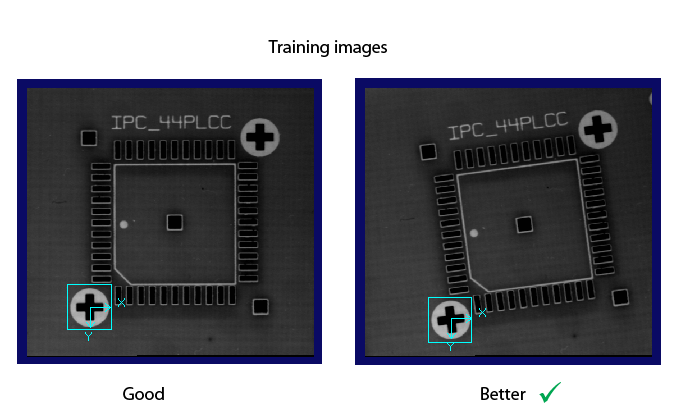
Pattern selection is critical to achieving both good accuracy and robustness when using the PMAlign tool. When selecting a PatMax pattern, try to ensure the features are not aligned to the pixel grid. It is best to have diagonal elements in the pattern to reduce biases introduced in image acquisition and sampling. Cognex suggests a good angle to select is 5 degrees. An alternative to choosing a pattern with diagonal elements is to rotate the sensor.
When choosing a PatMax pattern, try to ensure that the stroke width of elements in the pattern is not uniform. Also, avoid choosing stroke widths identical to other features found in the field of view (that is, if the pattern is a cross fiducial on a wafer, the cross arm widths should not be the same as the track widths). The PMAlign tool is capable of finding very low contrast patterns with high accuracy (particularly, when using its high sensitivity mode). One rare failure case to avoid is where a low contrast pattern contains large numbers of features found in parallel to a nearby high contrast edge. This should be avoided or search robustness may suffer.
PMAlign is an alignment tool that endeavors to precisely match run-time features with those with which it was trained. If the run-time image shows a pattern that is modified or distorted in some way, then accuracy will suffer. This commonly occurs when a pattern is trained on a fiducial from a semiconductor wafer that has undergone n process steps during manufacturing but is then run on a wafer that has undergone n+1 steps. The manufacturing steps will often reverse the polarity of the pattern, and even though the PatMax search can handle this reversal, there is often an associated tiny (not often noticed) change in the pattern stroke width which causes either a decrease in search robustness and/or a drop in accuracy. When dealing with these situations, if high accuracy is important, Cognex recommends training multiple instances and using the Multi-Model PatMax tool rather than using PatMax’s elasticity parameter.
The PMAlign tool can handle changes in noise level from training to run-time. Accuracy will suffer however if the signal-to-noise ratio becomes low. If at train-time images are unavoidably noisy, then accuracy (and robustness) may be improved by using the PatMax AutoTune feature (that is, combining edge information from multiple training instances).
Any form of blur at either training or run-time will reduce accuracy significantly. Blurring has the same effect as running the PMAlign tool at a reduced fine granularity. A final consideration regarding image quality is that dynamic range should not become clipped: the illumination should be controlled to ensure that pixels do not become saturated or features lost due to low brightness.
The PMAlign tool performs affine-transform-based search. If the image contains optical distortions not modeled accurately by an affine transform, then both search robustness and accuracy will suffer. In such cases, you should unwarp the train-time and run-time images prior to training and running the tool.