The Multi-Model PatMax tool allows you to locate instances of multiple patterns in a single runtime image. The Multi-Model tool is intended for use in modeling targets whose appearance varies significantly. In simple terms, the Multi-Model tool is a collection of patterns.
At runtime, the Multi-Model feature extraction step is performed only once on the runtime image; the features extracted are then used as inputs to each of the patterns the Multi-Model holds. This efficiency is a key advantage of the Multi-Model tool as opposed to using multiple PatMax tools each of which performing feature extraction individually. That is, if the number of pattern types you want to find is N, you perform feature extraction only once using the Multi-Model, instead of N times using individual PatMax models. To enable this efficiency, all patterns must be trained using identical coarse and fine granularities and all patterns must be trained with the same algorithm.
The Multi-Model tool holds, runs, and analyzes multiple patterns that are in the queue.
The run-time parameters of CogPMAlignMultiTool are an extension of the CogPMAlignRunParams making all the CogPMAlignTool search functionalities available. The CogPMAlignRunParams are exposed as a property on the CogPMAlignMultiRunParams class and the same values are used to locate all the patterns. The results returned from locating each pattern are then processed by the CogPMAlignMultiTool. This implies that the number of results returned may be greater than the ApproximateNumberToFind and the results may include results scoring less than the AcceptThreshold. The following figure illustrates the creation of the Multi-Model PatMax tool. A circle pattern, a diamond pattern, and a hashtag pattern are added to the Multi-Model.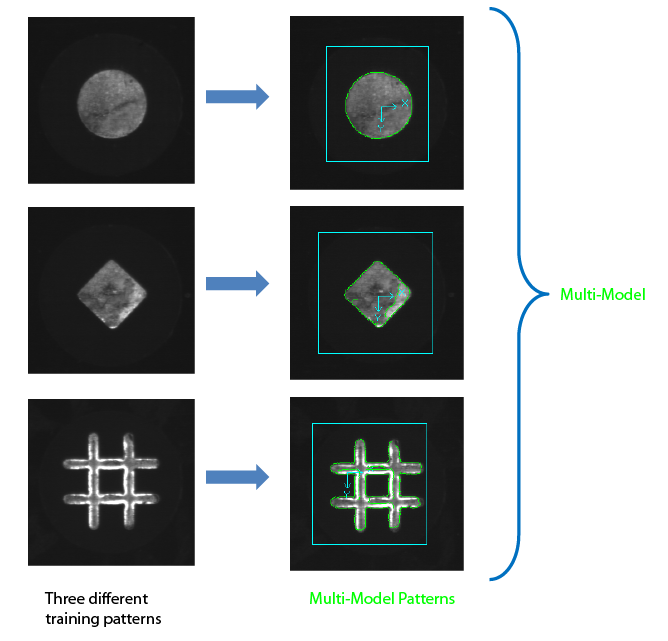
- Using multiple patterns of the same part at known orientations to avoid opening the angle degree of freedom. For example, if the part was presented to a regular PatMax tool at a different orientation from the trained pattern, for example at 90 degrees or 180 degrees when the part was trained at 0 degree, you would have to open the angle degree of freedom (DOF) to successfully locate the part. In the Multi-Model tool, you can create three patterns of the same part at the expected orientations such as 0 degree, 90 degrees, and 180 degrees, add these patterns to a single Multi-Model tool, and without opening the angle degree of freedom at run time, the Multi-Model tool attempts to locate the part only at the 3 specified orientations. In this case, the advantage of using the Multi-Model tool is to eliminate the additional processing time associated with opening the DOF and trying to locate the pattern at many angles.
- Counting the different parts in a tray. In this case, you have no prior knowledge of which parts will be seen at run time or how many there are of each in the tray. For example, if you wanted to count the different parts in a tray, you would have to create a PMAlign (PatMax) tool for each part, run all the PMAlign tools and do additional processing afterwards to show the parts and their count. In the Multi-Model tool, you can create a pattern for each part, add these patterns to a single Multi-Model tool and run the Multi-Model tool. The runtime image is processed once to extract the features and the extracted features are passed to each pattern to be located. In this case, the advantage of using the Multi-Model tool is to eliminate the redundant feature extraction step performed on the same runtime image in the PMAlign tools.
-
The combination of the previous two use cases: you would like to count the numbers of different parts in a tray, and each part can be presented to the tool at a small number of different, but known, orientations.
In this case, you will create a pattern for each orientation of each part and add the patterns to the Multi-Model tool.
For example:
- Part A at 0 degree
- Part A at 90 degrees
- Part B at 180 degrees
- Part B at 0 degree
- And so on...
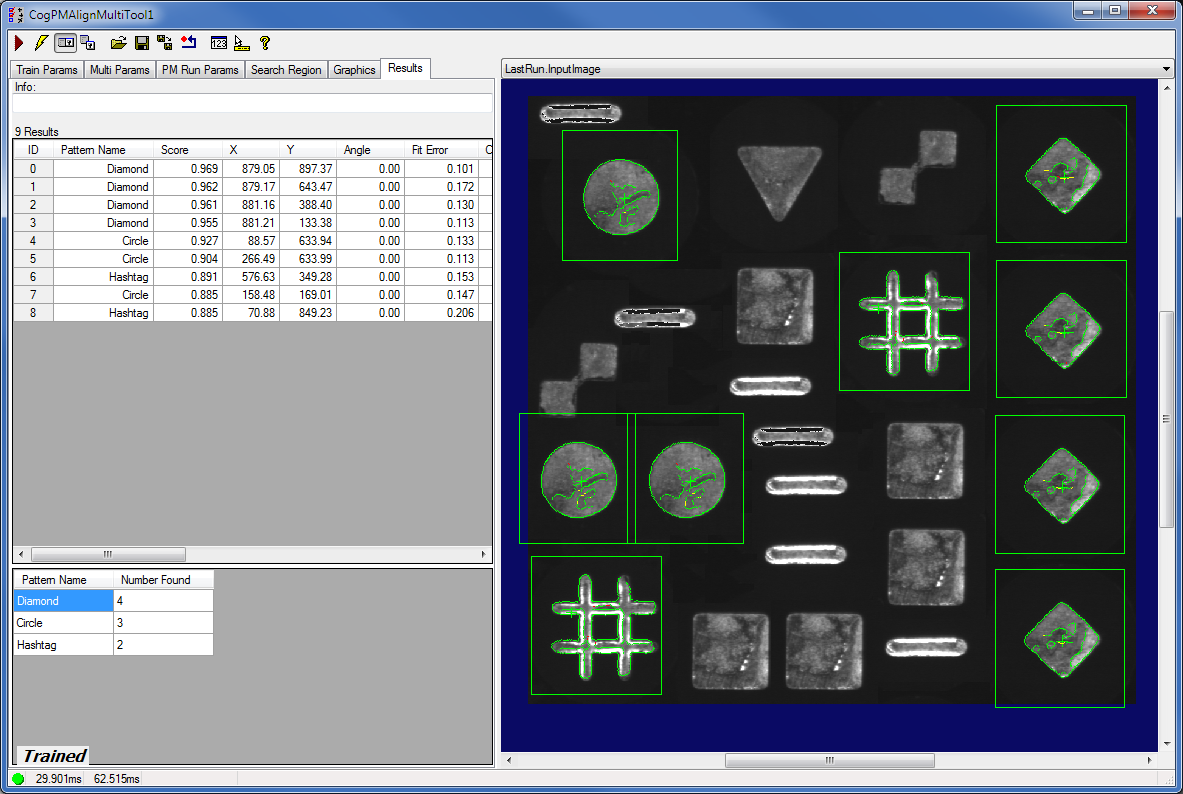
In this case, if you want to combine the counts for all orientations of each part, you can use either the results analysis tool or script to analyze the results further. The following figure demonstrates the results of such an application.Pattern Number of instances Part A at 0 degree 3 Part A at 90 degrees 1 Part B at 180 degrees 2 Part B at 0 degree 5 The advantage of using the Multi-Model tool in this case is performing the feature extraction only once.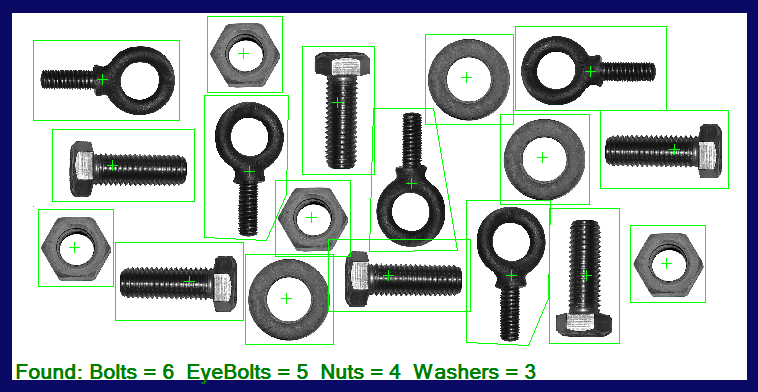
The run-time parameters of CogPMAlignMultiTool are an extension of the CogPMAlignRunParams making all the CogPMAlignTool search functionalities available. The CogPMAlignRunParams are exposed as a property on the CogPMAlignMultiRunParams class and the same values are used to locate all the patterns.
The additional Multi-Model run-time parameters are as follows:- RuntimeMode - A mode to specify the type of the search that will be performed on the patterns in the queue.
- StopSequentialThreshold - A threshold that controls the stopping condition of the sequential search.
- ReportResultsFromOnePatternOnly - A Boolean to choose whether the results returned are from a single pattern.
- UseXYOverlapBetweenPatterns - A Boolean whether to use the XYOverlap of CogPMAlignRunParams between patterns.
The Multi-Model runs in 4 different operating modes to improve the efficiency of the search.
Sequential
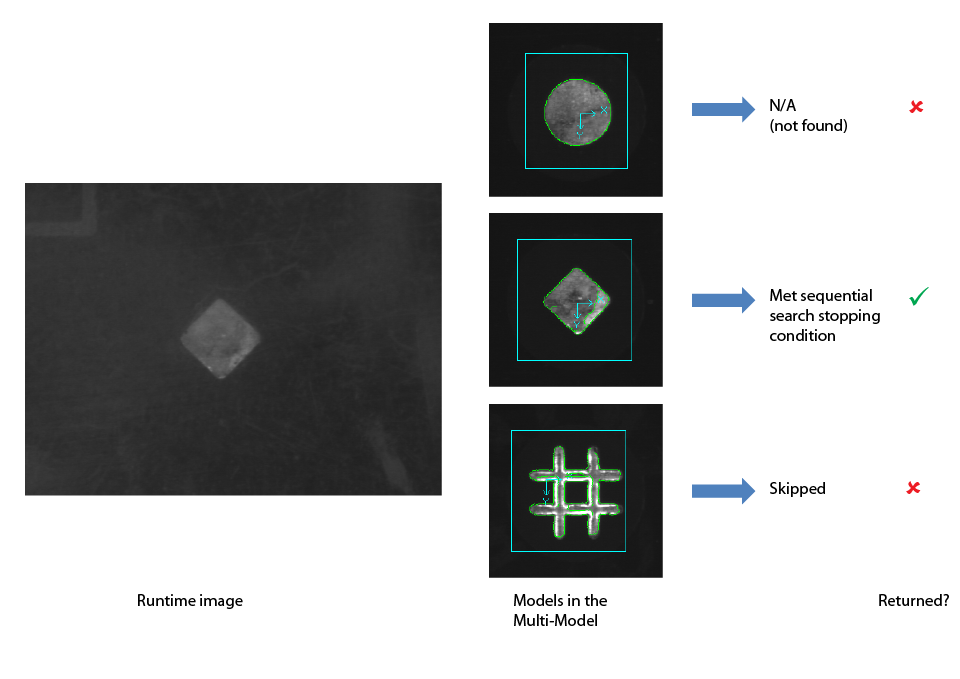
In sequential modes, the patterns are run in a predefined order (queue) until the stopping condition is met. The stopping condition is met when enough results from a single pattern are found with the following criteria:
- The score of each result must be greater than or equal to the StopSequentialThreshold. and
- The total number of results found must be greater than or equal to the ApproximateNumberToFind.
| ReportResultsFromOnePatternOnly | False | True |
| Stopping condition is met | The cumulative results when the stopping condition is met are returned (see example 1. below). | Only the results from the single pattern where the stopping condition is met are returned (see example 3. below). |
| Stopping condition is not met | The results from the pattern with the highest score are returned (see example 2. below). | The pattern with the most results that have scores greater than or equal to the AcceptThreshold will be returned. In the event of a tie, results from the pattern with the highest single score will be returned. (See example 4. below.) |
- The Multi-Model tool contains 2 trained patterns: a circle and a square.
- The queue sequence is that the circle will be tried before the square.
- The run-time image has three circles and five squares.
- In the case where ReportResultsFromOnePatternOnly is set to false and the stopping condition is met, the cumulative results are returned.
The stopping condition is specified as follows:
- The ApproximateNumberToFind is set to 4.
- The StopSequentialThreshold is set to the default 0.5.
- The first pattern "circle" did not meet both criteria of the stopping condition: ApproximateNumberToFind==4 was not met.
- The second pattern met the stopping condition so the search stops.
- Accumulated results are returned.
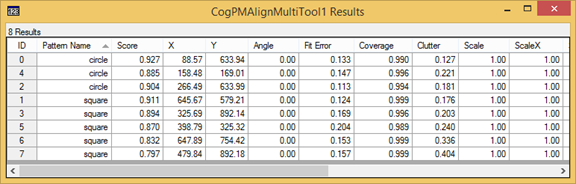
- In the case where ReportResultsFromOnePatternOnly is set to false and the stopping condition is not met, the results from the pattern with the highest score are returned.
The stopping condition is specified as follows:
- The ApproximateNumberToFind is set to 4.
- The StopSequentialThreshold is set to 0.98.
- The first pattern "circle" did not meet the stopping condition.
- The second pattern "square" did not meet the stopping condition.
- The circle has a higher score than the square so the results from the "circle" are returned.

- In the case where ReportResultsFromOnePatternOnly is set to true and the stopping condition is met, the results from the pattern where the stopping is met are returned.
The stopping condition is specified as follows:
- The ApproximateNumberToFind is set to 4.
- The StopSequentialThreshold is set to the default 0.5.
- The first pattern "circle" did not meet the stopping condition: ApproximateNumberToFind==4 was not met.
- The second pattern met the stopping condition so the search stops.
- The results from the "square" pattern are returned.
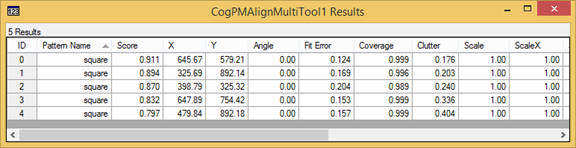
- In the case where ReportResultsFromOnePatternOnly is set to true and the stopping condition is not met, the pattern with the most results that have scores greater than or equal to the AcceptThreshold will be returned. In the event of a tie, results from the pattern with the highest single score will be returned.
The stopping condition is specified as follows:
- The ApproximateNumberToFind is set to 4.
- The StopSequentialThreshold is set to 0.98.
- The first pattern "circle" did not meet the stopping condition (3 are found).
- The second pattern "square" did not meet the stopping condition (4 are found below the StopSequentialThreshold).
- The results from the "square" pattern are returned because there are more of them.
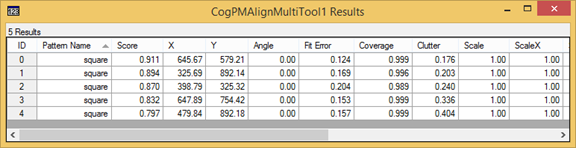
SequentialMostRecentlySuccessful
This mode is a variant of the Sequential mode. In this mode, the order of the patterns in the queue is evaluated and may be modified based on the results from the Sequential search.
The order of the patterns in the queue is determined as follows:- The list of results from the most recent search is first reduced to a set of results where the score is greater than or equal to the StopSequentialThreshold. Only the highest scoring instance of each pattern is retained.
- If the reduced list is empty, the order of the patterns in the queue stays the same.
- If the reduced list is not empty, the highest scoring pattern is pushed to the front of queue; the pattern with the second highest score is placed in the second position, and so on.
SequentialMostSuccessful
This mode is a variant of the Sequential mode. In this mode, the order of the patterns in the queue is evaluated and may be modified based on the results from the previous N searches. N is a user-defined integer specified by the property ResultStatisticWindowLength.
The results from the previous N search runs are tabulated in a histogram. For each pattern, the histogram records the number of instances found in the last N runs whose score is greater than or equal to the StopSequentialThreshold. Notes about the histogram:- The histogram is updated after each run, for all modes:
- The oldest results (over N) are thrown out
- New results are added only if the score is greater than or equal to the StopSequentialThreshold.
- The histogram is cleared only when the ResultStatisticWindowLength is changed, or by calling ResetResultStatistics.
- The pattern with the highest count in the histogram is pushed to the front of the queue.
- The pattern with the second highest count is second, and so on.
Exhaustive
This mode allows you to attempt to locate all patterns in the queue. The use case where different parts in a tray are counted can be achieved using Exhaustive mode. Exhaustive mode can take advantage of parallel processing. The patterns in the Multi-Model queue can be executed simultaneously, in parallel, using as many cores as are enabled by the CogVisionToolMultiThreading object.
The results returned will differ depending on the ReportResultsFromOnePatternOnly value and whether the scores are greater than or equal to the AcceptThreshold. The following table describes the results:| ReportResultsFromOnePatternOnly | False | True |
| All scores are greater than or equal to the AcceptThreshold | Results found from all patterns are returned (see example 1. below). | The results from the pattern with the most results scoring above the AcceptThreshold are returned. In the event of a tie, the higher scoring pattern will be returned (see example 2. below). |
| All scores are less than the AcceptThreshold | Results found from all patterns are returned (see example 1. below). | The results from the pattern with the highest scoring results are returned if none of the scores are above the AcceptThreshold. In the event of a tie, results from the first pattern in the result list are returned (see example 3. below). |
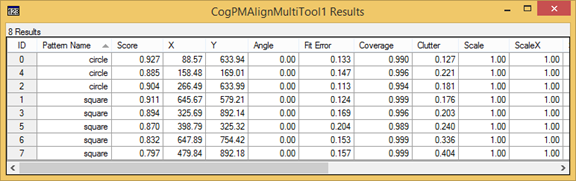
- A Multi-Model tool contains 2 trained patterns: a circle and a square.
- The queue holds both the circle and the square.
- The run-time image has three circles and five squares.
-
In the case where ReportResultsFromOnePatternOnly is set to false, results found from all patterns are returned.
The run-time parameters that affect the results are as follows:
- The ApproximateNumberToFind is set to 4.
- The AcceptThreshold is set to 0.5.
- Results from both patterns are returned.
-
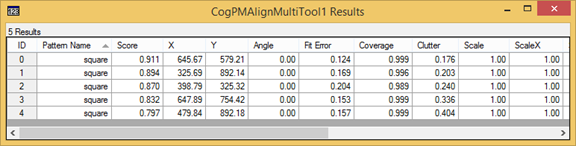
In the case where ReportResultsFromOnePatternOnly is set to true and all scores are greater than or equal to the AcceptThreshold, the results from the pattern with the most results scoring above the AcceptThreshold are returned. In the event of a tie, the higher scoring pattern will be returned.
The run-time parameters that affect the results are as follows:
- The ApproximateNumberToFind is set to 4.
- The AcceptThreshold is set to 0.5.
- Results from both patterns are returned.
- 3 results were found with scores above the threshold for the circle pattern.
- 4 results were found with scores above the threshold for the square pattern.
- The results from the pattern with the most results scoring above the AcceptThreshold are returned. The results of the square pattern are returned.
-
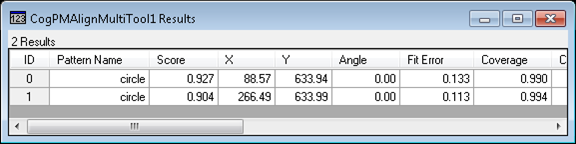
In the case where ReportResultsFromOnePatternOnly is set to true and the scores are less than the AcceptThreshold, the results from the pattern with the highest scoring results are returned. In the event of a tie, results from the first pattern in the list are returned.
The run-time parameters that affect the results are as follows:
- The ApproximateNumberToFind is set to 4.
- The AcceptThreshold is set to 0.98.
- Results from both patterns are returned.
- 3 results were found with scores below the threshold for the circle pattern.
- 4 results were found with scores below the threshold for the square pattern.
- The results from the circle pattern are returned because the circle has a highest scoring result.
A run-time parameter used to indicate that only results from a single pattern (in the queue) should be reported (as illustrated previously).
A run-time parameter used to determine whether lower scoring overlapping results from different patterns are discarded and are therefore not counted towards the total applied to the ApproximateNumberToFind threshold.
The ApproximateNumberToFind property informs PatMax about the numbers of results to locate for each pattern in the queue.
The number of results returned in the PMAlign tool may surprise you because in some cases more results than specified by the ApproximateNumberToFind are returned. The Multi-Model tool has the exact same behavior because the Multi-Model runs its patterns with this same ApproximateNumberToFind value. The Multi-Model tool does not discard any result returned from locating each pattern.The StopSequentialThreshold parameter is used in sequential modes only. This parameter controls the stopping condition. This value must be greater than the AcceptThreshold. It does not alter the PatMax search algorithm or the results returned from a single pattern.
The queue is used in all modes and it is updated after each run in SequentialMostRecentlySuccessful and SequentialMostSuccessful modes.
You have write-access to the pattern queuing sequence; this allows you to implement your own sequence modifying heuristic, which can be based on prior results or any other data. For example, you may decide to run all the patterns (in the Multi-Model) on a representative set of run-time images, then base the queuing sequence on the relative scoring of the models. In the Multi-Model tool, each result will identify the pattern that generated it.The Multi-Model tool's limitations are as follows:
- Only the 8-bit image type CogImage8Grey is supported.
- Only PatMax and PatQuick algorithms are supported.
- PatFlex and PatPerspective algorithms are not supported.