This topic contains the following sections.
- CogToolBlock
- Differences in Tool Group Edit Control
- QuickBuild Supplants QuickStart
- Direction of Arrows Changes
- Tool Group Must Contain Tools Before Creating Terminals
- Tool Group Terminals Must Be Created with Member Browser
- Connecting Tool Group Input to Other Tools Requires Different Technique
- Terminals Used in Scripting Can Be Created in Script
- Differences in Tool Group API
- Inter-Tool Links No Longer Part of the Tool Group
- Changes to Tool Group Terminals
Versions of VisionPro earlier than 4.1 provided support for the COM framework. These versions of VisionPro used a slightly different Tool Group object and Tool Group Edit control. If you have VisionPro applications based on the COM-based version of VisionPro, this topic will point out the differences between the COM and .NET versions of the Tool Group. VisionPro uses a different Tool Group object and Tool Group Edit control depending on whether you are using an earlier COM-based version of VisionPro or the VisionPro COM or VisionPro .NET. For most users, the differences are very minor. For both COM and .NET users, you use the Tool Group Edit control and QuickBuild in exactly the same way: you drag tools from the toolbox window, right-click on tools to add property terminals, and then click and drag between different tools' terminals to create links between the tools in the tool group.
As of VisionPro 6.1 the CogToolBlock is available for increasing and improving the structure of your application. The CogToolBlock offers many of the features of the Tool Group object in the COM-based version of VisionPro.
See the topic Using a CogToolBlock for details on using a CogToolBlock, and the topic ToolBlock Edit Control for details on its graphical user interface.
The COM and .NET versions of the Tool Group Edit control work similarly and can be used to perform the same tasks.
Before VisionPro 4.1, the QuickStart application provided a standalone framework for creating a tool group. Subsequent versions of VisionPro provide the much more powerful QuickBuild framework. In QuickBuild tool groups are contained within Jobs.
The COM Tool Group Edit Control showed input terminals as a right-pointing green arrow and output terminals as a left-pointing maroon arrow. The .NET Tool Group Edit Control shows input terminals as left-pointing maroon arrows and output terminals as right-pointint green arrows
| COM Tool Group Edit Control | .NET Tool Group Edit Control |
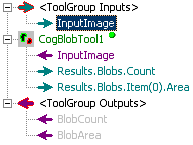 | 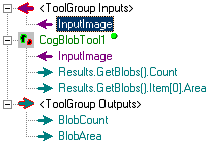 |
The COM versions of the Tool Group Edit control allowed you to create terminals for the tool group before it contained any tools.
In the .NET version of the Tool Group Edit Control every tool group terminal must be associated with a tool input or output. That means that you must add your tools to the tool group before creating group terminals.
The COM version of the TGEC allowed you to create tool terminals automatically by dragging from a tool input or output to the tool group's <ToolGroup Inputs> or <ToolGroup Outputs> markers.
In the .NET version of the TGEC you must right-click on the tool group's <ToolGroup Inputs> or <ToolGroup Outputs> markers and choose Add Terminals to open the Member Browser dialog.
The COM version allowed you to easily connect the input of a TGEC to several tools withing the tool group:
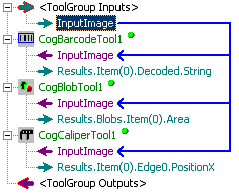
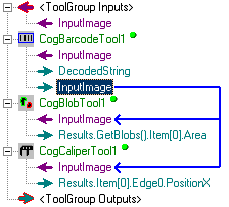
You can accomplish the same effect in the .NET TGEC using the following technique:
- Expose the Barcode tool's InputImage as a Tool Group input terminal
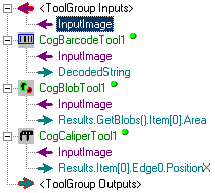
- Expose the Barcode tool's InputImage as a tool output
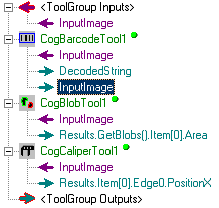
- The new output terminal functions as a distribution point for for the other tools
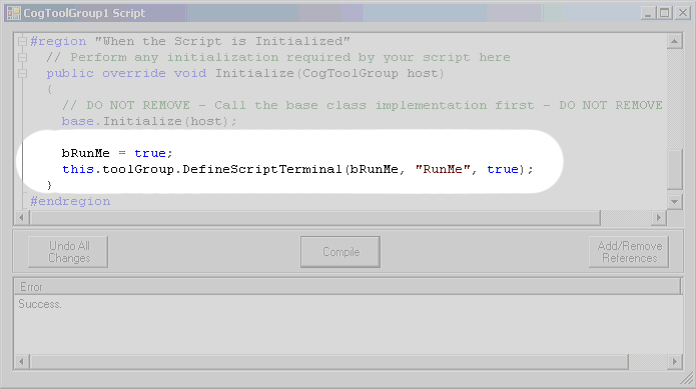
The only way to create terminals in the COM version of the TGEC was to use the user interface. The .NET version of TGEC allows you to create terminals that are visible only in a script.
In the Initialize medhod of the tool group's script use the DefineScriptTerminal function:
If you have been using tool groups programmatically from within a Visual Basic COM application, some of the differences between COM and .NET tool groups may require that you change the basic approach that your program uses, in addition to changing your code from Visual Basic 6 to Visual Basic .NET or C#. This topic describes these differences, and tells you how they might affect your attempts to port existing Visual Basic 6 COM code to .NET.
Note: Most VisionPro users are not affected by the changes described in this topic.
In VisionPro COM's CogToolGroup class, the CogToolGroup.Links property contains a CogToolGroupLink object for each link between tools in the tool group. When the tool group's Run() function is called, the tool group uses the contents of the Links collection to update the data links in the tool group. Your Visual Basic 6 code can easily examine and modify these links to change the behavior of a tool group when it runs.
In VisionPro .NET, there is no single collection that describes a tool group's links. Instead, each tool (whether it is part of a tool group or not) has a collection of data bindings that represent the links that are inputs to the tool. Each data binding in the collection represents a single link. The DataBindings property is a member of the [M:Cognex.VisionPro..ICogTool] interface, which all VisionPro .NET tools implement. The CogDataBinding class contains the actual binding information.
If your program wishes to examine or modify the links within a tool group, it must use the properties described above.
In VisionPro COM's CogToolGroup class, the CogToolGroup.Inputs and CogToolGroup.Outputs properties contained a collection of Variant items that represented the tool group's input and output terminals. Whenever you created a link between a tool property within a tool group and one of the tool group's output or input terminals, VisionPro would automatically update the items in the collections. Your Visual Basic 6 COM code could exploit this feature to examine the contents of the Outputs collection to obtain the values of embedded tool properties without needing to know the tool type being linked to the output terminal. For example, you could create a generic tool group with a generic "ResultsImage" output terminal. You could populate this tool group with different types of tools linked to the output terminal. At run time, your program could simply examine the contents of the output terminal without needing to know the type of tool to which it was linked.
In VisionPro NET, there is no collection that contains a tool group's output terminals. Instead, as described above, the tool group's data bindings collection (since a tool group is also a tool, it has a bindings collection) simply contains links to the embedded tools' properties.