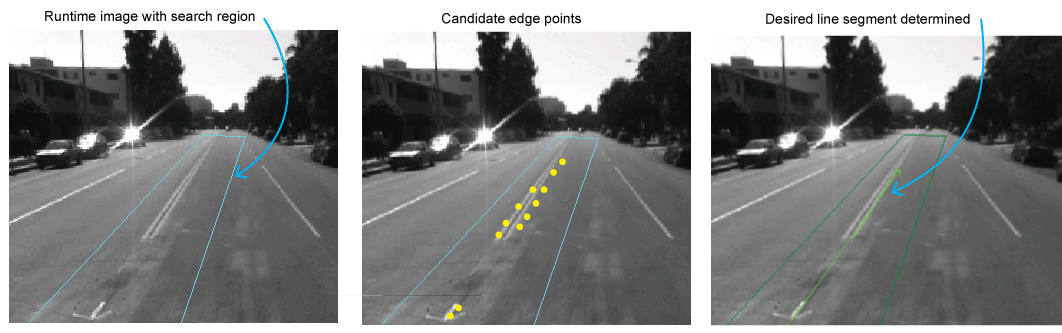
Several VisionPro tools use a proprietary form of the Random sample consensus (RANSAC) algorithm to fit some form of desirable geometry to a set of observed data in your runtime images. For example, a LineMax tool uses the algorithm to locate the road markings in a runtime image based on found edge points as shown:
For more information on the RANSAC algorithm, see:
Random Sample Consensus: A Paradigm for Model Fitting with Application to Image Analysis and Automated CryptographySee the following sections for more information:
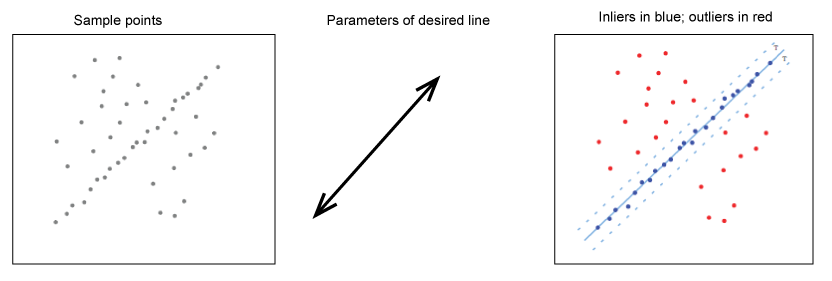
The algorithm must differentiate betweeen inliers, which is data whose distribution can be explained by some set of model parameters, and outliers, which are data that do not fit the model. Given a set of inliers, the algorithm can estimate the geometry that optimally fits this data. The following figure shows a set of inliers and outliers for a given set of data:
The following VisionPro classes can access the adaptive RANSAC algorithm depending on how they are configured:
| Class | Description |
| CogLineMax | Returns candidate line segments that meet the requirements specified by its properties such as Polarity and CoverageThreshold. |
| Cog3DRangeImagePlaneEstimator | Find the best fitting plane to pixels in a 3D range image determined by using a region or specified 2D point locations. |
| Cog3DCircleFitterUsing3DPoints | Computes the pose of a 3D circle based on the specified 3D input points. |
| Cog3DLineFitterUsing3DPoints | Computes the pose of a 3D line based on the specified 3D input points. |
| Cog3DPlaneFitterUsing3DPoints | Computes the pose of a 3D plane based on the specified 3D input points. |
All of these classes directly or indirectly access the following properties of the Cog3DRobustFitParameters class:
DistanceTolerance: The maximum allowable distance between an inlier and the desired model the tool will return. A point is considered an outlier if its distance in client units to the model is greater than this value.
As you increase the distance tolerance, you allow the tool to consider more data points as inliers and change the location of the found model.
Assurance: The desired likelihood that the computed fit contains inliers only. The higher the value, the more likely it will be that the returned model contains only inliers.
The usage of this property varies between the CogLineMax tool and the Cog3DRangeImagePlaneEstimator tool:
For a Cog3DRangeImagePlaneEstimator tool, the default value is 1. If you configure your Cog3DRangeImagePlaneEstimator tool to use the adaptive RANSAC option (through the RobustFitTechnique option), the tool will exhaustively evaluate the inliers and outliers for every possible 3D plane, which can potentially result in very large execution times.
The legal range for the Assurance property is greater than 0 but less than or equal to 1.
For a CogLineMax tool, the default value is 0.9999, which indicates that you expect to receive an optimal result from the tool 9,999 times in 10,000, but you will accept a less than optimal result 1 time in 10,000.
The legal range for the Assurance property is greater than 0 but less than 1.
Use this property to tradeofff speed versus reliability. Reducing the value makes the tool faster but less accurate, while increasing the value makes the tool more accurate but slower. The property specifies the success rate you can settle for in order to avoid excessive execution times.
WorstCaseProportionOutliers: The worst case proportion of outliers expected in the points used for model fitting. If, for example, you expect 7 out of every 10 input points to be an outlier, then this parameter should be set to 0.7.
This property is available directly through the Cog3DRobustFitParameters class only and has no analog in the API for the CogLineMax tool.
This value must be greater than or equal to 0, and it must be less than 1.
In the adaptive RANSAC approach, the number of attempts to fit the data to a desired geometric model is computed flexibly. Given a set of data and values for DistanceTolerance, Assurance and WorstCaseProportionOutliers, the algorithm performs the following steps:
- Compute the number of attempts based on WorstCaseProportionOutliers.
- Randomly select a sample of data points from the total set, using the minimum number of points to instantiate the other parameters of this model.
- Identify all the points that are within the DistanceTolerance. These points are considered inliers.
- Set WorstCaseProportionOutliers to be the number of outliers divided by the total number of data points.
- Recompute the number of attempts based on WorstCaseProportionOutliers and Assurance.
- If the total number of attempts so far exceeds the number of attempts just computed, terminate the algorithm. Otherwise, repeat steps 2 - 6.
- Re-estimate the model using all inliers.
- Refine the model by recategorizing the data points as inliers and outliers and fitting to the inliers.
- Repeat the previous step for a maximum of three times or until the number of inliers ceases to increase.