This topic contains the following sections.
If you are using more than one sensor, all of the sensors must be connected to the same encoder, so that all of the sensors receive the same information about the motion of your part or surface.
The sequence of pulses from a quadrature-type encoder are organized into two pulse trains, with a 90 degree phase offset between the pulses, as shown here:
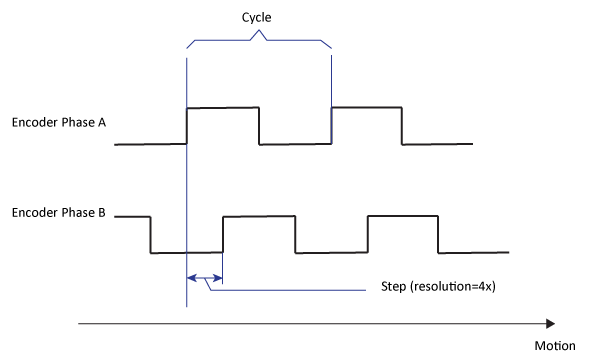
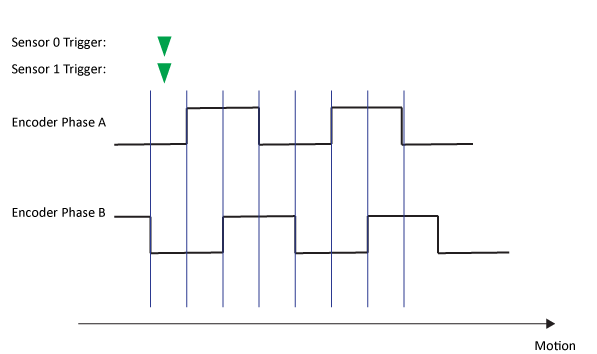
When multiple sensors' acquisitions are precisely synchronized, the first line of data acquired by both sensors corresponds to the same physical encoder position, as represented by a particular step (count). As shown in the following diagram, if both sensors' acquisition triggers arrive during the same encoder step, the first line of data will correspond to the same physical offset for both sensors:
If the sensors' acquisitions are not precisely synchronized, then the sensors' triggers may arrive during different encoder steps. When this happens, the data acquired by the two sensors does not correspond to the same physical offset.
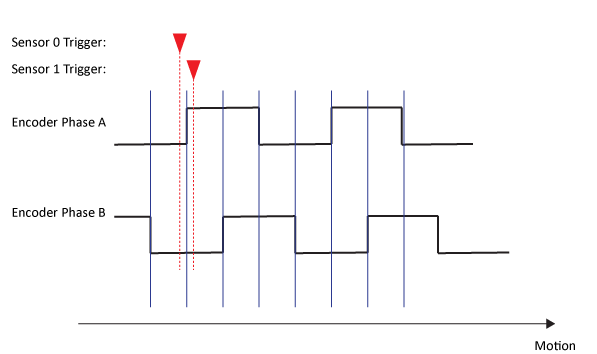
Any attempt to field-calibrate multiple sensors where the data is not properly aligned will produce an inaccurate calibration, which in turn, will result in incorrectly stitched images. The remainder of this topic describes how to achieve proper synchronization for both software and hardware trigger types.
Software triggered acquisition refers to image acquisition that is initiated as a result of a call to the StartAcquire method. If a single application attempts to trigger acquisition on multiple sensors at the same time, the inherent indeterminacy caused by variable software timing and latency, variable network latency, and variable host system loading will prevent the two sensors from initiating their acquisitions at the same time.
If, however, you are using a system such as a linear stage, where there is no motion except during image acquisition, it is possible to use software trigger, as long as the following requirements are met:
- All sensors are connected to the same encoder.
- No encoder pulses are generated before all of the calls to StartAcquire have been completed.
It is never possible to use software triggers for systems with continuous motion.
Hardware triggered acquisition refers to image acquisition that is initiated by an electrical signal on the sensor's input trigger line generated by a triggering device such as a photelectric sensor or contact switch.
To trigger multiple sensors simultaneously, simply connect (in parallel) all of the sensors' input trigger lines to the same triggering device.
 Note Note |
|---|
If you are using a Cognex VC5 Vision Controller with DS1000 series sensors, and you are using the direct-connect interface cable, you must create a precision I/O event that maps an input trigger on the Vision Controller to an output signal on the output bank connected to the sensors. The following example code shows how to do this: // Add a new event to the VisionPro Comm Card's collection. // The event is caused by an input pulse on Bank0Line0. // The event responds by immediately pulsing the // VC5's dedicated DS1000 output trigger line for 10ms. prio.Events.Clear(); prio.Events.Add ( new CogPrioEvent() { Name = "TriggerDS1000", CausesLine = new CogPrioEventCauseLineCollection() { new CogPrioEventCauseLine() { LineBank = CogPrioBankConstants.InputBank0, LineNumber = 0, // Select input line for triggering here LineTransition = CogPrioLineTransitionConstants.LowToHigh } }, ResponsesLine = new CogPrioEventResponseLineCollection() { new CogPrioEventResponseLine() { OutputLineBank = CogPrioBankConstants.DS1000OutputBank0, OutputLineNumber = 2, // Select 2 for SENSOR1 output, 3 for SENSOR2 output OutputLineValue = CogPrioOutputLineValueConstants.SetHigh, PulseDuration = 10.0, DelayType = CogPrioDelayTypeConstants.None, DelayValue = 0.0 } } } ); |