VisionPro supports convolution operators to modify a pixel value on the basis of neighboring pixel values. VisionPro multiplies each pixel in the input image by a numerical matrix, called a kernel, and replaces the corresponding pixel in the output image.
A Convolve 3x3 operator can be useful in sharpening the edges in images your vision application acquires:
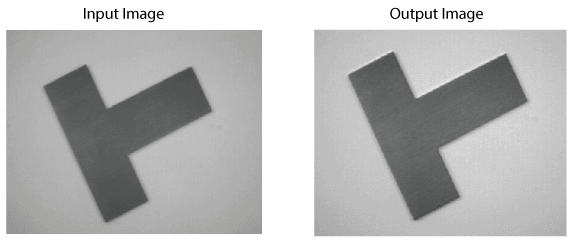
See the following sections for more information:
The Convolve 3x3 operator modifies an input image with a 3x3 kernel to generate a new output image which can then be used for further image processing or analysis. Depending on the values you choose for the 3x3 kernel, the operator can perform a smoothing function over the original image, generate edge information from the original image, or generate an output image with heightened information about the edges along a particular direction.
For each location, the operator multiplies the grey value of each of the nine pixels in that region of the input image by the values of the corresponding pixels in the kernel. It then adds these values together and assigns this new value to the pixel in the output image that corresponds to the origin of the kernel.
The following figure shows how the Convolve 3x3 operator computes the first pixel in an output image:
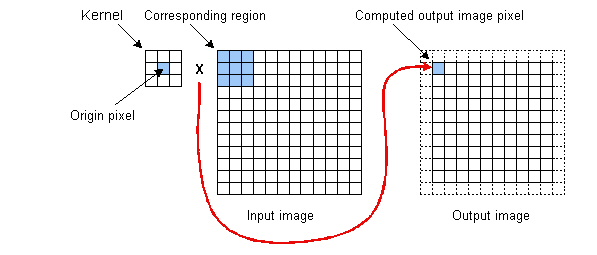
Be aware that the kernel requires 9 input pixels to produce a single output pixel and that the kernel must always be fully contained within the input image, so the resulting output image is smaller than the input image. The Convolve 3x3 operator performs the operation shown above at every possible kernel location within the input image.
The Convolve 3x3 operator is available with the image processing One Image tool. If you need to generate output images with strong edge information, consider using the Sobel Edge tool.
When you create a kernel for use with the Convolve 3x3 operator, you can specify an origin other than the default center of the 3x3 kernel. The following figure shows the effect of specifying a different kernel origin on the convolution shown in the previous figure:
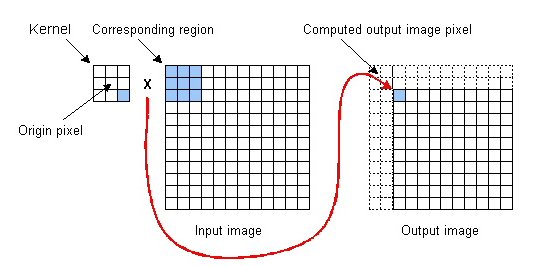
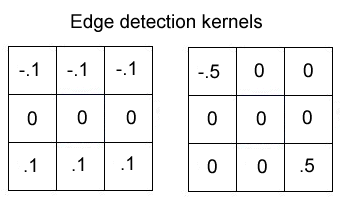
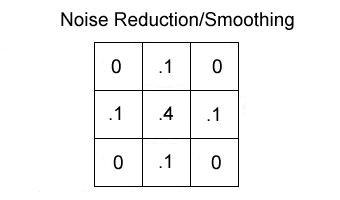
Experiment with values for the 3x3 kernel in order to achieve the best results for your application. The following figures show typical values for performing specific image-processing tasks:
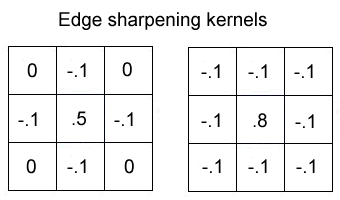
The operator clamps the calculated values so that no pixel has a grey value great than 255. The operator does not perform any wrapping, so you must either choose kernel values that will not cause overflow when applied to your input images or use the Add/Subtract Constant operator to add a grey value to each pixel and effectively wrap them into the 0-255 range.