Use an IPOneImage tool and a Pixel Set operator to selectively copy some input image pixels to an output image while setting other output image pixels to a uniform value. Applications that use a Pixel Set operator can use an input region or an image mask to define which pixels you want to copy and which you want to set between the input image and the output image.
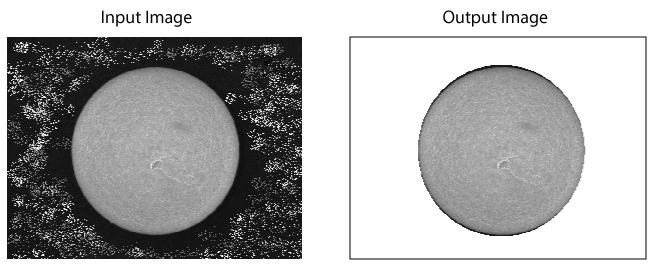
The following figure shows an input image and the output image produced after using a Pixel Set operator and an image mask to set all background pixels to a value of 255:
See the following sections for more information:
A Pixel Set operator takes two parameters:
Pixel Value: An integer grey value between 0-255.
The grey value you choose depends on your vision application.
Operation: A choice between two options:
- SetCarePels: Set Care pixels in the output image to the value defined by Pixel Value and pass Don't Care pixels directly to the output image unchanged.
- SetDontCarePels: Set Don't Care pixels in output input image to the value defined by Pixel Value and pass Care pixels directly to the output image unchanged.
By default, the operator consideres all pixels in the input image as Care pixels. Depending on how you configure an input region and/or an image mask, the operator can classify certain input image pixels as Care pixels and others as Don't Care pixels before setting one or the other to a uniform grey value in the output image.
How the operator designates pixels as Care or Don't Care depends on the type of input region and/or image mask you use.
See the following sections for examples of using a Pixel Set operator:
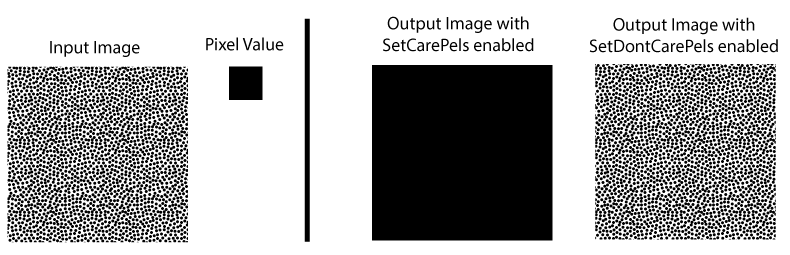
With no region or image mask, the Pixel Set operator considers all pixels in the input image as Care pixels. Depending on your choice for Operation, the output image is either an exact copy of the input image or an output image consisting entirely of the value defined by Pixel Value:
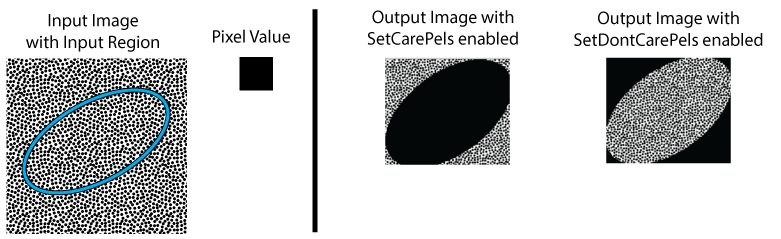
You can specify an input region to perform image-processing on a portion of the input image and choose from several region shapes. The output image will be the size of the pixel-aligned bounding box around the shape you choose. See the topic One Image Edit Control for details. The Pixel Set operator supports two different region shape modes:
- Bounding Box: All pixels that lie within a pixel-aligned bounding box around the shape of the region are considered Care pixels and are set to the grey value defined by Pixel Value when choose the operation SetCarePels.
- Masked Region: All pixels that lie within a pixel-aligned bounding box around the shape of the region, but are outside the region shape itself, are considered Don't Care pixels and are set to the grey value defined by Pixel Value when choose the operation SetDontCarePels. Pixels within the region shape are set to the grey value defined by Pixel Value when choose the operation SetCarePels.
Note: The IPOneImage tool generally supports a third region mode option for affine rectangle transforms, but the Pixel Set operator does not support that mode.
Since choosing the Bounding Box region mode treats all pixels within the bounding box as Care pixels, the effect of the Pixel Set operator is to create an output image with all Care or all Don't Care pixels, similar to not using any region at all. Choosing the Masked Region mode, however, creates Care and Don't Care pixels depending on the shape of the region you choose:
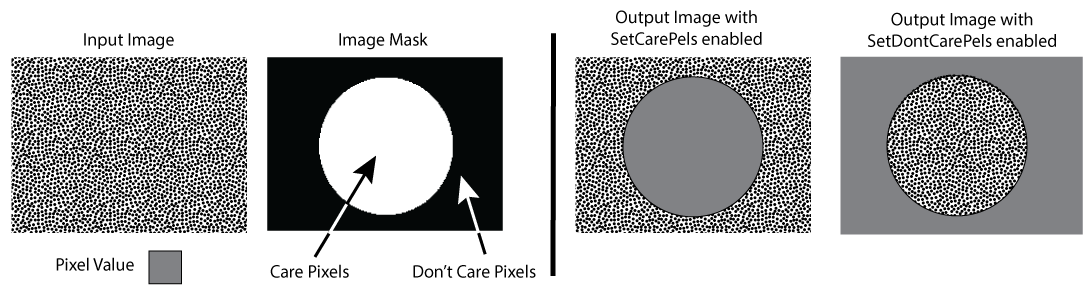
You can supply an IPOneImage tool with a CogImage8Grey to use as an image mask. Every pixel in the image mask has one of two pixel values - 0 for Don't Care and 255 for Care pixels. See the topic Image Processing with Image Masks for details on using image masks.
The following figure illustrates the use of an example image mask with the Pixel Set operator:
The output image coordinate space tree will be equivalent to the input image coordinate tree.