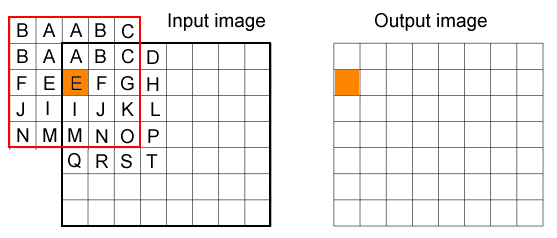
This topic contains the following sections.
VisionPro supports convolution operators to modify the value of a pixel on the basis of the value of neighboring pixels. Images are convolved by multiplying each pixel and its neighbors by a numerical matrix, called a kernel. This matrix is moved over each pixel in the image, where each pixel is multiplied by the appropriate matrix value, the total is summed and normalized, and the central pixel is replaced by the result.
VisionPro supports the 3x3 Convolve operator, which can be suitable for many image-processing operations. See the topic 3x3 Convolve Operator for more information. The 3x3 Convolve Operator is available through the One Image Edit Control.
To specify your own custom sized kernel, use the NxM convolve functionality and specify an NxM sized kernel appropriate for your vision application. Images that show a lower spatial frequency might require a larger kernel to effectively process the image. For example, you might use an NxM kernel to smooth out changes that occur over a larger number of pixels than the 3x3 Convolve operator can handle.
The size of the NxM kernel must be represented by an odd integer for both the width and height. In addition, the origin of the kernel is always at the center, unlike the 3x3 Convolve operator where you can specify which pixel is the origin.
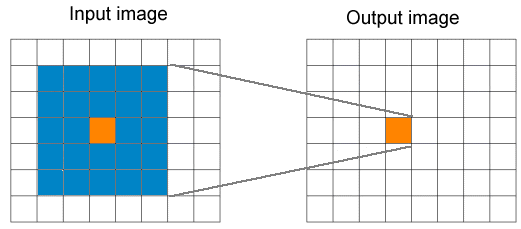
If you specify a 5x5 kernel, for example, the following figure shows how an output pixel relies on the values of specific pixels in the input image:
When calculating output pixels near the boundary of the image, not all the pixels inside the kernel can necessarily be mapped to the underlying input image. The following figure shows pixels in a 5x5 kernel that do not map to the underlying input image:
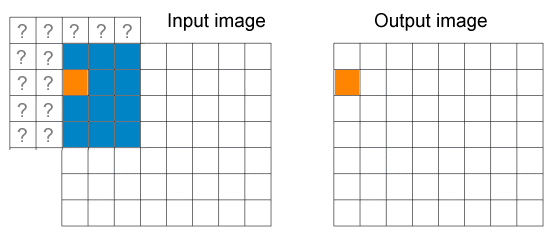
The NxM Convolve operator generates an output image that is smaller than the input image because the 3x3 kernel must always be fully contained within the input image as the operator executes, so rows and columns along the edge of the input image are discarded. To preserve the size of the output image, especially in cases where you might specify a large NxM kernel, the NxM Convolution interface supports different operating modes that control how kernel pixels that lie outside the input image are handled.
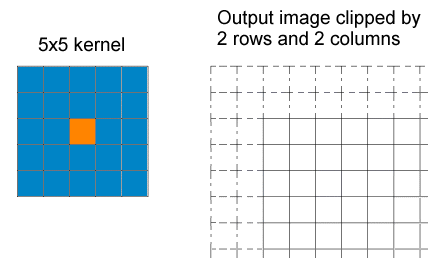
Clipped mode works in the same way as the 3x3 Convolve operator, where the output image is smaller than the input image. The size of the NxM kernel you use determines how many rows and columns are clipped in the output image:
In reflected mode, pixels in the kernel that do not have a corresponding pixel in the input image use values as if the input image is reflected, generating an output image with the same dimensions as the input image: