Labeling
For the ViDi tools, Labeling involves instructing the tools about the areas of the image that you are interested in. The Label is the "ground truth" for the tool, i.e. you are telling the tool that this is what it should learn. The most important part of programming the tools is ensuring that the images that are being used for training are completely and accurately labeled. Without knowing the ground truth data for the images, you cannot tell whether the tool is working properly or not. Also, without accurate labeling, the tool's training will not work as well.
For each of the tools, labeling is a manual operation. The most important characteristic of good labeling is that it is consistent, both between images and between observers and people performing the labeling. If you provide an image set to multiple people to label, and their labels do not agree, then the tool will likely not work well.
However, for each tool, there is a slightly different process, but the principle is the same. Once Labeling is complete, you will be ready to train the tool, and examine the Markings that the tool provides.
The specifics for how labeling is performed for each tool is discussed below:
-
The Blue Locate tool locates and identifies features in an image. The Blue Locate tool labeling process involves identifying the locations and identities of features in an image. You label features by identifying the center of the feature in a training image. If orientation and/or scaling is enabled, then you can also specify an orientation or scale. You specify the identity of a feature using a single UTF-8 character.
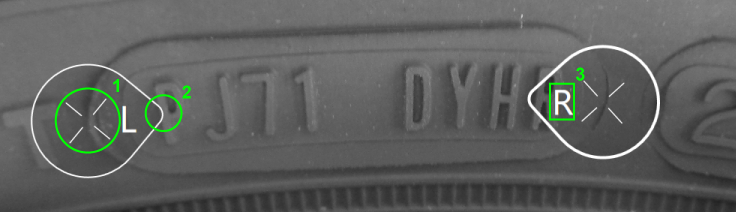
1
Feature Origin
2
Feature Orientation
3
Feature Identity
-
The Blue Read tool is pre-trained to automatically recognize characters and strings, so labeling is not required to use the tool. However, labeling is recommended for application validation and incremental training. Since the Blue Read tool does not return detailed information about character positions, it does not require precise positional labeling. Instead, the labeling is simply the approximate size of the character, and its identity.
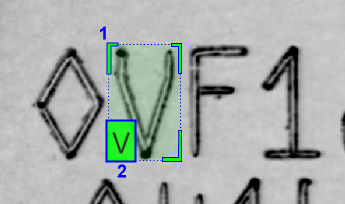
1
Feature Size
2
Feature Identity
-
In Unsupervised Mode, the only labeling provided to the tool is a defect-free training image.
In Supervised Mode, the labeling process involves first labeling "good" and "bad" images, i.e. images that are defect-free and contain defects. Then for the bad images, you draw regions over the pixels that contain the defects. The accuracy with which your labeled defect masks match the actual defects in the images is a key determinant in the performance of the tool.
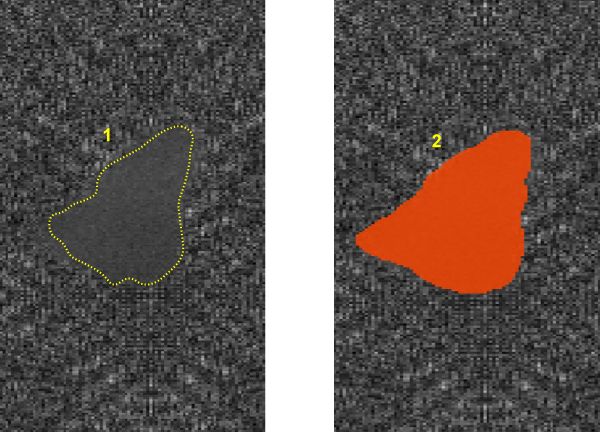
1
Defect
2
Labeled defect (region drawn over the defect)
-
The only labeling process entails simply assigning a class to which the image belongs.
Note: The Green Classify tool also allows you to label training images as belonging to multiple classes, through the use of the Exclusive Mode Tool Parameter.