Device IO
In the Device IO section of the Communications settings, you can enable and configure device inputs and outpus:
-
Switch on the Inputs toggle to allow changing the programs of the vision sensor from the PLC through an industrial protocol and triggers from TCP.
-
Switch on the Outputs toggle and the Write Image toggle in the Finalize step to enable transferring images to an SFTP server. If an industrial protocol and the Outputs toggle are enabled, you can also send inspection results data to a PLC.
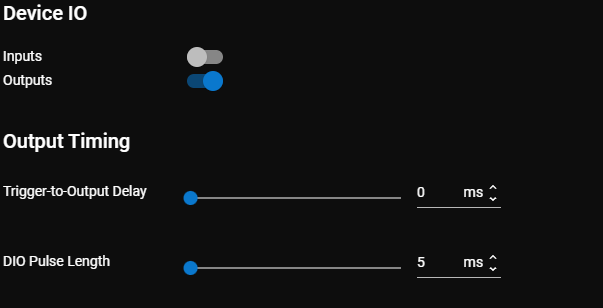
If you enable Outputs, the following Output Timing options become available:
-
Trigger-to-Output Delay is the time delay between when the vision sensor receives a trigger and when it sends the output to device IO, TCP, or industrial protocols. The vision sensor queues outgoing inspection results, and outputs them in the order of inspection. You can set the delay between 0 (default) to 2000 ms.
Note:-
If the Trigger-to-Output Delay is 0 or smaller than the cycle time (that is, the delay elapses before the inspection is completed), the vision sensor sends the output immediately after the inspection.
-
If you change the delay, all queued inspection results are cleared.
-
The Trigger-to-Output Delay does not apply to SFTP output or web events.
-
-
DIO Pulse Length is the pulse length of the discrete IO. You can set the pulse length between 5 (default) and 1000 ms.
For more information on how these settings influence the vision sensor, see Input and Output Timing.