Connectors and Indicators
|
|
|---|---|
| Connector/Indicator | Function |
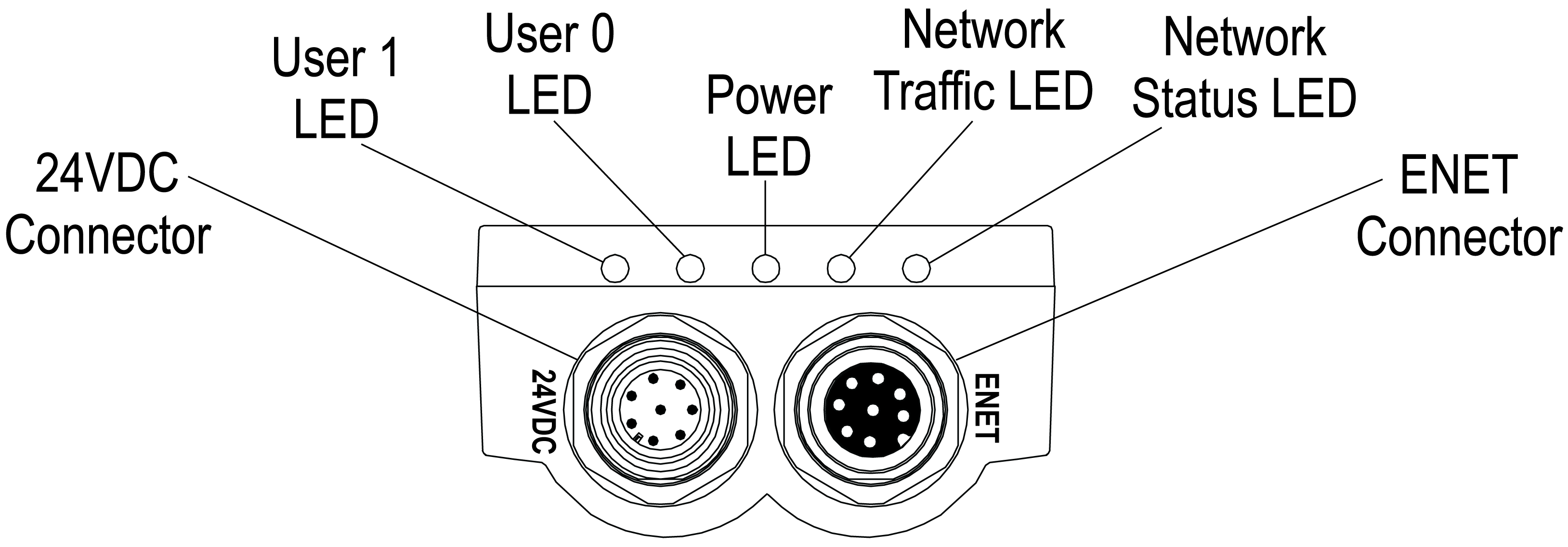
| 24VDC Connector |
Connects the Breakout cable, which provides connections to an external power supply, the acquisition trigger input, high-speed outputs and RS-232 serial communications. For more information, refer to Breakout Cable Specifications. Alternately, this connector is used to attach the I/O Module cable to an optional In‑Sight I/O module, which adds general-purpose discrete I/O and light control functionality. For more information, refer to the I/O Module Cable Specifications. |
| User 1 LED | Green when active. User-configurable within the In-Sight Explorer Discrete Output Settings dialog, using Discrete Output Line 4 (Line 10 for all I/O modules, except the CIO-1400, which uses Line 9). |
| User 0 LED | Red when active. User-configurable within the In-Sight Explorer Discrete Output Settings dialog, using Discrete Output Line 5 (Line 11 for all I/O modules, except the CIO-1400, which uses Line 10). |
| Power LED | Green when power is applied. |
| Network Traffic LED | Flashes green while transmitting and receiving data. |
| Network Status LED | Green when a network connection is detected. |
| ENET Connector | Connects the vision system to a network. The ENET connector provides the Ethernet connection to external network devices. For more information, refer to the 5100 and 5400 Series Vision System Ethernet Cable Specifications and 5600 and 5700 Series Vision System Ethernet Cable Specifications. |
Note:
- For the In-Sight 5100 and 5400 series, when the vision system is powered up, User 0 LED and User 1 LED both momentarily turn on. Then, User 0 LED turns off and User 1 LED stays on. Next, User 0 LED turns on and User 1 LED turns off. Finally, both LEDs momentarily turn on and then turn off.
- For the In-Sight 5600 series and In-Sight 5700 series, when the vision system is powered up, User 0 LED and User 1 LED both momentarily turn on. Then, User 1 LED turns off and User 0 LED stays on. Next, User 1 LED turns on and User 0 LED turns off. Finally, both LEDs momentarily turn on and then turn off.