DataMan 300, 360, 370, and 470 Series Readers External Lighting
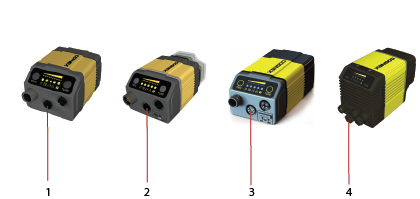
On the back of the reader, there is a socket dedicated to external light control (1, 2, 3, and 4 in the following image).
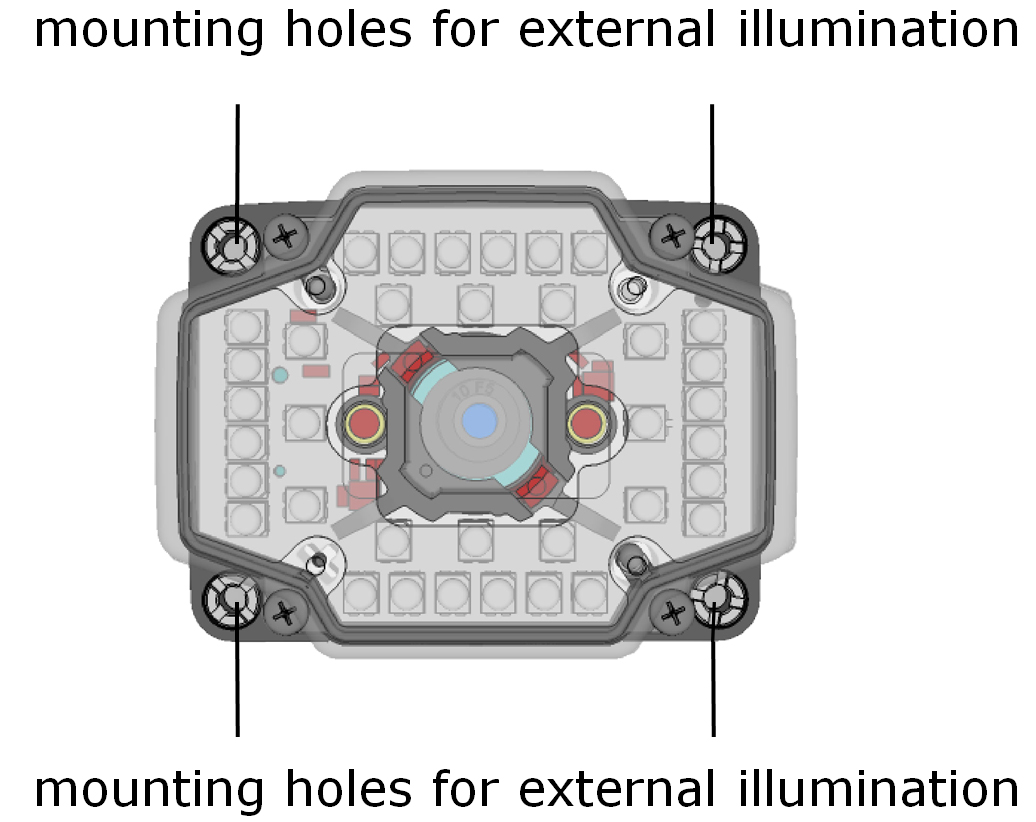
There are four mounting holes on the front of the reader to mount external illumination.
You can control the intensity output of the external illumination connector if the external illumination you use supports this control. In the DataMan Setup Tool, go to the Optimize Image pane and check the External checkbox. You can also choose your light type from the drop-down box below. In the Optimize Image pane's Advanced tab, you can make further external illumination settings.
The DataMan 300, 360, 370, and 470 series readers support high power illumination accessories. For more information, see the Accessories sections in the DataMan 300 Reference Manual, the DataMan 360 Reference Manual, the DataMan 370 Reference Manual, and the DataMan 470 Reference Manual.
For detailed instructions on how to set the DataMan 370 and 470 series readers up with high power illumination accessories, see the following sections:
| DataMan 370 series readers with High Power Integrated Light |
Installing the Liquid Lens Module with High Power Integrated Light (HPIL) |
| DataMan 370 series readers with High Power Illumination Accessory |
Installing a Lens with High Power Illumination Accessory (HPIA) |
| DataMan 370 series readers with High Power Integrated Torch (HPIT) | |
| DataMan 470 series readers with High Power Integrated Light |
Installing the Liquid Lens Module with High Power Integrated Light (HPIL) |
| DataMan 470 series readers with High Power Illumination Accessory |
Installing a Lens with High Power Illumination Accessory (HPIA) on page 1 |
| DataMan 470 series readers with High Power Integrated Torch (HPIT) |