Application Settings
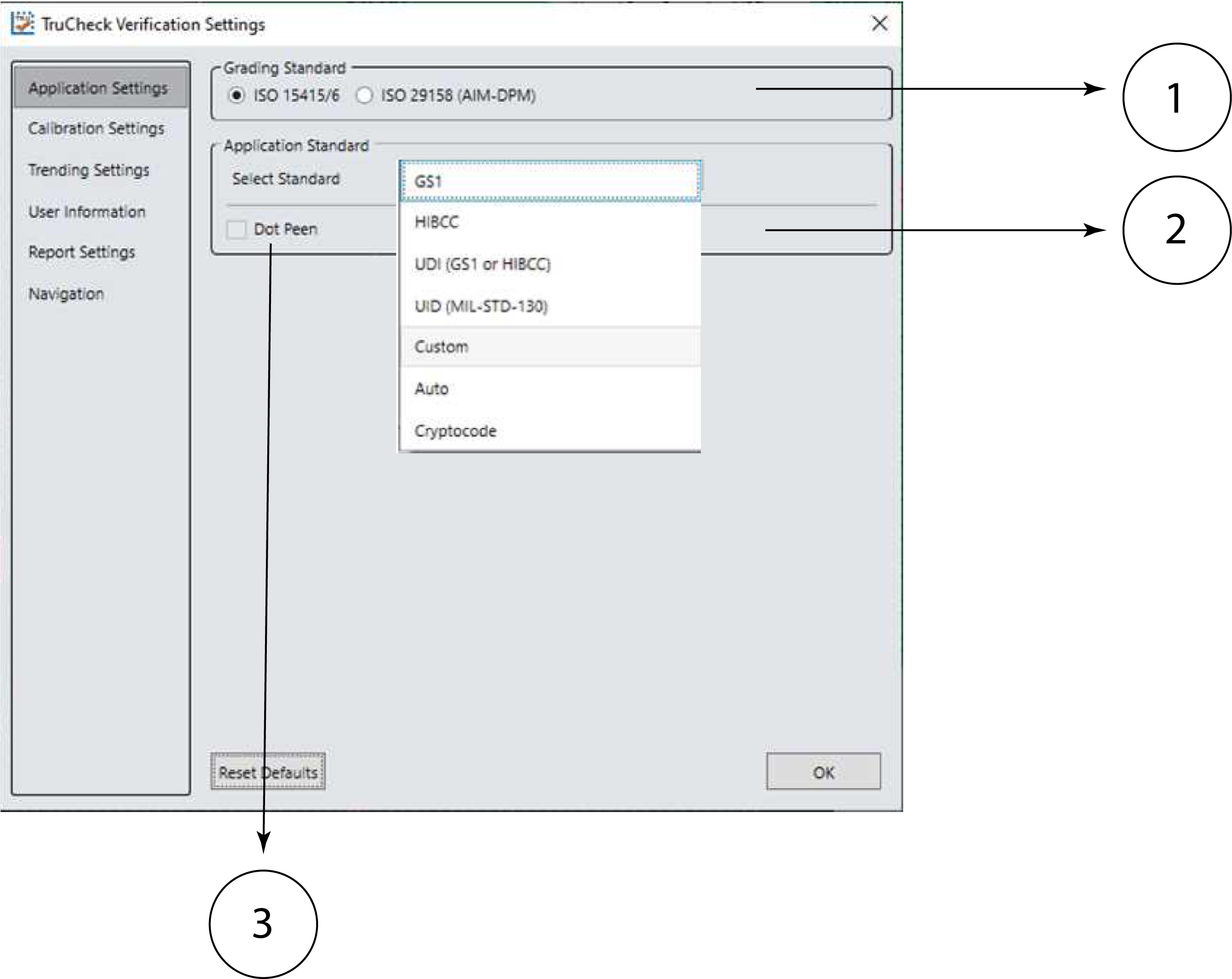
The content of the Application Settings window depends on which Application Standard you select. The application standard setting automatically sets many of the parameters.
|
||
|---|---|---|
| Number | Element | Description |
| 1 | Grading Standard |
For any Application Standard selected, you need to select a Grading standard, depending on your application. For more information, see Grading Standards. Available options are:
|
| 2 | Application Standard |
You can select pre-defined and custom application standards. For more information, see Application Standards Settings
|
| 3 | Dot Peen |
The Dot Peen option helps you connect dots in case of codes created through a process where dots are peened onto a metal surface. Select Dot Peen to use the AIM-DPM Stick algorithm to connect dots. For more information, see in Dot Peen. Available options are:
|
The Reset Defaults button resets the Application Settings menu to the default settings (Auto).
After clicking Reset Defaults, you must calibrate the verifier before using it. For more information, see Calibration.