Build the OnTrigger Task
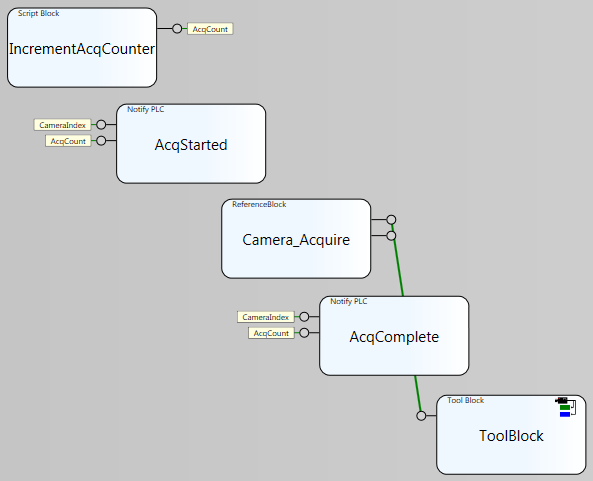
The OnTrigger task is constructed to execute automatically whenever the PLC sends an Acquisition trigger to the camera. It uses a Script block to increment the value of the AcqCount tag, and then a Notify PLC block sends an AcquisitionStarted signal to the PLC. The Camera block acquires an image, and then another Notify PLC block sends an AcquisitionComplete signal to the PLC. Finally, after the image has been acquired, a Tool Block is used to process the image and perform an inspection.
-
Add a Script block, and enter the following script:
$AcqCount += 1;
return $AcqCount;
- Add a Notify PLC block to the Task.
- Configure the Selected Device property to the Cognex Communications Card or Vision Controller.
-
Set the Notification Method Type property to AcquisitionStarted, as shown in the Notification Settings dialog below:
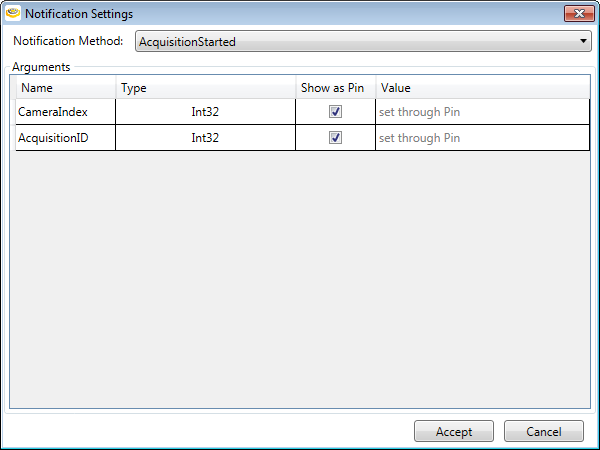
- Set the Notify PLC block's input pins to the CameraIndex and AcqCount tags by right-clicking the pin and selecting Assign to Tag, which will launch the Tag Selector dialog, where you can select the tags.
- Add a Camera block to the Task.
- Add another Notify PLC block to the Task.
- Configure the Selected Device property to the Cognex Communications Card or Vision Controller.
-
Set the Notification Method Type property to AcquisitionComplete, as shown in the Notification Settings dialog below:
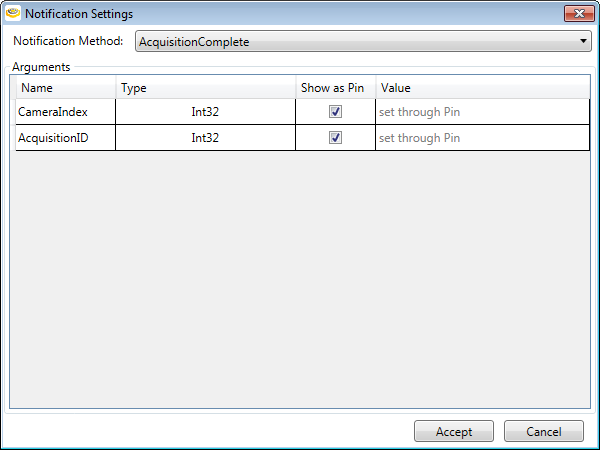
- Set the Notify PLC block's input pins to the CameraIndex and AcqCount tags by right-clicking the pin and selecting Assign to Tag, which will launch the Tag Selector dialog, where you can select the tags.
- Add a Tool Block to the Task.
- Link the Camera block to the Tool Block.