Green Classify
You can use the Green Classify tool to identify and classify an object or the entire scene in an image. The tool assigns a tag to the images, and uses the tag for sorting the images into classes. The tag is represented by a label, and each label has a percentage showing how confident the tool is in the assigned class.
The Green Classify tool can perform tasks such as:
-
Classifying objects or scenes
-
Separating different classes based on a collection of labeled images
-
Identifying products based on their packaging
-
Classifying the quality of welding seams
-
Separating acceptable or unacceptable anomalies
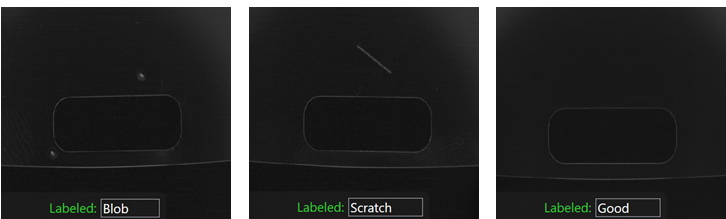
You can use the Green Classify tool flexibly as part of a tool chain. For example:
-
The Green Classify tool can pass images of a class to a Red Analyze tool for further inspection, and images of another class to a Blue Locate tool to count features instead.
-
The Green Classify tool can take images from a Red Analyze tool to classify the types of defects.
-
The Green Classify tool can take images from a Blue Locate tool to classify the type of model A specific spatial arrangement of a set of features (Blue Locate and Blue Read tools only.) During a post-processing step, the Blue Locate and Blue Read tools can fit all of the features detected in an image to the models defined for the tool. The overall pose and identity of the model is then returned. that produced a particular view A view of an image is a region of pixels in an image. Tool processing is limited to the pixels within the view. You can manually specify a view, or you can use the results of an upstream tool to generate a view..
Tool Types
When you know that you need a Green Classify tool to solve your machine vision problem, you must choose the type of the tool you want to train. You can do so by setting the Type parameter in the Tool Parameters sidebar.
The Green Classify tool is available in the following types:
-
Standard type for the most accurate classification.
-
Legacy type for compatibility with Focused mode tools from earlier VisionPro Deep Learning software versions. Legacy type tools are faster than Standard type tools but less accurate.
The different tool types correspond to different types of neural network models. If you want more accurate results at the expense of increased training Training is the process that your tool, which is a neural network, is learning about the features (pixels) based on the labels you made. For example, a tool will learn the defect/normal pixels in each image based on the defect/normal labels you drew. The goal of the tool Training is learning enough to give the correct inspection results of whether an unseen image is defective or not. The key to training is to ensure that you include all possible variations within your training set, and that your images are accurately labeled. Training times vary by the application, tool setup and the GPU in the PC being used to train the network. and processing times, use the Standard type. The Standard type tools examines the entire image equally, while the Legacy type tools uses Feature Sampling, which makes them selective, focusing on the parts of the image with useful information. Due to this focus, the tool can miss information, especially when the image has important details everywhere.
Standard Type
The Standard type tool is an improved version of the Legacy type. The Standard type has higher performance, but the training and processing times are longer. Standard type tools do not support multiple labels per image.
The Standard type tool supports the following features in its different modes:
| Mode | NVIDIA Tensor RT Speed Optimization | Outlier Score | Heat Map |
| Fast | Yes | Yes | Yes |
| Few Shot | Yes | No | Yes |
| Accurate | Yes | Yes | Yes |
| Robust | No | Yes | Yes |
Modes of the Standard Type
Mode refers to the subtype of the neural network model Each VisionPro Deep Learning tool is a neural network. A neural network mimics the way biological neurans work in the human brain. The neural network consists of interconnected layers of artifical neurons, called nodes, and they have multiple layers. Neural networks excel at tasks like image classification and pattern recognition., which affects the time required for training and processing. Select the mode before training with the Mode parameter. The following modes are available:
-
Fast: Select this mode for fast processing time at the cost of lower accuracy.
-
Accurate: Select this mode for increased accuracy at the cost of slower processing time.
-
Robust: Select this mode if you want to use the tool on different production lines and new products without retraining the tool. This mode allows the tool to adapt to changes on the production line and to product variants that have similar kinds of defects.
-
Few Sample: Select this mode to train the tool with only a few images. Training and processing time is higher than in the other modes.
-
If you do not have enough images to train the tool in the other modes, use Few Sample mode. Switch to another mode when you have enough training images.
-
This mode has fewer parameters than the other modes.
-
This mode does not use the Loss Inspector feature A feature is a visually distinguishable area in an image. Features typically represent something of interest for the application (a defect, an object, a particular component of an object). and a validation Validation refers to a process during the training of a tool that helps to evaluate performance. Validation is like a mock exam that the tool takes during the training phase, separate from the final test. For example, validation helps you to recognize overfitting and avoid wasting time when training a tool. If you recognize that the tool is overfitting, you can stop the training early. image set in training.
-
This mode automatically reduces the image size to 512x512 pixels.
-
You can train the tool in Few Sample mode with just one image in each class in the training set, while the other modes require four images in each class.
-
This mode does not support the Cognex Deep Learning Parameter Search utility.
-
Standard Type Features and Benefits
The Standard type has the following benefits:
-
Has more training and perturbation Perturbation is the process of improving the trained tool tolerance of part and image variation by simulating the effect of specific types of variation. parameters, and no sampling parameters, since Standard type tools sample the entire image.
-
Monitors validation loss, using a validation image set in training, and supports the Loss Inspector feature.
-
Supports a heat map in the View Inspector and as an image overlay. The heat map shows the clues the tool used to classify the image.
-
Supports outlier score, which you can enable with Outlier Score processing parameter.
The outlier score shows how much a view deviates from the other views in the training set. A high outlier score can indicate that an anomaly happened on the production like, for example, the lighting conditions changed.
-
Supports processing speed optimization using NVIDIA Tensor RT for runtime.
-
Note: You cannot use the outlier score and the heat map features at the same time as Tensor RT speed optimization. Enabling speed optimization disables the outlier score and the heat map. When exporting the runtime workspace A runtime workspace is a configuration file that does not contain images or databases, containing only streams and tools, which makes it a smaller version of a full Workspace. This configuration file can be loaded in the library in order to perform some analysis., you must choose which feature to include in the export dialog.
Legacy Type
The Legacy type tool is a less advanced version of the Standard type tool. The Standard type has higher performance, but the training and processing times are longer. The Legacy type supports multiple labels per image. You can enable this feature with the Exclusive parameter.
The Legacy type tool samples pixels with a feature sampler that is tied to a sampling region. You define the sampling region with the sampling parameters in the Tool Parameters sidebar. If a sampling region does not include any defect pixels, then the network should produce no response.