Feature Sampling
During training Training is the process that your tool, which is a neural network, is learning about the features (pixels) based on the labels you made. For example, a tool will learn the defect/normal pixels in each image based on the defect/normal labels you drew. The goal of the tool Training is learning enough to give the correct inspection results of whether an unseen image is defective or not. The key to training is to ensure that you include all possible variations within your training set, and that your images are accurately labeled. Training times vary by the application, tool setup and the GPU in the PC being used to train the network., Blue Locate, Blue Read, and Legacy mode tools use a special technique to selectively sample at a higher rate those parts of the images that are determined to be more likely to contribute additional information to the network. Legacy mode tools do not sample the input images the same way although the image sampling does cover the entire image extent.
Because the training is performed using both information within the sample region and contextual information from around the sample region, samples collected at the edge of an image can strongly influence the tool. If you use a view A view of an image is a region of pixels in an image. Tool processing is limited to the pixels within the view. You can manually specify a view, or you can use the results of an upstream tool to generate a view. within an image, then the context information for samples collected at the edge of the view use pixels from outside of the view for context data.
|
|
|
|
|
1 |
Feature Size |
|
|
2 |
Sample Region |
|
|
3 |
Context Region |
|
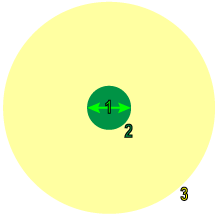
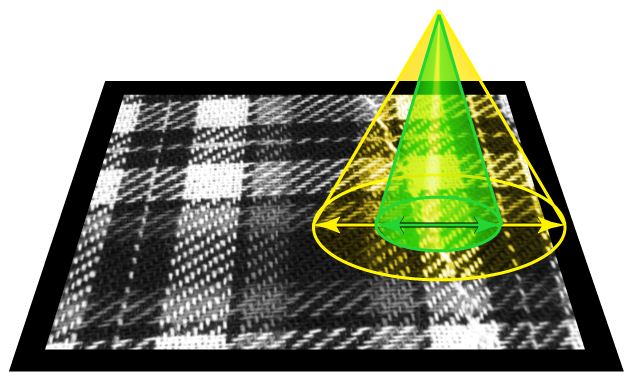
If the sample is at the edge of the image itself, the tool generates synthetic pixels for use as context. You can control the specific method used for this through the use of masks, borders, and sample color channels with the Border Type and Color parameters.
By using a mask, you can exclude parts of the image from training, although even masked regions are considered as context, depending on the Masking Mode parameter setting.
Finally, if you are using color images (or any image with multiple planes or channels), you can specify which channels are sampled. Using multiple channels has a minor impact on training and processing time, but it can allow the tools to work more accurately in cases where color provides important information.
Feature Sampling at Runtime
Each input image is exhaustively sampled at runtime, and the individual samples are then processed by the trained network. The same feature size The subjective size of the image features that you feel are most important for analyzing image content. The feature size determines the size of the image region used for sampling. Only used with Blue Locate, Blue Read, and Legacy type tools. used for training is also used at runtime (ensuring that the trained network is processing inputs that are consistent with the inputs used for training).
Unlike training, where the sampling density The amount by which the sampling point is moved in the image between samples, expressed in terms of the feature size. If the feature size is 100 and the sampling density is 1, the sampling location is advanced by 100 pixels between samples. A sampling density of 4 advances the sampling location by 25 pixels between samples. is determined automatically, you can control the runtime sampling density for all the Deep Learning tools. The sampling density determines the degree of overlap between adjacent samples. A sampling density rate of 1 means that the sampling location is incremented by the feature A feature is a visually distinguishable area in an image. Features typically represent something of interest for the application (a defect, an object, a particular component of an object). size between samples. The default sampling density rate for most tools is 3, which means that the sampling location is incremented by one third of the feature size.
| Sampling Density = 1 (4 samples) | Sampling Density = 3 (4 samples) |
|---|---|
|
|
|
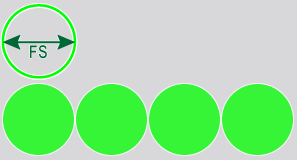
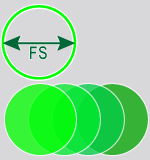
When the combination of image size, Feature Size and Sampling Density settings exceeds the limit, the following error message may be displayed:
"Failed to process database sample 'image_file.name' (maximal number of samples exceeded, please reduce the sampling density, view size and/or feature size)."
In this event, consider options to reduce the number of pixels being processed, either through the use of a mask, focusing the ROI The Region of Interest (ROI) defines the area of operation for the tool. The ROI preserves the positions, angles, stretch and skew of the original image. to specific areas or using a larger feature size setting.