Loss Inspector
The Loss The Loss refers to validation loss, which is a metric that shows how a tool performs on the validation set. Loss can have a value between 0 and 1. The VisionPro Deep Learning application calculates the Loss based on the errors the tool makes when processing the images in the validation set. During training, you can check the Loss in real-time using the Loss Inspector. Inspector window provides real-time information about how the tool performs during the training Training is the process that your tool, which is a neural network, is learning about the features (pixels) based on the labels you made. For example, a tool will learn the defect/normal pixels in each image based on the defect/normal labels you drew. The goal of the tool Training is learning enough to give the correct inspection results of whether an unseen image is defective or not. The key to training is to ensure that you include all possible variations within your training set, and that your images are accurately labeled. Training times vary by the application, tool setup and the GPU in the PC being used to train the network. session. The Loss Inspector shows you how the validation Validation refers to a process during the training of a tool that helps to evaluate performance. Validation is like a mock exam that the tool takes during the training phase, separate from the final test. For example, validation helps you to recognize overfitting and avoid wasting time when training a tool. If you recognize that the tool is overfitting, you can stop the training early. loss changes during the training session, which indicates how well the tool performs on the validation set The validation set is a set of images reserved for validation. The validation set is separate from the training set and test set. Since the validation set is separate, it allows you to evaluate how well the tool performs when using unseen images. The VisionPro Deep Learning application calculates a special metric, the Loss. The Loss is based on the performance of the tool on the validation set.. If the results are not good enough, you can stop the training early. This saves you time, because you can stop an ineffective training session and try again, for example, after adjusting the settings.
Using the Loss Inspector
You can use the Loss Inspector any time during or after training a tool.
To open the Loss Inspector:
-
Go to Tool > Inspect Loss.
-
While training, click the Graph icon
 .
.
If you abort the training before it finishes, a pop-up window asks you if you want to save the current model A specific spatial arrangement of a set of features (Blue Locate and Blue Read tools only.) During a post-processing step, the Blue Locate and Blue Read tools can fit all of the features detected in an image to the models defined for the tool. The overall pose and identity of the model is then returned.. Saving the model also saves the validation loss recorded over the training so far.
Loss Inspector Window
|
|
|||||||||||
|---|---|---|---|---|---|---|---|---|---|---|---|
| Number | Description | ||||||||||
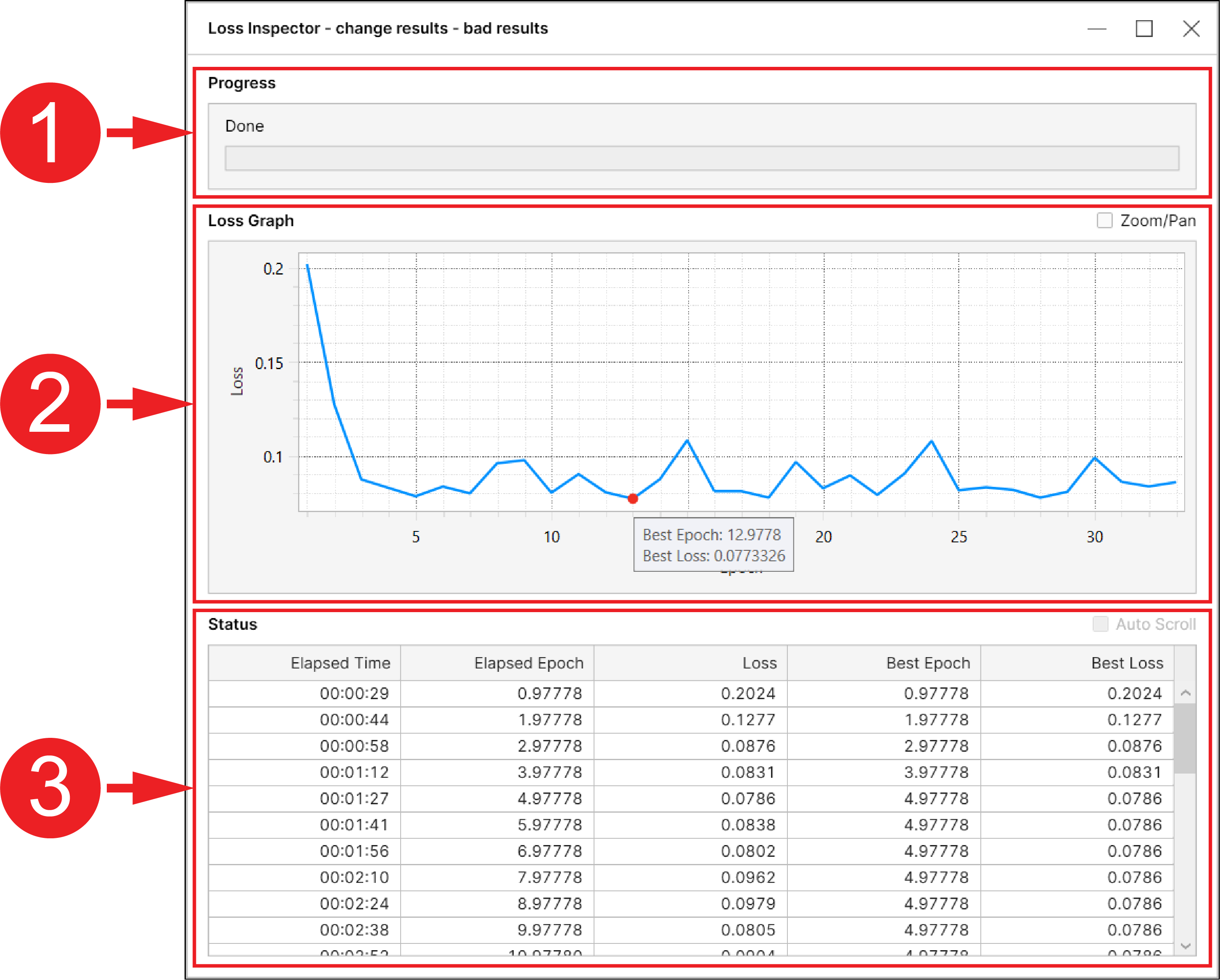
| 1 | The Progress bar shows the progress of the current training session. | ||||||||||
| 2 |
The Loss Graph shows how the validation loss score changes over time. After the training finishes, a red dot appears on the graph to mark the Best Epoch and the Best Loss for this training session. Note: Enable the Zoom/Pan checkbox, you can zoom in and out, zoom in a specific rectangular region, or pan the Loss Graph.
|
||||||||||
| 3 |
Detailed results in table format.
|
||||||||||
How to Interpret Loss
The VisionPro Deep Learning application calculates the Loss at the end of each epoch. An epoch is the time it takes for the tool to process the data from the training set. Each training phase lasts several epochs. If the training session is effective, Loss decreases over the epochs.
When interpreting Loss scores, consider the following aspects:
-
Lower is better: a lower score means that the tool makes fewer errors on the validation set.
-
Stability over time: Ideally, the score decreases and stabilizes over time. If the score varies between high and low, or increases, it means that the training session is not effective.