VisionPro supports the following user interface to the Image File tool, which you use to acquire static images or save the current acquired image to a file:
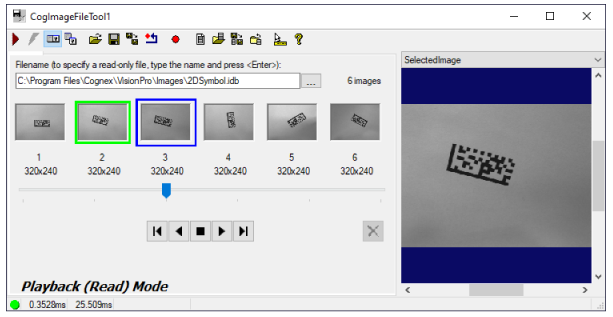
See the topic Control Reference for a description of the common buttons along the top of most edit controls. In addition, the Image File edit control supports the following buttons:

|
Toggles between Record and Playback mode. The control automatically switches to playback mode if you open an image file in read-only mode.
|

|
Creates a new file for saving images obtained by the ImageFile edit control.
|

|
Opens an existing image file.
|

|
Saves the current image file to another name. The file must not be in read-only mode. |

|
Closes the current image file. |
The edit control supports the following image buffers:
- The SelectedImage displays the currently selected image in the image file that will become the LastRun.OutputImage the next time the tool runs. The thumbnail image in the edit control has a blue outline.
-
The Current.InputImage displays the last image passed to the tool by your vision aplication.
The Image File tool does not copy an image to the Current.InputImage buffer. It must come from a vision tool that passes the image to the Image File tool.
- The LastRun.OutputImage displays the image from the file that can be passed to other vision tools.