Troubleshooting
Refer to the following list for additional reference if you have difficulty creating a .NET C# application:
-
Unable to Find the Cognex.VisionPro.Control.Net package?
- Choose Tools->Options from Visual Studio.
- Scroll down to NuGet Package Manager and select Package Sources.
-
Verify that Cognex_Local is available as a package source:

-
If it does not appear as a package source click the "+" button and specify:
Name: Cognex_Local
Source: C:\ProgramData\Cognex\.nuget\packages
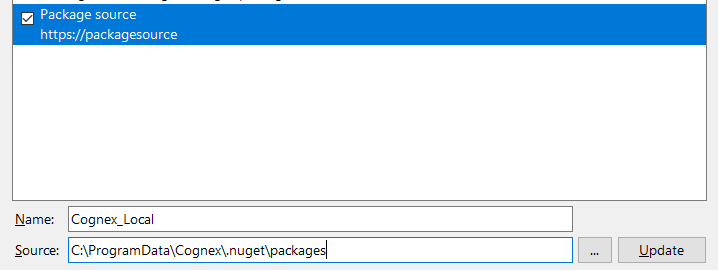
- Click Update.
-
Cognex.Rbbt.Interop.TypeSystemException: 'Unable to find the Factory for TypeId '1234...'
If you see the following exception error:
CopyCognex.Rbbt.Interop.TypeSystemException
HResult=0x80131500
Message=Unable to find the Factory for TypeId '1756358770240'.
Please ensure you have called Cognex.Vision.Startup.Initialize()This indicates that the VisionPro backend has not been initialized. Ensure your static void Main() method contains a call to the Initialize() method:
Copy[STAThread]
static void Main()
{
Cognex.Vision.Startup.Initialize();
...
...
Cognex.Vision.Startup.Shutdown();
} -
System.RuntimeInteropServices.COMException
The following exception indicates an issue with the manifest file.
CopyException thrown: 'System.Runtime.InteropServices.COMException' in System.Windows.Forms.dll
An unhandled exception of type 'System.Runtime.InteropServices.COMException' occurred in System.Windows.Forms.dll
Class not registered (0x80040154 (REGDB_E_CLASSNOTREG))Try either recommendation:
- Rebuild the solution
- Remove the manifest file and follow the instructions in the topic Add an Application Manifest again.