This topic contains the following sections.
The Image Sharpness tool computes a measure of the relative sharpness of an image as measured by the grey values of adjacent pixel values. Vision applications that use an Image Sharpness tool use it to assist in the process of generating the best focus setting for a particular scene of interest. After each execution, an Image Sharpness tool returns a sharpness score. By keeping all other optical parameters the same and changing only the lens focus, you can run the tool repeatedly on successive images until you determine a focus setting that provides the highest sharpness score. Images with a sharp focus are more easily analyzed by other vision tools.
Be aware that a sharpness score generated only once for a particular scene conveys no information about the absolute sharpness of an image. Also, comparing sharpness scores of different scenes has no meaning.
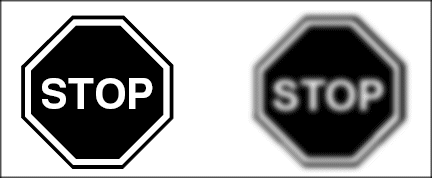
The sharpness of an image is determined by the lighting and optics used to acquire the images. Figure 1 shows examples of sharp and blurred images.
Figure 1. Sharp and blurred images
The Image Sharpness tool provides four methods for measuring the sharpness of an input image:
- Absolute difference at a specified offset
- Auto-correlation
- Band pass filtering
- Gradient energy
Absolute difference mode computes the difference between each pixel and a corresponding pixel at a user-specified offset within the same image. In general, the greater the difference in pixel values between the sets of corresponding pixel pairs, the sharper the image.
Figure 2 illustrates how absolute difference mode works. A small section of both the sharp and blurred images are shown at high magnification. With an offset value of 2 pixels along both the x-axis and y-axis, the difference in value for a pair of pixels near a feature boundary is much greater in the sharp image. The overall sharpness score is measured by computing the average difference between pixel pairs at all locations within the input image.
Figure 2. Absolute Difference Mode
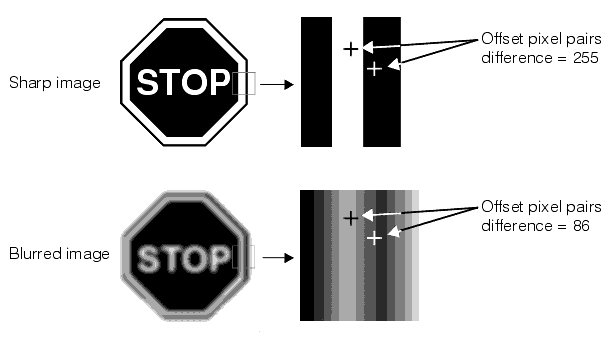
The absolute difference value that is returned is normalized by the number of pixel-pairs and scaled to the range 0.0 through 1.0.
Auto-Correlation mode works by computing how blurred the image appears, a concept inversely related to image sharpness. The amount of blur is determined by computing the normalized correlation coefficient between an image and a slightly offset portion of the same image. The higher the correlation coefficient between two offset locations within the image, the blurrier the image can be considered to be.
The Image Sharpness tool computes the normalized correlation coefficient at four offsets within the image. The smallest correlation coefficient of the four offsets is taken to be the blurriness of the image. The offsets at which the Image Sharpness tool computes the correlation coefficient are +1 and -1 pixel in both the x- and y-directions.
Figure 3 shows how auto-correlation mode works. For both images, sections of the image are compared with four offset images and the correlation coefficient is calculated. In each case, the lowest coefficient of the four is used as a measure of how blurred the image appears.
Figure 3. Computing image blurriness in auto-correlation mode
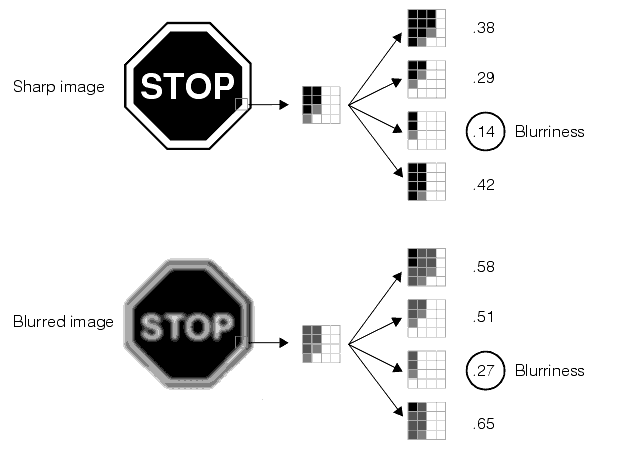
Because the difference in pixel values across the area being compared is smaller for the blurred image, the correlation coefficients tend to be higher for the blurred image. The tool returns a sharpness score in the range of 0.0 to 1.0, with high scores indicating a higher degree of image sharpness.
Figure 4. High and low frequency edges
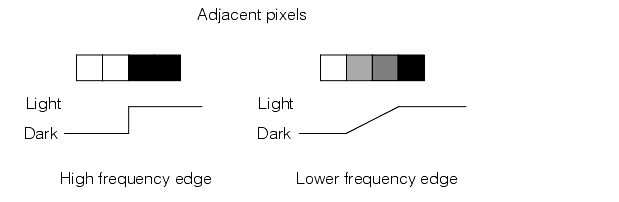
When you specify band pass filtering mode in the sharpness parameters you also specify a band pass range.
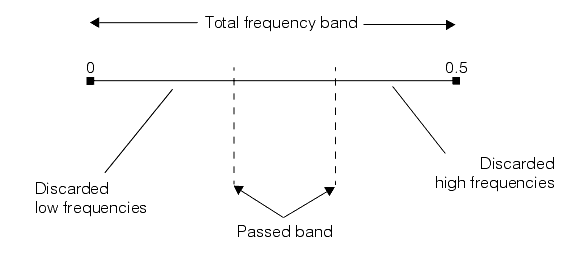
You specify the low and high limits for the band pass range as frequency values between 0.0 and 0.5, where the frequency is the reciprocal of the feature size in pixels. For example, the frequency value for an image feature 10 pixels in size would be 0.10. Since the smallest possible feature has two pixels, the highest possible frequency value is 0.5.
You should use your knowledge of the image content to restrict the range to the frequencies you expect. By doing this you can cause the tool to discard unwanted frequencies that may be present, such as high frequency noise and low frequency image background, as shown in Figure 5.
Figure 5. Band pass filtering mode
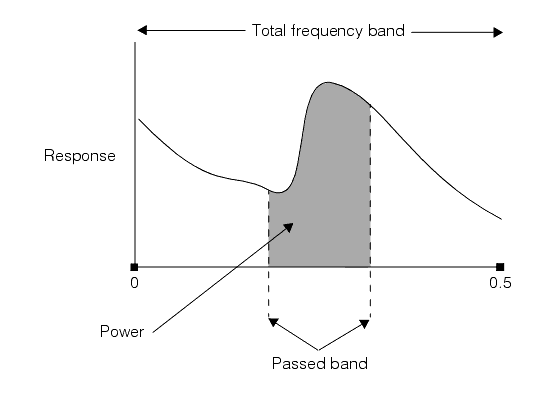
The score returned by the Image Sharpness tool in band pass filtering mode is a measure of the total power in the specified band of the frequency response curve, as shown in Figure 6.
Figure 6. Band pass filtering mode score
As with the other tool modes, a particular sharpness score is relative to other scores generated using the same parameters and the same image content.
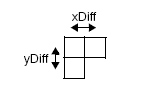
The gradient energy of an image is generated by summing the squares of the differences between adjacent pixel values over an entire image. In general, a sharper image will have greater pixel-to-pixel contrast values and generate higher result scores. The Image Sharpness tool uses a 3-pixel kernel, as shown in the following figure, to generate the score for gradient energy:
Gradient energy mode supports a smoothing parameter, initially set to 0, which you can increase to remove potential high frequency noise from an image.
| Mode | Notes |
Absolute Difference |
|
Auto-Correlation |
|
Band Pass Filtering |
|
Gradient energy |
|
For most applications, Cognex recommends you try the modes in the following order:
- Auto-Correlation
- Band Pass Filtering
- Absolute Difference
- Gradient energy (in API only)
In general, Auto-Correlation mode will handle most images reliably.
| Mode | Notes |
Auto-Correlation |
|
Band Pass Filtering |
|
Absolute Difference |
|
Gradient energy |
|