This topic contains the following sections.
Many GigE Vision cameras include a timestamp, a 64-bit counter that increments at specified intervals. The value of the timestamp counter at the time that an image is acquired is stored with each image. You can use the timestamp to detect when a GigE Vision Camera has missed acquiring an image (a missed trigger) or to determine the clock time that an image was acquired.
This topic illustrates how to implement both of these techniques in a VisionPro program and in a QuickBuild script.
You can use time stamps to detect when an image has been missed. For example, in the image below, parts are moving on a conveyor belt from left to right at a rate of 1 part every 100 counts.
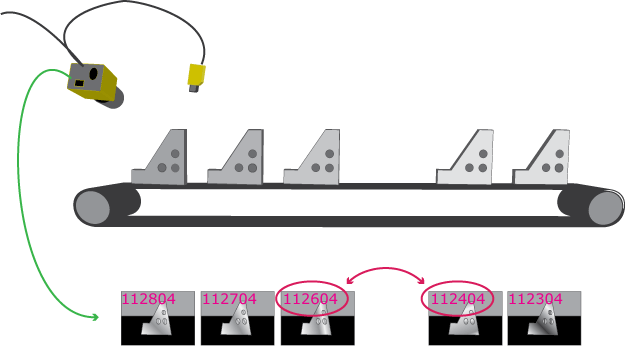
If the difference between timestamps is greater than 100, you can determine that an image or trigger was missed.
Note: Note that the code in the examples below assume that application uses a GigE Vision camera.
To detect missed images in a QuickBuild application you need to add a job script and override the PostAcquisitionRefInfo method in your class derived from CogJobBaseScript
const Int64 COUNTS_PER_IMAGE = 100;

#region "When an Acquisition Has Just Completed"
  // Called immediately after an acquisition has completed.
  // Return true if the image should be inspected.
  // Return false to skip the inspection and acquire another image.
  public override bool PostAcquisitionRefInfo(ref Cognex.VisionPro.ICogImage image,
                                                  Cognex.VisionPro.ICogAcqInfo info)
  {
    static Int64 lastTimeStamp = 0;

    if (lastTimeStamp == 0)
    {
        lastTimeStamp  = job.AcqFifo.FrameGrabber.OwnedGigEAccess.TimeStampCounter;
    }

    if (info.TimeStamp - lastTimeStamp > COUNTS_PER_IMAGE)
    {
        // handle missed image
    }
    lastTimeStamp = info.TimeStamp;
    // allow VisionPro to inspect the image
    return true;
  }
#endregionTo detect missed images in an application that uses the VisionPro API, use the CompleteAcquireEx method, which provides the timestamp associated with the image, instead of using CompleteAcquire
private ICogImage AcquireImage ()
{
    const string VIDEO_FORMAT = "Generic GigEVision (Mono)";
    const Int64 COUNTS_PER_IMAGE = 100;
    static Int64 lastTimeStamp = 0;
    ICogImage image;
    int    acqTicket;
    CogAcqInfo info;

    myFrameGrabbers = new CogFrameGrabbers();
    myFrameGrabber = myFrameGrabbers[0];
    myAcqFifo = myFrameGrabber.CreateAcqFifo(VIDEO_FORMAT, Cognex.VisionPro.CogAcqFifoPixelFormatConstants.Format8Grey, 0, false);

    lastTimeStamp = myFrameGrabber.OwnedGigEAccess.TimeStampCounter;
    acqTicket = myAcqFifo.StartAcquire();

    info.RequestedTicket = acqTicket;
    image = myAcqFifo.CompleteAcquireEx(info);
    if (info.TimeStamp - lastTimeStamp > COUNTS_PER_IMAGE)
    {
        // handle missed image
     }
    lastTimeStamp = info.TimeStamp;
    return image;
}Since timestamps are generated at a specific frequency, you can correlate the counter to another time base such as the system's performance counter.
You can determine the timestamp frequency by obtaining an ICogGigEAccess through the "frame grabber" associated with a GigE Vision camera. Once you have the frequency and the value of the TimeStampCounter at a given time, you can calculate the clock time by comparing it with the current timestamp. For example, if the frequency is 100 counts per second, and the value of the counter at 12:00 was 100,000, you can determine that an image whos timestamp is 130,000 was acquired at 12:05.
myFrameGrabbers = new CogFrameGrabbers();
myFrameGrabber = myFrameGrabbers[0];
myAcqFifo = myFrameGrabber.CreateAcqFifo(VIDEO_FORMAT, Cognex.VisionPro.CogAcqFifoPixelFormatConstants.Format8Grey, 0, false);

timeStampFrequency = myFrameGrabber.OwnedGigEAccess.TimeStampFrequency;
You can use the same technique in a QuickBuild application, obtaining the "frame grabber" through the acquisition FIFO as shown in the example in the previous section.