This topic contains the following sections.
This topic describes the CogTransform2DPerspectiveAndRadial transformation, a 2-dimensional transformation that provides a mathematical representation of the perspective and radial distortion often present in images that are acquired using a camera.
It also discusses the CogTransform2DComposed transformation, a special transformation object that you use to construct a composed transformation. This transformation is used in cases where the result of composing two transformations cannot be represented using any of the VisionPro transformation objects (for example, the composition of two CogTransform2DPerspectiveAndRadial objects cannot be represented using another CogTransform2DPerspectiveAndRadial, nor as a CogTransform2DLinear object).
Planar perspective distortion is introduced when the camera's optical axis is not perpendicular to the scene being acquired, as shown in the following figure:
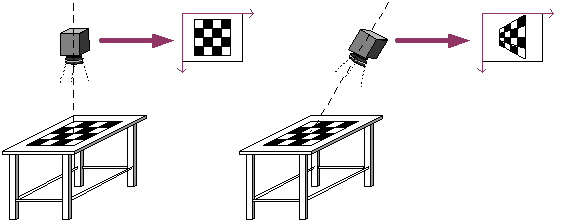
Planar perspective distortion is nonlinear: it cannot be described using a 2D linear transformation.
Radial distortion affects any optical lens where the magnification is different at the edges of the field of view than at the center of the field of view. Radial distortion is generally more severe with larger fields of view; wide-angle lenses tend to exhibit more radial distortion than telephoto lenses. There are two kinds of radial distortion: barrel distortion, which occurs when the off-axis magnification is weaker than at the center, and pincushion distortion, which occurs when the off-axis magnification is stronger than at the center. Both types of distortion are shown in the following figure:
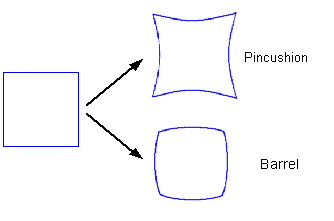
Like perspective distortion, radial distortion is nonlinear.
The CogTransform2DPerspectiveAndRadial is a transformation object that describes both planar perspective and radial distortion. There is no single mathematical representation that describes both planar perspective and radial transformation. The CogTransform2DPerspectiveAndRadial works by performing each part of the transformation separately, in this order:
- The planar perspective transformation. The Checkerboard calibration tool uses this part of the transformation to account for the planar perspective distortion, to account for the physical tile size that you specify, and to center the origin at the optical center of the image.
- The radial transformation. The Checkerboard calibration tool use this part of the transformation to account for the radial distortion in the image.
- A linear transformation (translation and scale only). The Checkerboard calibration tool uses this part of the transformation to reset the scale and origin information that was changed by the first step.
Note: The planar perspective transformation step also includes the degrees of freedom associated with a 2D linear transformation: translation, scale, and rotation.
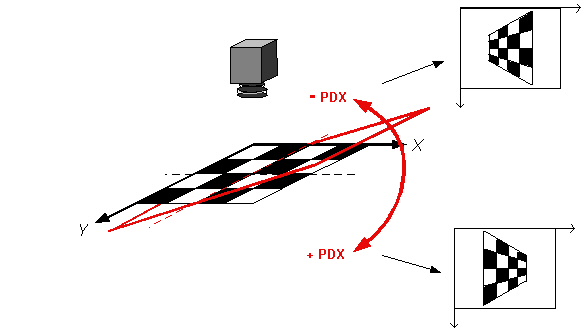
The PDX and PDY terms describe the perspective distortion in the X-axis and Y-axis directions. Positive values for PDX causes the plane to recede with increasing values in the unmapped X-axis direction while negative values cause the plane to recede with decreasing values in the unmapped X-axis direction, as shown in the following figure:
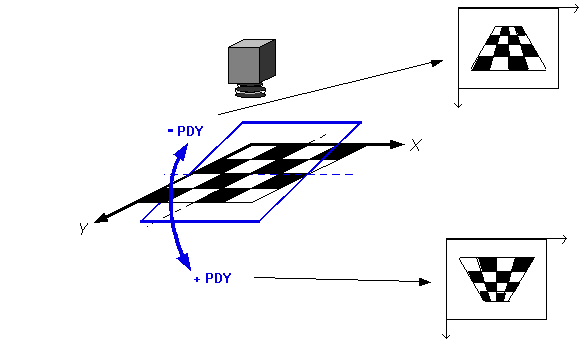
Positive values for PDY causes the plane to recede with increasing values in the unmapped Y-axis direction while negative values cause the plane to recede with decreasing values in the unmapped Y-axis direction, as shown in the following figure:
When evaluating the transformation produced by the Checkerboard Calibration tool, you can use the computed PDX and PDY terms to measure the degree of perspective shift between your camera and calibration plate.
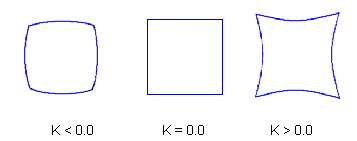
The K term specifies the coefficient of radial distortion. A value of zero indicates no radial distortion, positive values indicate pincushion distortion, and negative values indicate barrel distortion, as shown in the following figure:
A powerful feature of a CogTransform2DLinear 2D linear transformations is that the composition of any number of CogTransform2DLinear objects can be represented by a single CogTransform2DLinear object. The result of composing a CogTransform2DPerspectiveAndRadial transformation with any other type of VisionPro transformation object, however, cannot be represented as a new CogTransform2DPerspectiveAndRadial object.
Because the composition of transformations is such a commonly used and powerful feature, VisionPro implements a special transformation object, CogTransform2DComposed, that lets you create a single object that can represent the composition of any number of VisionPro transformation objects, regardless of their types. This object lets you combine radial and perspective transformation information with other transformations into a single object which you can then use to map points.
Note: The ComposeBase function automatically returns a composed transformation object when it is called upon to compose two transformations whose composition cannot be represented by a transformation object other than a CogTransform2DComposed.
The CogTransform2DComposed object works by maintaining a list of the composed transformations, and then transforming points through the transformations in sequence using each transformation's MapPoint method.
CogTransform2DComposed allows for efficient direct initialization of its contained sequence of transforms using a modified list-style interface. The object exposes PushOntoLeft, PushOntoRight, PopFromLeft, and PopFromRight to add and remove transformations from the ends of the list. The object also provides methods to split and merge lists, to replace a transformation with the list, and to Canonize the transformation (convert it to its simplest mathematically equivalent form).