This topic contains the following sections.
The Intersect Line Ellipse edit control provides a graphical user interface to the IntersectLineEllipse method, which determines whether Line and Ellipse intersect, and depending on the relationship of the two shapes, the points of intersection. The edit control allows you to configure the line and circle, dictate which graphics appear as the tool executes, and view tool results. The following figure shows the Intersect Line Ellipse edit control:
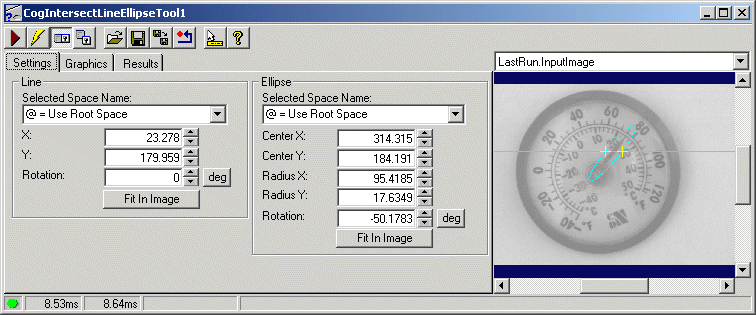
The edit control offers the following features:
- A row of control buttons at the top left
- A set of function tabs to define the line and the ellipse, choose what graphics the tool will use, and view results
- An image display window for displaying tool images and graphics
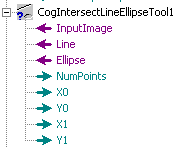
You can experiment with the edit control by using QuickBuild to create a CogIntersectLineEllipse tool. A new CogIntersectLineEllipse tool appears as shown in the following figure:
To include the edit control in your custom vision application, you must first add it to your Visual Studio.NET development environment. See Using Edit Controls in Your Custom Vision Applications for more information.

The following table describes the function of each button:
| Button | Description | Function |
 | Run | Determines whether the two shapes intersect |
 | Electric mode | Toggles electric mode, where the Intersect Line Ellipse tool executes automatically when particular configuration parameters change. In electric mode, a lightning bolt appears next to every electric property |
 | Local image display | Opens or closes the local image display window. An Intersect Line Ellipse tool supports the following image buffers:
|
 | Floating image display | Opens one or more floating image windows, which support the same image buffers as the local image display window |
 | Open | Opens a VisionPro persistence (.vpp) file that contains a set of saved properties for this vision tool object type. VisionPro reports an error if you try to open a .vpp file for another object type. |
 | Save | Saves the current properties of the vision tool to a VisionPro persistence (.vpp) file. The edit control allows you to choose between saving the vision tool with or without its image buffers and tool results. |
 | Save As | Saves the current properties of the vision tool to a new VisionPro persistence (.vpp) file |
 | Reset | Resets the vision tool to its default state. |
 | Show ToolTips | Enables or disables the display of tooltips for individual items in the edit control |
 | Help | Opens this VisionPro online help file |
Use the Settings tab to define Line and Ellipse, or use the tab to confirm that the existing shapes correspond to the correct input parameters generated by another tool. The following figure shows the Settings tab:
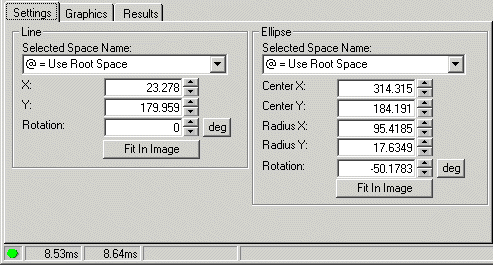
The Settings tab offers the following features to define the Line parameter:
| Feature | Description |
| SelectedSpaceName | Names the coordinate space for the line shape |
| X | The x-coordinate of a reference point on the line |
| Y | The y-coordinate of a reference point on the line |
| Rotation | The angle of the line |
| FitToImage | Centers the line within the Current.InputImage |
The Settings tab offers the following features to define the Ellipse parameter:
| Feature | Description |
| SelectedSpaceName | Names the coordinate space for the ellipse shape |
| CenterX | The x-coordinate at the center of the ellipse |
| CenterY | The y-coordinate at the center of the ellipse |
| RadiusX | The distance from the center of the ellipse to its boundary along the x-axis. |
| RadiusY | The distance from the center of the ellipse to its boundary along the y-axis. |
| FitToImage | Centers the ellipse within the Current.InputImage |
Use the Graphics tab to control which graphics the Intersect Line Ellipse tool generates and displays. The following figure shows the Graphics tab:
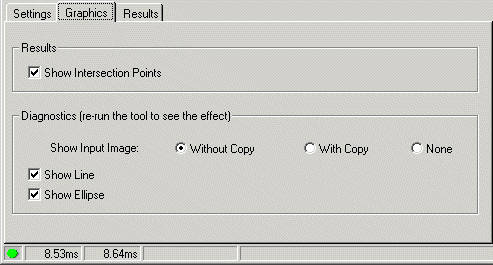
The Graphics tab offers the following features:
| Feature | Description |
| Show Intersection Points | Show the points where the shapes intersect in the LastRun.InputImage buffer |
| Show Input Image | Determines whether or not the input image is recorded as part of the diagnostic record, and whether the image is copied to the record or saved in the record as a reference |
| Show Line | Show Line in the LastRun.InputImage buffer |
| Show Ellipse | Show Ellipse in the LastRun.InputImage buffer |
Use the Results tab to view the relationship between Line and Ellipse as determined by the Intersect Line Ellipse tool. The following figure shows the Results tab:
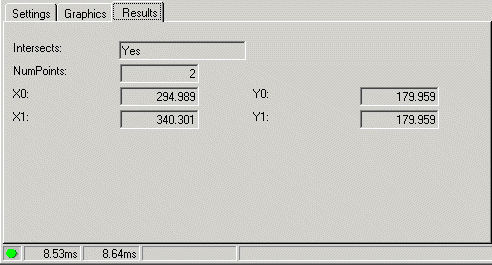
The Results tab offers the following features:
| Feature | Description |
| Intersects | Indicates whether or not the shapes intersect |
| NumPoints | An indication of the relationship between the point Line and Ellipse, as described in the IntersectLineEllipse method |
| X0 and Y0 | The (x, y) coordinate of the first point where the shapes intersect |
| X1 and Y1 | The (x, y) coordinate of the second point where the shapes intersect |