Logging In
To access the EI Tunnel Manager web interface, simply log in using your credentials or single sign-on (SSO). If this is your first time logging in, use the default credentials. Once logged in, you can modify your settings and explore the apps available to you.
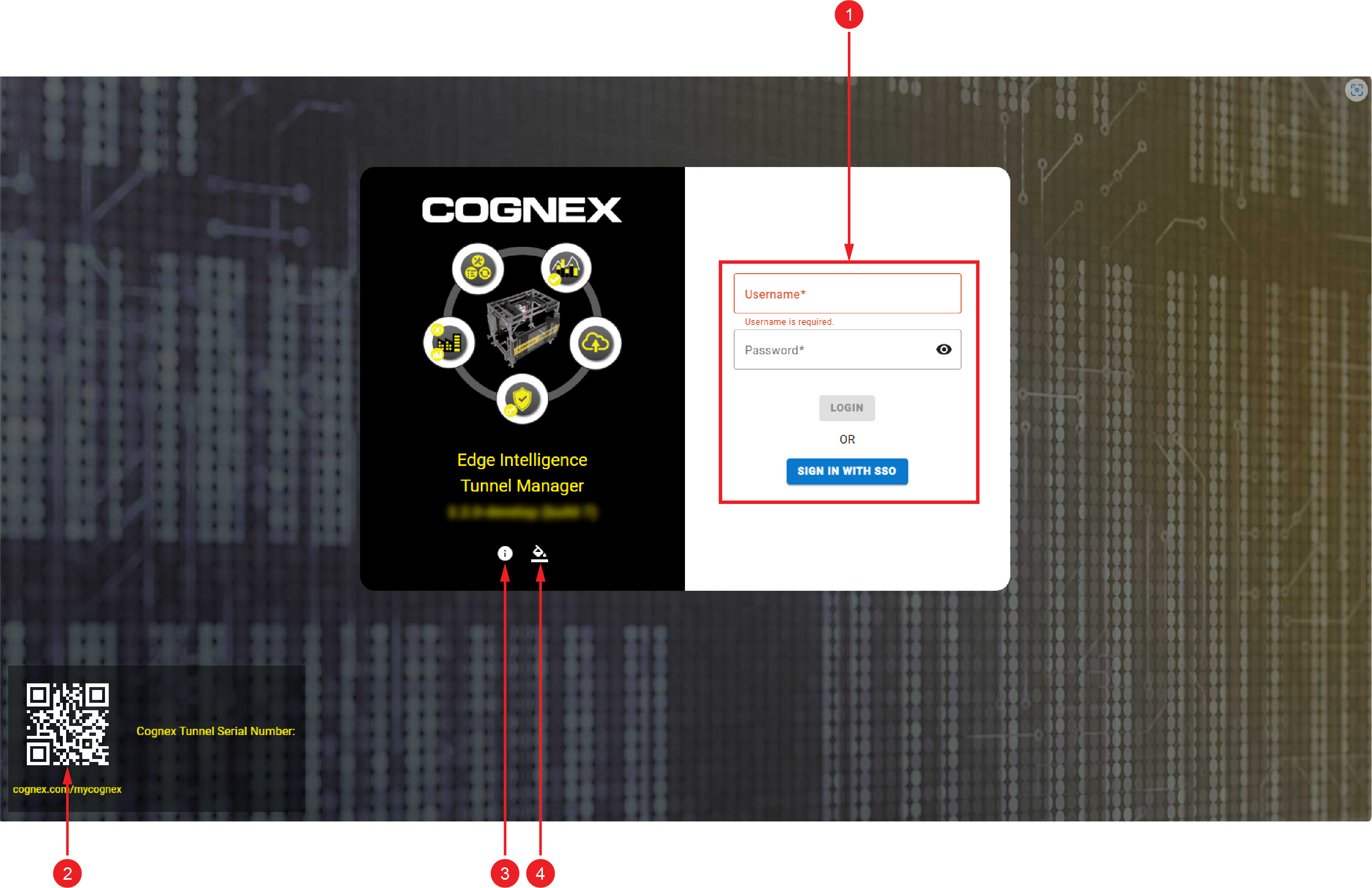
EI Tunnel Manager Login Page
|
|
|
| Number | Element |
| 1 |
Sign in using your credentials or SSO. Note: The Sign in with SSO button only appears in the login page if SSO is configured for the EI Tunnel Manager unit. For more information, see Single Sign-On.
|
| 2 | Scan the QR code to register your EI Tunnel Manager unit on the cognex.com/mycognex website. |
|
3 |
The information button opens the About Pop-Up window that provides the following options and information:
|
|
4 |
The paint bucket icon allows you to change the website color theme. |
Default User Credentials
The following users credentials are available by default:
| User | Password | Default Permissions |
|---|---|---|
| admin | BnthWWSD | Has access to all apps and features. Admin users can modify the default user profiles, enable access permissions for the other user roles, or create new profiles. |
| engineer | TaRDpKVx | Has access to all apps and features. |
| operator | SxtXGmxs |
User with read-only rights. The operator does not have access to the Device Management app and the Settings. |