SLMP Communications Settings
If you choose SLMP, the Communications Settings window changes to display SLMP-specific configuration options. The available options are listed below.
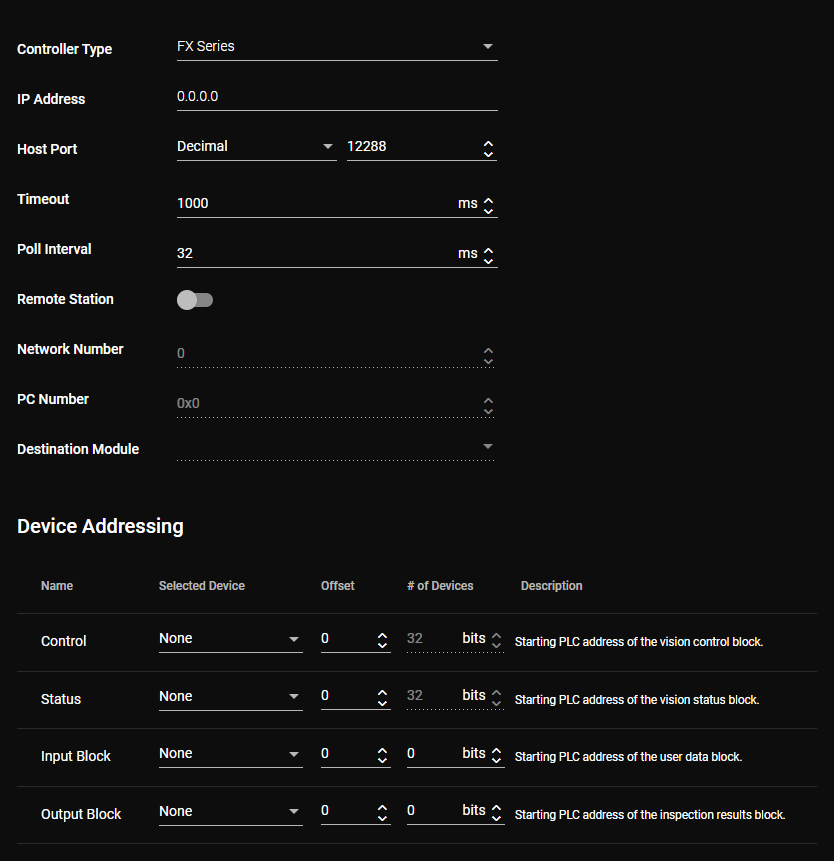
|
|
| Controller Type |
Choose the type of the Mitsubishi PLC/MC. |
| IP Address |
Enter the IP address of the Mitsubishi PLC/MC that you want to use with the vision sensor. |
| Host Port |
Choose the TCP port number format. Then, enter the port number that matches the Host Port setting on the SLMP Port of the Mitsubishi PLC/MC. |
| Timeout |
Optional: Adjust the timeout parameter. This parameter defines the timeout for both read and write operations. Note: This parameter might increase the execution time of the program. If both the read and write operations fail, the amount of time added to the program is twice the Timeout value, since the timeout of both operations aggregate.
|
| Poll Interval |
Optional: Adjust the poll interval parameter. This parameter defines the time between successive polls of the Control block on the Mitsubishi PLC/MC. |
| Remote Station |
This toggle enables the configuration of a primary SLMP device. By default, this option is disabled and the vision sensor is directly connected to a PLC/MC with the Ethernet Module specified by the IP Address. When this option is enabled, the following settings are available:
|
| Device Addressing |
The parameters under this heading are used to define the PLC/MC device addresses and the sizes for the data blocks to be communicated to the PLC/MC. The available device types and the size of the data blocks vary, depending on the selected Controller Type. The Name column under the Device Addressing heading shows the name of the data block that can be communicated to or from the Mitsubishi PLC/MC. Each block has its own row to configure the starting PLC address by setting a device, its offset, and the number of PLC devices. |
Related Information
For more information about configuring your vision application to use SLMP, see the following pages: