FindPatMax3D
The FindPatMax3D function Functions are tools that are available in Spreadsheet for processing and analyzing acquisitions or other results. You can add functions to your Spreadsheet job to create tool chains and produce results for specific applications. is used to find objects in the point cloud A point cloud is a 3D structure that consists of the data points collected by a 3D vision system during acquisition. based on a trained PatMax3D pattern configured with the TrainPatMax3D function. The function returns a Patterns3D structure.
You can find an example on how to use FindPatMax3D here.
 Inputs
The FindPatMax3D function has the following syntax:
FindPatMax3D(PointCloud A point cloud is a 3D structure that consists of the data points collected by a 3D vision system during acquisition., Fixture3D, ExternalFixture, Region3D, ExternalRegion, ExcludeBasePlane, Plane3D, ExternalPlane, Offset, Pattern, NumberToFind, AcceptThreshold, MaxInPlaneRotationAngle, MaxTiltAngle, Show)
See the table for a description of the available parameters.
| Parameter | Description | ||||||||||||||||||
|
PointCloud |
Reference to a cell containing a point cloud. The default value is $A$0. |
||||||||||||||||||
|
Fixture3D |
Specifies the point cloud coordinate system in which the 3D fixture A fixture is a coordinate location on the image that keeps the tool in the place determined by the fixture. is defined. It is offset from the PointCloud origin in the following format with the following arguments: {X, Y, Z, Rotation, Tilt, TiltDirection}
Note: The Fixture3D parameter is only available if you set External Fixture to 0.
Note: You can use the Fixture3D parameter to set the ROI fixture.
|
||||||||||||||||||
| External Fixture |
Specifies a reference to a Fixture3D structure defined in another cell. The function uses the referenced cell as the fixture of the function. Set to 0 (OFF) to use the internal fixture of the function instead. |
||||||||||||||||||
|
Region3D |
Specifies the dimensions, offset and angle for 3D region of interest (ROI) of the function. It is offset from the Fixture3D origin in the following format with the following arguments: {SizeX, SizeY, SizeZ, X, Y, Z, Rotation, Tilt, TiltDirection}
Note: This setting is only available if you set External Region to 0.
|
||||||||||||||||||
|
External Region |
Specifies a reference to a 3D region defined in another cell. The function uses the referenced cell as the Region of Interest of the function. Set to 0 (OFF) to use the internal Box3D structure of the function as the ROI. |
||||||||||||||||||
| Exclude Base Plane |
When enabled, the function adds a separate planar region of interest (ROI), so that the surface plane can be excluded when training or finding a 3D pattern, improving the performance of the tool. This setting is disabled by default, as undesired areas can also be excluded with appropriate placement of the Box3D structure. |
||||||||||||||||||
| Plane3D |
Specifies the offset and the angle of the plane to use. It is offset from the PointCloud origin in the following format with the following arguments: {X, Y, Z, Tilt, TiltDirection}
Note: This parameter is available only if External Plane is set to 0.
Note: You can use Plane3D to mask data for training. The Plane3D function prevents the tool from taking any points that belong to that plane and are within the ROI.
Note: This parameter is available only if Exclude Base Plane is True and External Plane is 0.
|
||||||||||||||||||
| External Plane |
Specifies a reference to a Rectangle3D or Circle3D structure defined in another cell to be used by the function. Set to 0 (OFF) to use the function's internal Plane3D structure instead. Note: This parameter is available only if Exclude Base Plane is True.
|
||||||||||||||||||
| Offset | Specifies the signed distance to the offset base plane. The value range is -inf. to inf., and the default value is 1. | ||||||||||||||||||
| Model3D | Specifies a reference to a trained Model3D structure trained with the TrainPatMax3D function in another cell. | ||||||||||||||||||
| Num to Find |
Specifies the number of pattern instances to find. The value range is 1 to inf., and the default value is 1. |
||||||||||||||||||
| Accept Threshold | Specifies the minimum percentage score that a result must have to be considered a found pattern. The value range is 0 to 100, and the default value is 50. | ||||||||||||||||||
| Max In-Plane Rotation Angle |
Specifies the maximum in-plane rotation angle that a result can have to be considered a found pattern. The value range is 0 to 180 and the default value is 180. |
||||||||||||||||||
| Max Tilt Angle |
Specifies the maximum tilt rotation angle that a result can have to be considered a found pattern. The value range is 0 to 180 and the default value is 90. |
||||||||||||||||||
| Sort Key |
Specifies the logic by which the found objects are sorted. The available values are the following:
|
||||||||||||||||||
| Sort Order |
Specifies whether to sort the results in ascending or descending order. Note: This parameter is disabled if Sort Key is set to None.
|
||||||||||||||||||
| Sort Tolerance |
Specifies a threshold to determine if 2 or more results are tied. If they are tied, they can be sorted by a subsequent sort. Only takes effect when multiple sorting rules are applied (such as grid sorting or appending a sort tool). Note: This parameter is disabled if Sort Key is set to None.
|
||||||||||||||||||
| Sort Reference |
Specifies the origin of the coordinate space in which the positional and rotational values are defined. The available values are the following:
Note:
This parameter is disabled if:
|
||||||||||||||||||
|
Show |
Selects the type of graphics to overlay on the image.
|
||||||||||||||||||
| Diagnostic Visualization | |||||||||||||||||||
| Max Deviation |
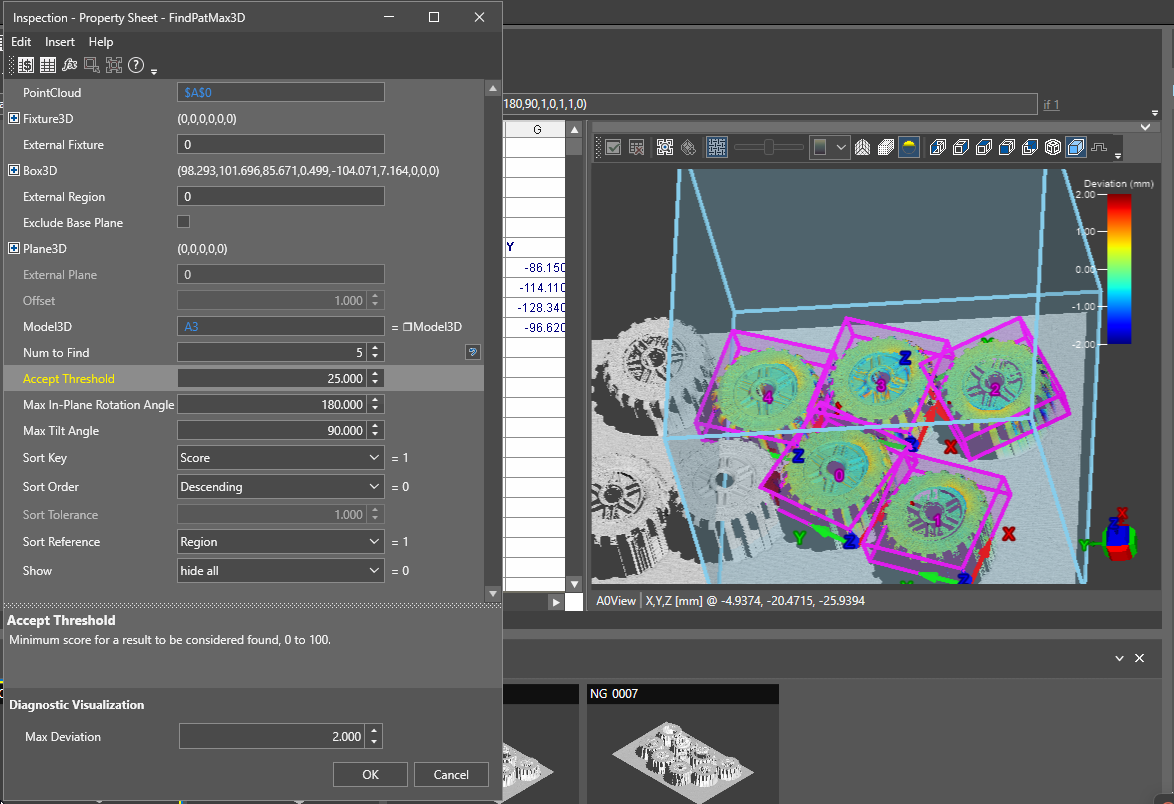
Controls the color coding of the deviation heatmap on the 3D visualizer. The visualizer only displays the deviation heatmap while the FindPatMax3D property sheet is open. The deviation heatmap allows you to check the part alignment and deviations from the trained model while you are configuring the FindPatMax3D tool.
Note: The deviation heatmap is only available if the TrainPatMax3D function was trained with In-Sight Vision Suite version 26.1 or later. To display deviation for jobs created in earlier versions, re-train the TrainPatMax3D function with a newer version.
|
||||||||||||||||||
 Outputs
|
Returns |
A Patterns3D data structure containing the found patterns, or #ERR if any of the input parameters are invalid. |
|||||||||||||||||||||||||||||||||||||||||||||||||||||||
|
Results |
When initially inserted into a cell, the following functions are automatically inserted into the spreadsheet to create a result table.
N = min(10, NumToFind) |
Vision Data Access functions
The following FindPatMax3D Vision Data Access functions are automatically inserted into the spreadsheet to create the result table:
| Function | Description |
| GetFixture(Patterns3D, index) | Returns the Fixture3D structure of the found pattern's fixture. |
| GetNFound(Patterns3D, index) | Returns the number of found patterns. |
| GetRotation(Fixture3D) | Returns the rotation of the Z-axis in degrees, also known as the in-plane rotation. |
| GetScore(Patterns3D, index) | Returns the score of the found pattern specified with the index, as a value between 0 – 100. |
| GetTilt(Fixture3D) | Returns the tilt angle of the Fixture3D structure in degrees on the Z-axis. |
| GetTiltDirection(Fixture3D) | Returns the tilt direction angle of the specified Fixture3D structure in degrees. The angle is measured in the X-Y plane of the original reference coordinate system, and specifies the direction for the projection of the tilted Z-axis onto that plane. |
| GetX(Fixture3D, index) | Returns the X-axis coordinate of the pattern fixture's center point. |
| GetY(Fixture3D, index) | Returns the Y-axis coordinate of the pattern fixture's center point. |
| GetZ(Fixture3D, index) | Returns the Z-axis coordinate of the pattern fixture's center point. |