Develop an In-Sight ViDi Job
The topics in this section provide an overview on how to develop an In-Sight ViDi machine vision application incorporating the deep learning- based Cognex ViDi Tools within the Spreadsheet Editor, for use on an In-Sight D900 series vision system.
The phases of job development for an In-Sight D900 series vision system entail the following:
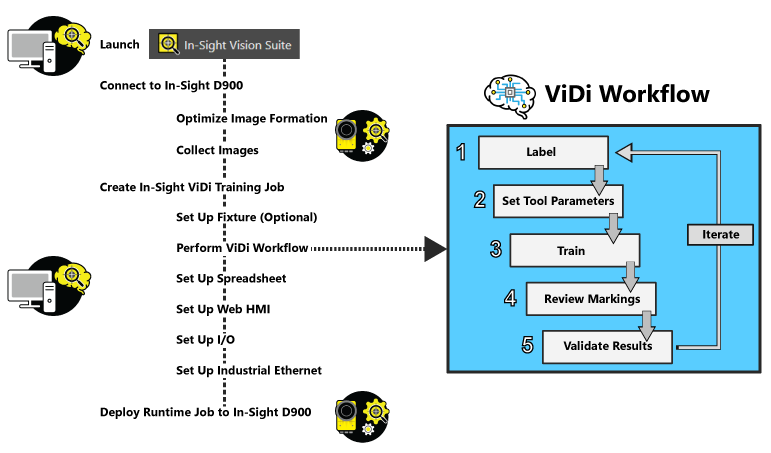
-
If you are developing a job for use with the In-Sight ViDi PC, there are slight differences.
- In step 1, you will use a GigE camera to capture your images, and you can use the WriteImage function to record your images.
- In step 6, you will deploy your job to a PC. See the Deploying an In-Sight ViDi PC Job topic for more information.
-
When you are connected to an In-Sight D900 series vision system, you may see slight differences in the results produced by processing images in the ViDi Editor (which is processing images using the host GPU) and the spreadsheet (which is processing images using the vision system). This is due to slight differences between the devices.
When you are connected to the emulator, you may also see slight differences in results between the ViDi Editor and the spreadsheet.
- When using the emulator to train and process imported images within the ViDi Editor, make sure that the emulator is configured so that the camera's resolution size is the same as the size of the images. If the resolution size is larger than the images, the images may not return the same results when processed through the spreadsheet as they do when processed through the ViDi Editor.