Save Images to a PC or FTP Server Using the Web HMI Filmstrip
What is Needed?
-
The Web HMI application must be running on a PC and connected to the target In-Sight vision system.
Note: For more information, see Configure the Web HMI -
A web browser
Note: Supported we browsers are listed in Open Web Browser View. - An FTP server that is accessible from the In-Sight vision system through the network.
How are the Images Saved?
-
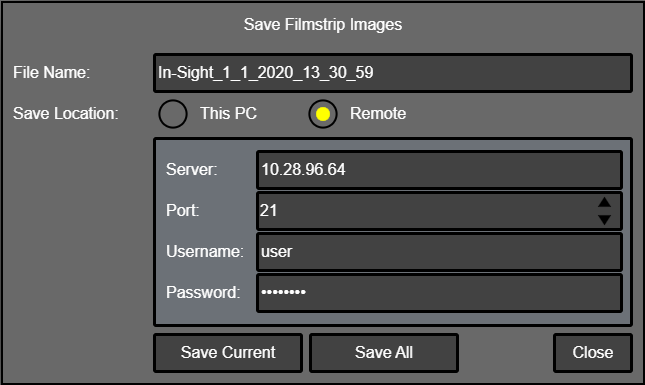
Any image that appears in the Web HMI filmstrip can be saved by using the Web HMI application's Save Filmstrip Images dialog. For more information, see the Save Filmstrip Images section in Web HMI Filmstrip.
Where are the Images Saved?
PC
This option uses the web browser's Downloads settings.
- If the web browser is set to automatically download files to a specific directory (such as the Downloads directory), the image(s) will be automatically saved to the location.
- If the web browser is set to manually select the download location, you will be prompted to select the download location.
FTP Server
- An FTP server specified in the Web HMI application's Save Filmstrip Images dialog.
How to Set Up
Follow the steps described in Web HMI Filmstrip.