Integrated: In-Sight Illumination
The In-Sight illumination accessory includes 8 LEDs that are separated into 4 LED banks. In-Sight Illumination is supported with the In-Sight 7000 Gen2 series vision systems only.
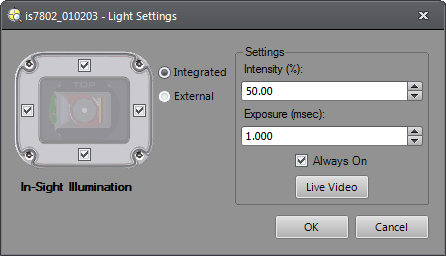
-
Intensity: Specifies the effective intensity of the illumination accessory LED banks as a percentage. All LED banks share a common intensity value and the intensity is limited to 50% - 100% to ensure it is evenly distributed across all LED banks. (50% to 100%; default = 100%)
-
Exposure: Specifies a fixed exposure value to use for every image acquisition.
Note: For the following vision systems/sensors, the resolution can be configured in the Image Settings dialog: In-Sight Micro 1500, In-Sight 2000-130, 2000-130C, 2000-230, 2000-230C, 2000-23M, 2001-230, 2001-230C, In-Sight 7500, 7500C, 7600, 7600C, 7800, 7800C, 7900, 7900C, 7802, 7802C, 7902, 7902C.In-Sight Model
Resolution Exposure Time (ms) In-Sight 7500, 7500C, 7600, 7600C, 7800, 7800C, 7900 & 7900C 800 x 600 0.014 to 550 (default = 1.000) 640 x 480 0.014 to 520 (default = 1.000) In-Sight 7501, 7501C, 7801, 7801C, 7901 & 7901C 1280 x 1024 0.017 to 750 (default = 1.000) In-Sight 7802, 7802C, 7902 & 7902C 1600 x 1200 0.020 to 940 (default = 1.000) In-Sight 7802, 7802C, 7902 & 7902C 800 x 600 (Low Light Mode) 0.020 to 940 (default = 1.000) In-Sight 7802P & 7902P 1920 x 1200 0.021 to 1000 (default = 1.000) In-Sight 7905 & 7905C 2448 x 2048 0.021 to 1000 (default = 1.000) The In-Sight illumination accessory has a maximum strobe pulse width that is dependent on the Intensity, LED ring light color, vision system resolution and number of rows acquired. Up to a certain Exposure time, the illumination accessory will illuminate for the specified Exposure time. If the Exposure time exceeds the maximum strobe pulse width, the LED ring light will only illuminate for the maximum strobe pulse width. For example:
LED Ring Light Color Intensity Maximum Strobe Pulse Width (ms) In-Sight 7500, 7600, 7800, 7900 (800 x 600) In-Sight 7500, 7600, 7800, 7900 (640 x 480) In-Sight 7501, 7801, 7901 (1280 x 1024) In-Sight 7802, 7902 (1600 x 1200) In-Sight 7802, 7902 (800 x 600, Low Light Mode) In-Sight 7802P, 7902P (1920 x 1200) In-Sight 7905 (2448 x 2048) White 100% 0.314 0.232 0.704 1.022 1.022 0.744 1.599 50% 0.779 0.574 1.744 2.531 2.531 1.842 3.961 Red 100% 0.375 0.277 0.841 1.220 1.220 0.888 1.847 50% 1.083 0.799 2.426 3.519 3.519 2.561 5.508 IR 100% 0.351 0.259 0.786 1.140 1.140 0.830 1.785 50% 0.857 0.632 1.921 2.787 2.787 2.028 4.361 Blue 100% 0.314 0.232 0.704 1.022 1.022 0.744 1.599 50% 0.765 0.564 1.713 2.485 2.485 1.808 3.889 LED Ring Light Color Intensity Maximum Strobe Pulse Width (ms) In-Sight 7500C, 7600C, 7800C, 7900C (800 x 600) In-Sight 7500C, 7600C, 7800C, 7900C (640 x 480) In-Sight 7501C, 7801C, 7901C (1280 x 1024) In-Sight 7802C, 7902C (1600 x 1200) In-Sight 7802C, 7902C (800 x 600, Low Light Mode) In-Sight 7905C (2448 x 2048) White 100% 0.314 0.232 0.704 1.022 1.022 1.599
50% 0.779 0.574 1.744 2.531 2.531 3.961 Note: At Exposure times greater than the maximum strobe pulse width, a lower Intensity may result in brighter images, due to increased LED efficiency at a lower current. - Always On: The selected LED banks are always on to provide consistent light levels between acquisitions.
-
Live Video: Places the vision system in Live Video mode to display a live image to use when making adjustments to the illumination settings. Click the Live Video button again to exit Live Video mode.
Tip: If the autofocus accessory is installed to the vision system, the focus position of the lens can be adjusted while in Live Video mode.