IP License Generator
The IP License Generator allows you to generate a license for password-protected cells in a Spreadsheet job file. You can add the generated license to your vision system using the IP Licensing utility.
To open the IP License Generator dialog, open the System Settings dropdown menu by clicking on the cogwheel icon at the top of the device list, and click on IP License Generator.
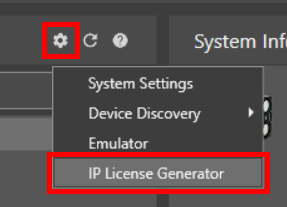
To generate a license for password-protected cells:
-
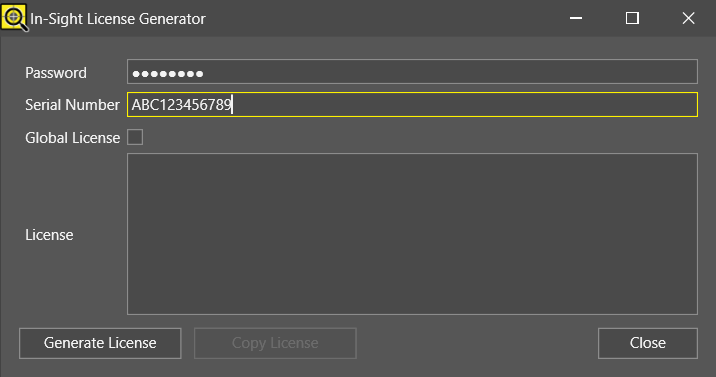
In the In-Sight License Generator dialog, enter the password you used for cell protection in the Password field.
-
If you are generating a license for a single vision system, enter the serial number for the vision system you want to add the license to in the Serial Number field, and leave the Global License checkbox unchecked.
-
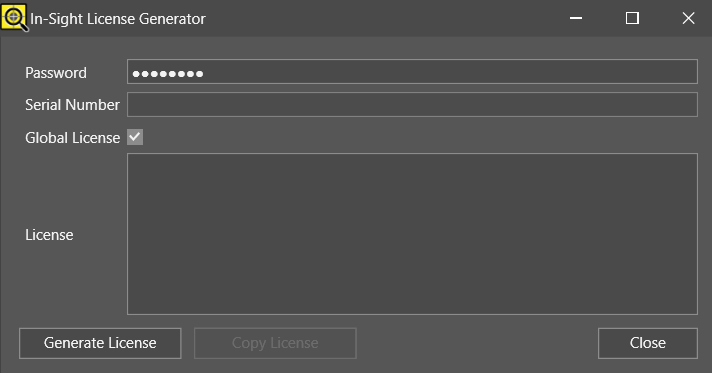
If you are generating a license for multiple vision systems, leave the Serial Number field empty, and check the Global License checkbox.
-
Click Generate License to generate a license in the License field.
-
Click Copy License to save the license string to your clipboard.
-
Click Close to exit the In-Sight License Generator.
For more information about the complete job licensing workflow, see the Job Licensing section in the In-Sight Spreadsheet Help document.