Parallel
In the Task Editor, the Parallel region allows you to draw a region around multiple blocks and have all of those blocks execute in parallel.
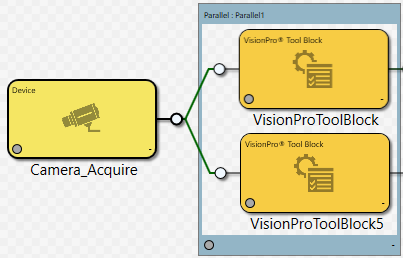
Below is an example of using a Parallel region to speed up the processing of two image processing tools.
Note:
- Do not put a Parallel region inside another Parallel region.
- When blocks are placed within a Parallel region, the blocks within the Parallel region are executed simultaneously; the left-to-right order of the blocks within the Parallel region does not affect the order of execution. Use a Group Region or a Sub Task block to control the order of execution if multiple blocks will be within a Parallel Region. For more information, see the Executing Blocks Inside a Parallel Region topic.