Optional Communications Plugins
Cognex Designer also supports the following optional communication Devices:
- Modbus
- TwinCAT 2 and 3
- OPC UA Server
These communication plug-ins are only available in a project if the following conditions are met:
-
They have been selected during the Cognex Designer setup for installation (this is the default installation setting).
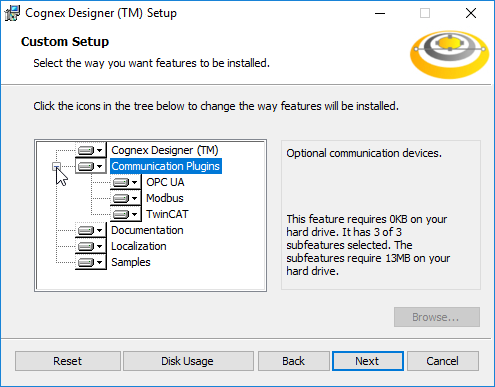
-
The plugins are enabled in the project. See the Enabling Optional Plugins in a Project topic for more information on how to enable them in a new or an existing project.
Note:
- Optional plugins are enabled in Cognex Designer on a per-project basis, and not globally. In other words, if you have multiple projects in use, enabling optional plugins in one project does not enable them in the rest of your projects.
- The selected communications plugins are installed by the setup even if the same or different versions of the plugins already exist on the PC running Cognex Designer:
- If the same version of a selected plugin is already installed, the setup will not overwrite the existing installation.
- If a different version of a selected plugin is already installed, the setup will install the current version alongside the already installed version of the plugin.
- If a specific version of a plugin is used by multiple Cognex Designer installations on the PC (e.g. Cognex Designer 4.0 and 4.4.3 are both installed, and they both use the same version of a plugin), then that specific plugin version will only be uninstalled if all Cognex Designer builds using it are uninstalled.